McHale V Series Baler
45
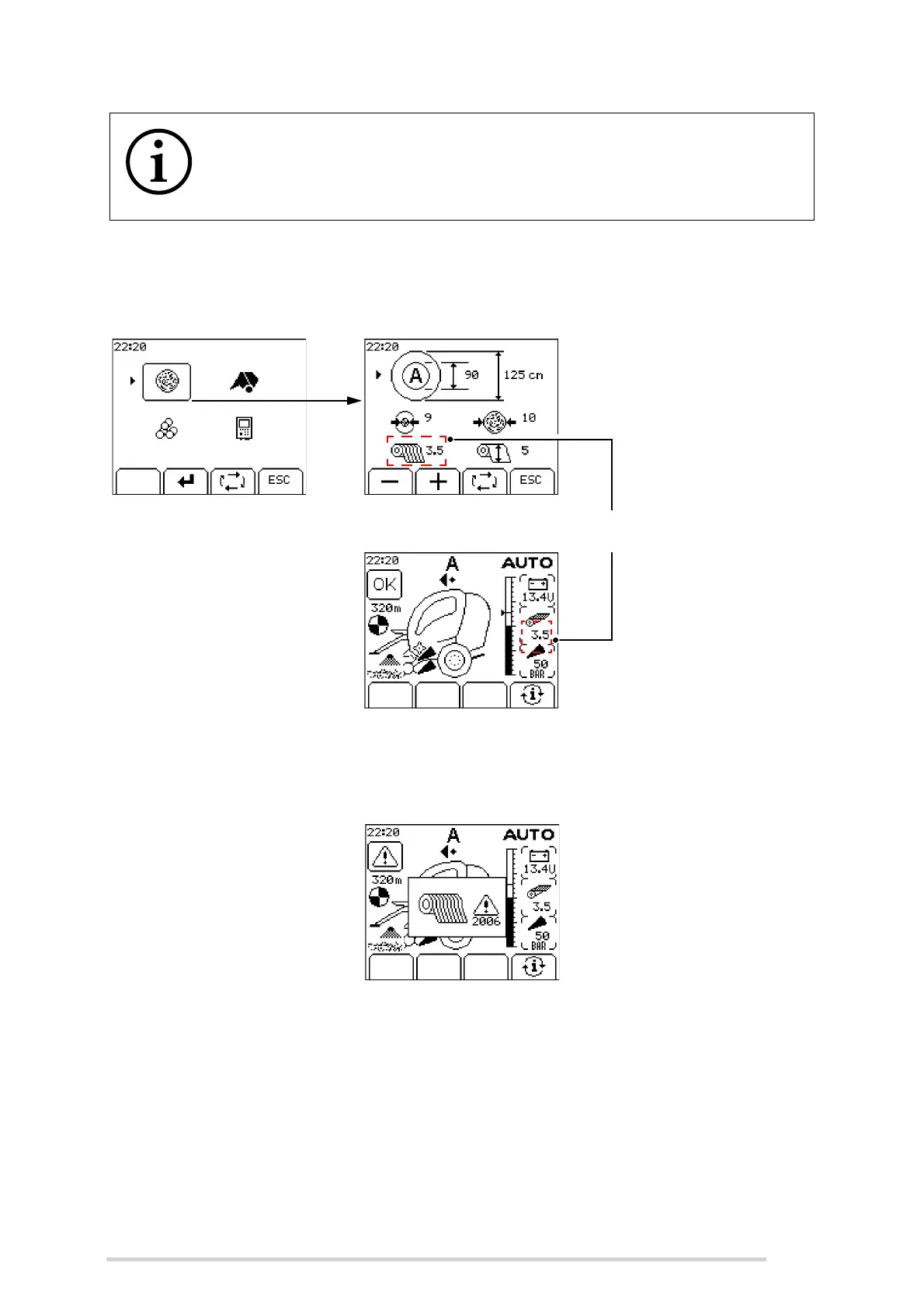
The net setting can be changed by accessing the machine menu and going into the
bale setup. Once the net layers are selected, the setting can be changed using the +
or - buttons.
The passage of net through the netting unit is monitored. If the net breaks or does not
feed, or if the roll of net runs out, then the alarm sounds, the net error symbol is
displayed on the control box display and the cycle is halted.
Once set, the number of net layers is automatically calculated, regardless of bale
diameter or size.
In general, automatic mode is used. Manual mode is not normally selected unless there
is a machine fault preventing automatic mode from working.
In MAN mode, the operator must complete the net feeding and net cutting functions
manually. The net is fed in by pushing and holding button 5 until the bale catches the
net. When the preset amount of net has been applied, the red light beside button 6 will
NOTE: Hay or straw with a high % dry matter needs more net
When hay or straw is being baled with high dry matter, more net must be
applied. Dry conditions and very high densities require up to twice as
many layers to ensure a good bale shape.
Adjust net layers up or down using
+ or - keys
Net layer setting
(Main screen)
(Bale setup menu)



 To Next Page