EasyManua.ls Logo

Meccer TF10EA2 - Page 17

Default Icon
88 pages
Print Icon
To Next Page IconTo Next Page
To Previous Page IconTo Previous Page
Loading...
6
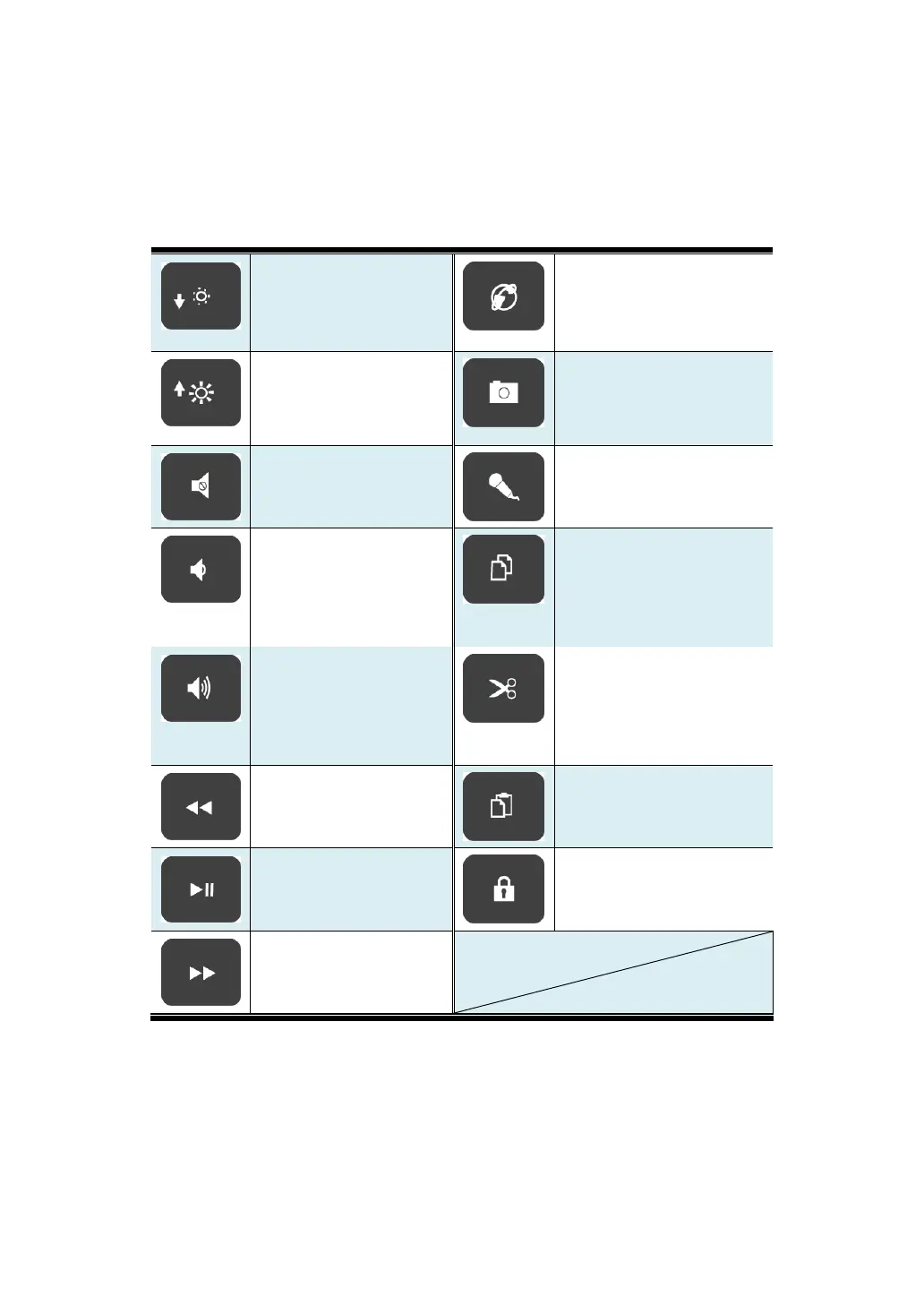
You can access certain system settings and apps quickly by pressing the
appropriate function keys.
Decreases the display
brightness.
Shows a list of internet
browser from which you
can choose one to
browse websites.
Increases the display
brightness.
Enables the photo app to
take pictures or videos.
Mutes the audio
output.
Enables the voice
recognition feature.
Decreases the volume
level. Or, when the
tablet is muted, press
here to unmute the
audio output.
Copy the selected
content.
Increases the volume
level. Or, when the
tablet is muted, press
here to unmute the
audio output.
Cuts the selected
content.
Rewind button
Pastes the previously
copied or cut content.
Play/Pause button.
Locks your tablet.
Fast forward button.

Table of Contents