24
starlight pro
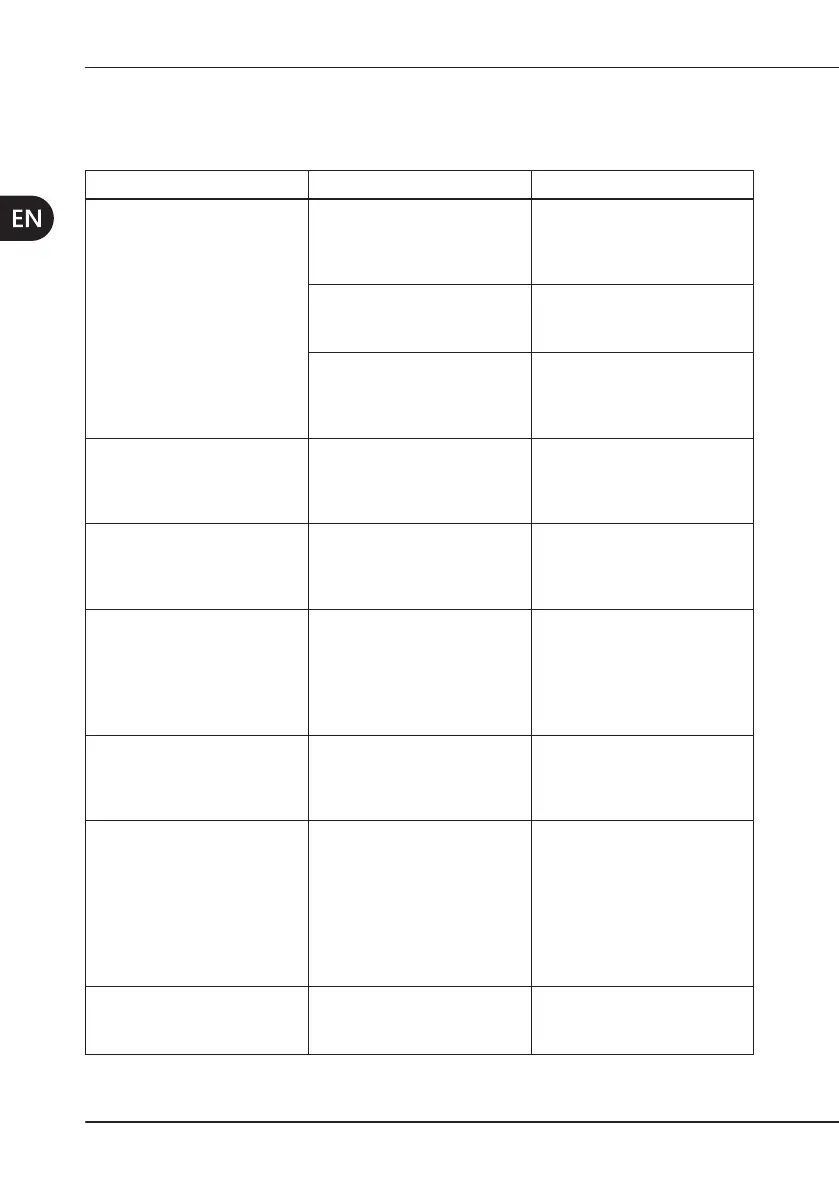
10 TROUBLESHOOTING
the Table 5 at page 25.
Problem PossibleCause Solution
The charging unit does not
switch on (none of the LEDs
light up).
The power cable is not
correctly connected.
Connect the cable both to
the charging unit and to the
wall socket.
The power cable is faulty. Replace the power cable.
The charging unit is out of
order.
Contact an authorised
assistance centre.
The yellow battery LED
(check) of the charging unit
The contacts of the charging
unit have been short-
circuited.
See
Chapter 6.6 on page
19
The yellow battery LED
(check) of the charging unit
Battery failed.
Contact Mectron Customer
Service. See
Chapter 5.4 on
page 14.
There is no light emission
the starlight pro is pressed
and an acoustic signal is
produced (2 beeps).
Battery discharged.
Recharge the battery. See
Chapter 5.3 on page 13.
An acoustic signal is
produced at the end of the
Battery low.
Recharge the battery. See
Chapter 5.2 on page 13.
An acoustic signal (3
beeps) is produced during
at the end of the cycle
starlight pro will not allow
any further treatment to be
carried out.
The thermal protection has
been activated.
It will be possible to use the
equipment only after it has
cooled down. See
Chapter
6.5 on page 19.
The polymerisation is
The terminal surface of the
soiled.
See
22.



 To Next Page