EasyManua.ls Logo

Medonic M16C-US - High Background Counts; Troubleshooting High Background Counts

Medonic M16C-US
109 pages
Print Icon
To Next Page IconTo Next Page
To Previous Page IconTo Previous Page
Loading...
103
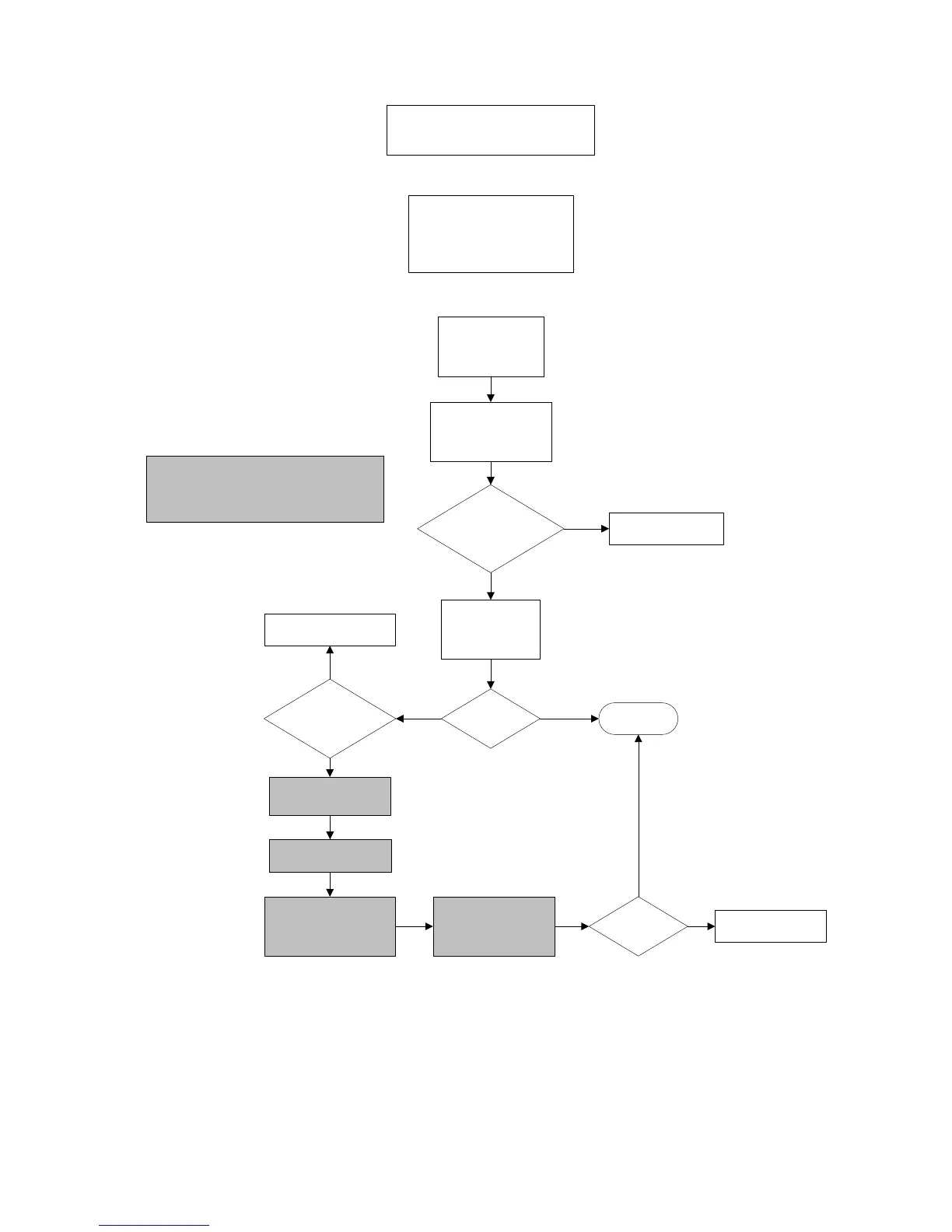
Display Issues
Usual Cause:
1. Keypad flex-cable loose
2. Static electricity
3. Power Outage/Lightening
Verify/determine
with clinic if power
surge was noted
Is display
visible?
Contact Service
Representative
YES
YES
NO
NO
Is green power
light on front of
analyzer lit?
Touch screen and
wait one minute.
Turn off analyzer with
On/Off switch and then
turn back on.
Contact Service
Representative
DONE
Is beep
heard when screen
is touched?
Contact Service
Representative
Remove front cover
Turn off analyzer with
On/Off switch.
Check that keypad flex-
cable, behind top of
screen, is firmly pressed
into connector.
Turn on analyzer with
On/Off switch.
Is display
visible?
YES
NO
NO
YES
All highlighted areas of flowchart
are to be performed by trained in-
house technician ONLY.

Table of Contents