Initial setup of the instrument, except date and time, has been factory set to
default values for the average Boule users. However, other user definable
formats may be preferred, details are provided below.
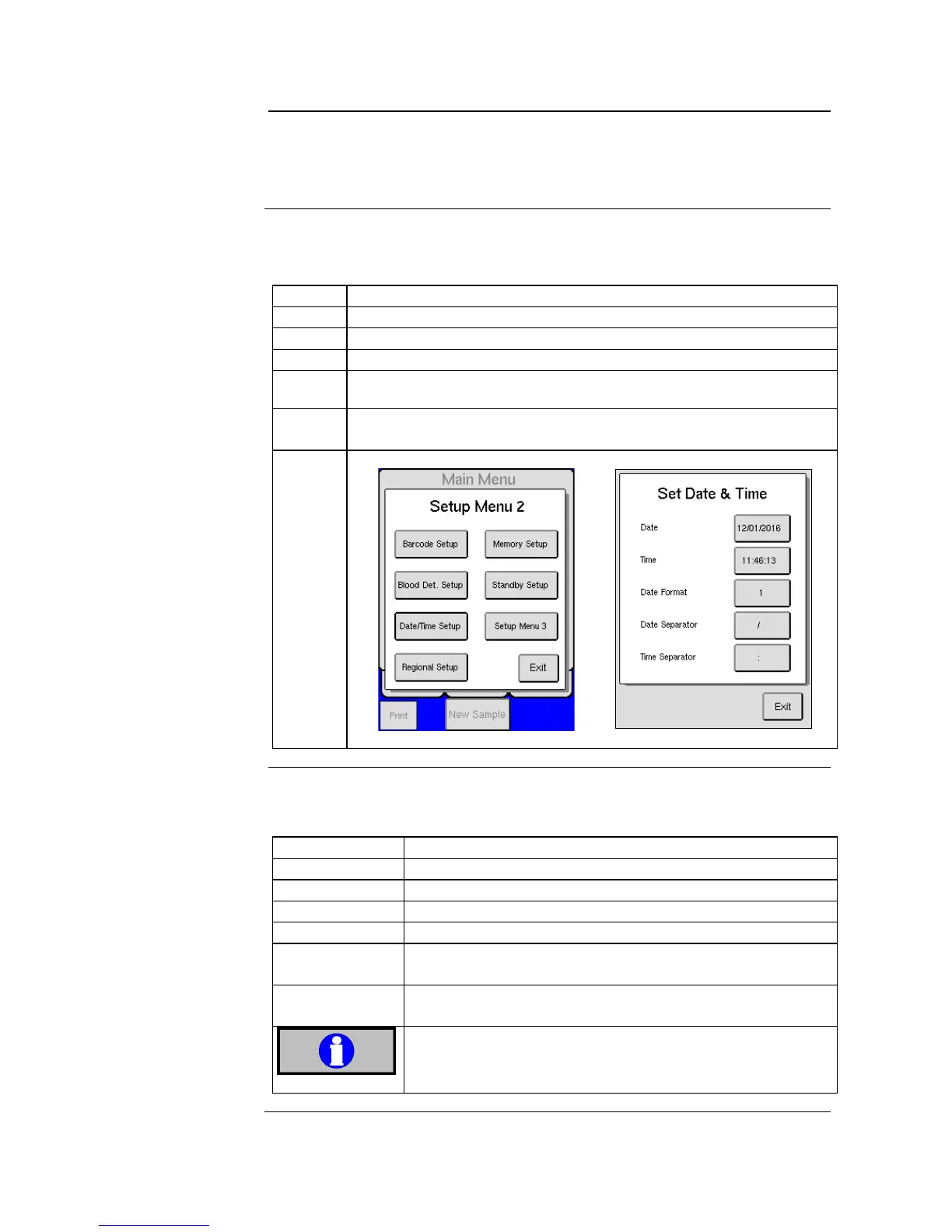
The date/time function is shown on all samples and printouts and should
always be setup correctly. To set date/time follow the instruction below:
Start by pressing [ADVANCED] from the MENU tab.
Press [SETUP], then press [SETUP MENU 2].
Press [DATE/TIME SETUP] to enter the set date/time menu.
Press [DATE FORMAT] to select date specific setting.
1 = DD/MM/YY; 2 = YY/MM/DD, 3 = YY/DD/MM, 4 = MM/DD/YY
Press on the item that you want to change and enter the changes on
the numerical pad. See Menus below.
Activate Mixer
(optional)
To activate mixer follow the instruction below:
Start by pressing [ADVANCED] from the MENU tab.
Press [SETUP] and then [SETUP MENU 2].
If the mixer is not activated the button will have empty
brackets ( [ ] ). To activate press button and select [X].
Upon sample aspiration mixer will discontinue rotation
until sample analysis is complete.
It is recommended that whole blood samples are mixed for
10 – 15 minutes and then analyzed. Mixing for more than 4
hours may cause erroneous results.



 To Next Page