6.1 Quality Control (QC) (continued)
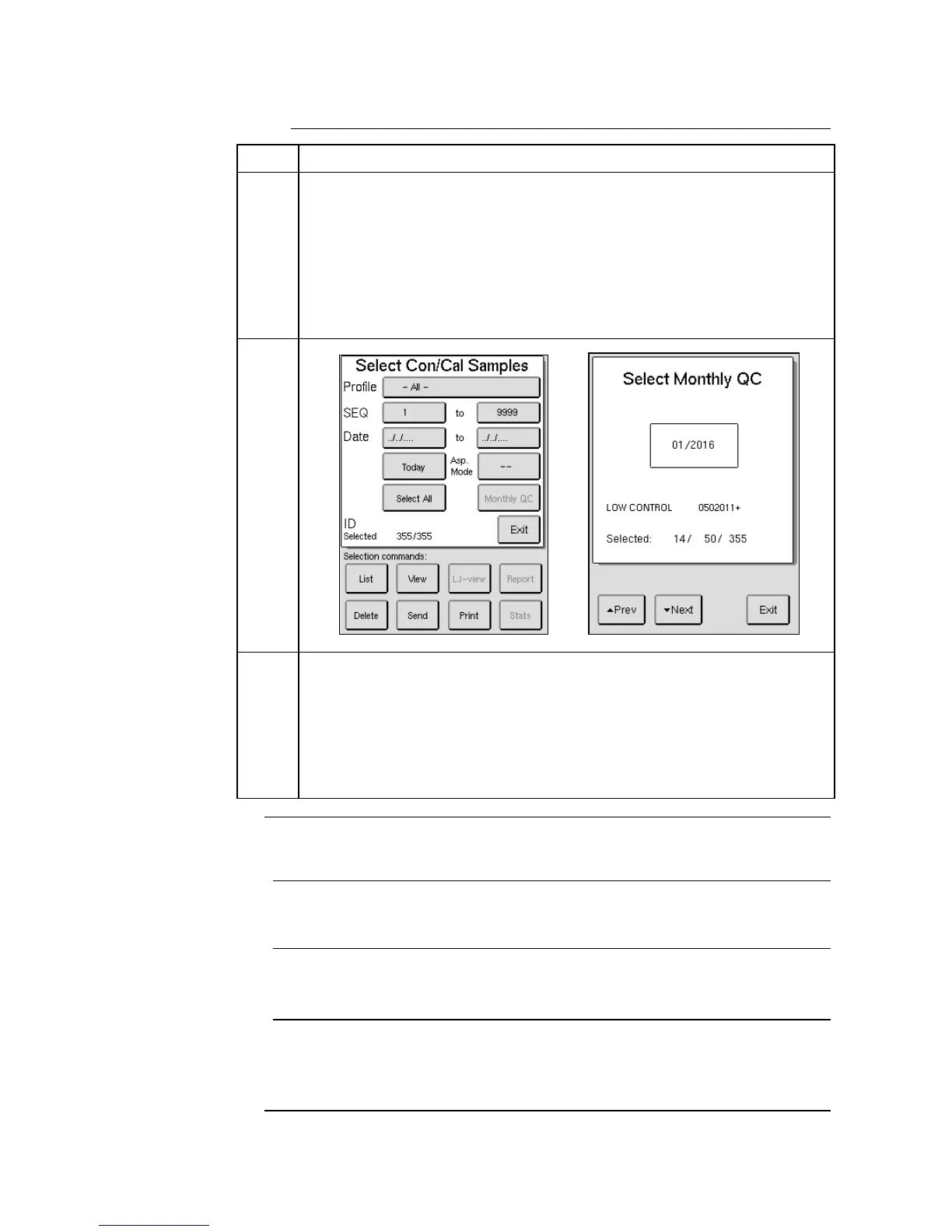
Press the [SAMPLE] or [LIST] buttons to display the selected samples.
Once samples are displayed they can also be printed out in a Monthly QC
summary report.
After the control lot (profile) has been selected the Monthly QC button
will become active.
Press [MONTHLY QC] button, use the [PREV] and [NEXT] buttons
to scroll to desired month, and press [EXIT].
The Monthly QC button will turn green when lot and month have been
chosen. Press [REPORT] button to print out report.
To exclude a sample from the Monthly QC or LJ Diagram summary
reports perform the following steps prior to Step 5 above:
Scroll to the control sample to be excluded using the [PREV] and
[NEXT] buttons in the Con/Cal Sample or List tabs.
Then press [EXCLUDE/INCLUDE] button. An “X” will be placed
next to excluded sample.
To include the sample press the [EXCLUDE/INCLUDE] button again.
This section describes selecting, viewing, and printing Levey-Jennings Plots.
Levey-Jennings (L-J) plots are used to monitor the long term stability of the
instrument using Boule blood controls.
To be able to use L-J plots, the Control/Calibrator Assay Values for the
controls must be scanned with the installed barcode reader or manually
entered in. Follow direction on Assay Sheet to scan in assay values.



 To Next Page