6.1 Quality Control (QC) (continued)
It is recommended that the performance of the Medonic M-Series system is
checked daily with certified blood controls authorized by Boule.
Handle and prepare controls in accordance to control package insert.
Never use an open vial longer than recommended by the manufacturer or
subject any vial to excessive heat or agitation.
Wipe the aspiration probe with a clean, dry lint free absorbent cloth before
each control run. Not following this technique will impact control accuracy.
As there are no assurances of the absence of HIV, Hepatitis B or C viruses
or other infectious agents in blood samples, controls, and calibrators these
products should be handled as potentially biohazardous.
Refer to local regulations and established laboratory protocol for handling
biohazardous materials.
Follow directions on Assay Sheet to scan in assay values.
Choose either List, Sample, or Main Menu to begin control analysis.
Using installed barcode reader, scan the Control ID from the blood control vial
label or manually enter in barcode.
Aspirate the blood control and wait for the results. The Medonic M-Series will
identify this ID and match the results with the previously defined control assay
values.
Each blood control type can be found by control lot number, level, date or
sequence number.
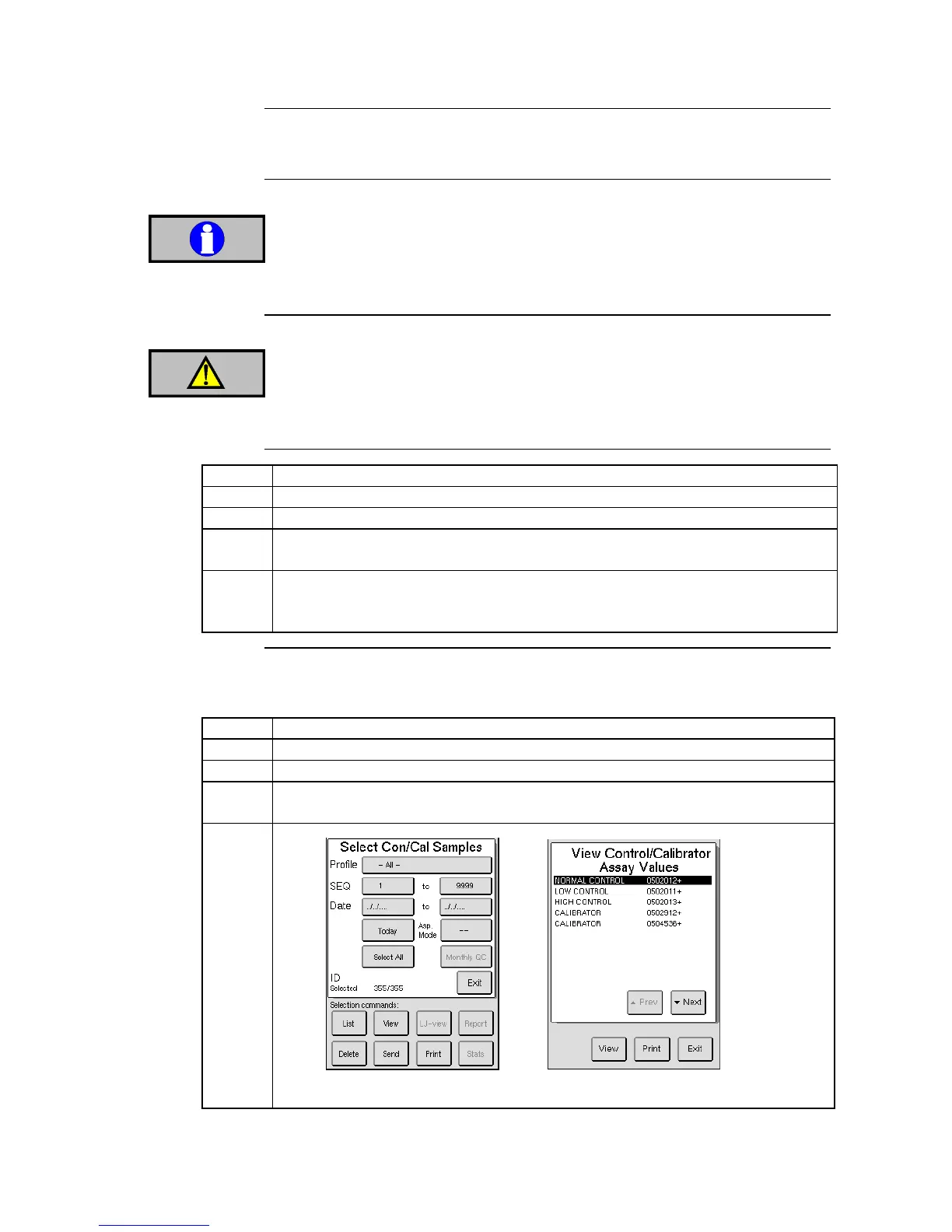
Enter the QC menu and press [VIEW CON/CAL].
Input the search criteria to be used.
Pressing on the SEQ bar will display Figure 6.4, in which one particular lot or
level can be selected.



 To Next Page