4.4 Reagent Setup (continued)
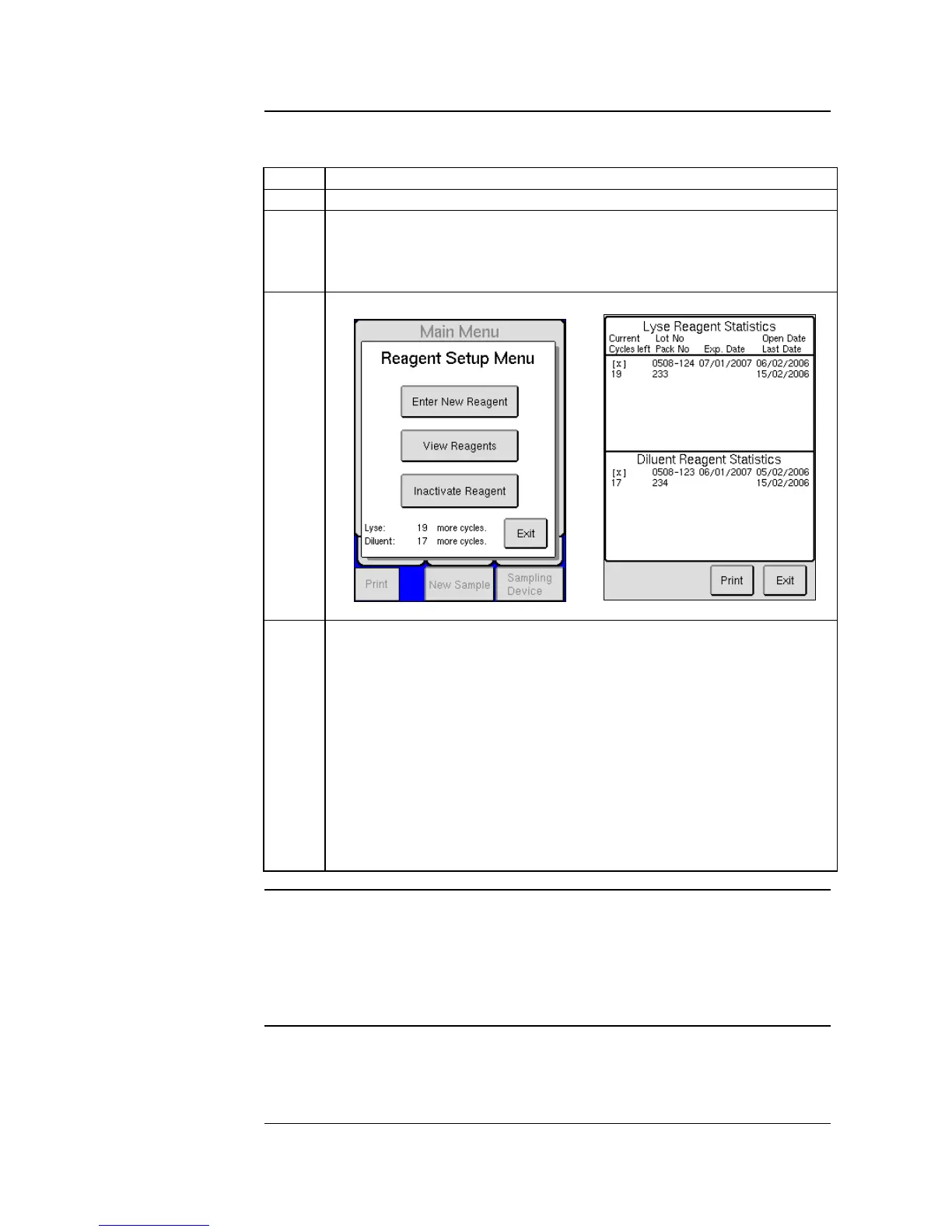
Reagent statistics can be viewed in two ways:
Start by pressing [REAGENT SETUP] from the MENU tab.
On the lower left-hand side of the Reagent Setup Menu, both the
remaining cycles for Diluent and Lyse are displayed. (It is important to
remember that cycles include analyses, wash cycles, background
counts, primes, exit standbys, etc.)
The second method of viewing reagent statistics is by pressing [VIEW
REAGENTS] from the Reagent Setup Menu. This screen is divided
into the last four Lyse Reagent Statistics and the last four Diluent
Reagent Statistics. For each, the operator can view the following:
[X] indicates which reagent is currently activated.
The number of cycles left for specific reagent container.
The Lot and Pack Numbers
The expiration date of the specific reagent container.
The Open Date, when the reagent container was first used on
the system.
The Last Date, when the last time that reagent container was
used to run a cycle.
It is possible for the operator to inactivate the current reagent box by pressing
the [INACTIVATE REAGENT] button and then [YES]. Once deactivated the
operator must scan in or manually enter another reagent container before
analysis of samples can begin. (If reagent level is adequate, an inactive reagent can
be re-activated by simply scanning the barcode on the reagent bottle again.)
The interlocked reagent system displays indicator and warning messages to
alert the operator when reagents are running low and need to be changed. See
Section 12.2 and 12.3.



 To Next Page