10 Settings
49
Format Description
Format 0 Short form - only the log header is outputted.
Format 1 The log header and the program steps are outputted.
Format 2 Standard format - in addition to the log header and the program steps, a key is displayed
explaining the individual program steps.
In logs outputted via the log printer MELAprint, the corresponding legend row is always
located under the row to which it refers.
User administration
An individual ID and user PIN can be issued to every user to facilitate reliable traceability via the approval
process after the end of a sterilization program. The user is able to authenticate himself before providing
the batch with approval. You can determine the necessity of user authentication via a PIN in the User
administration menu by setting a checkmark against Batch approval with PIN . Activation of this option
documents the user ID and the outcome of the approval procedure in the log header.
Adding a user
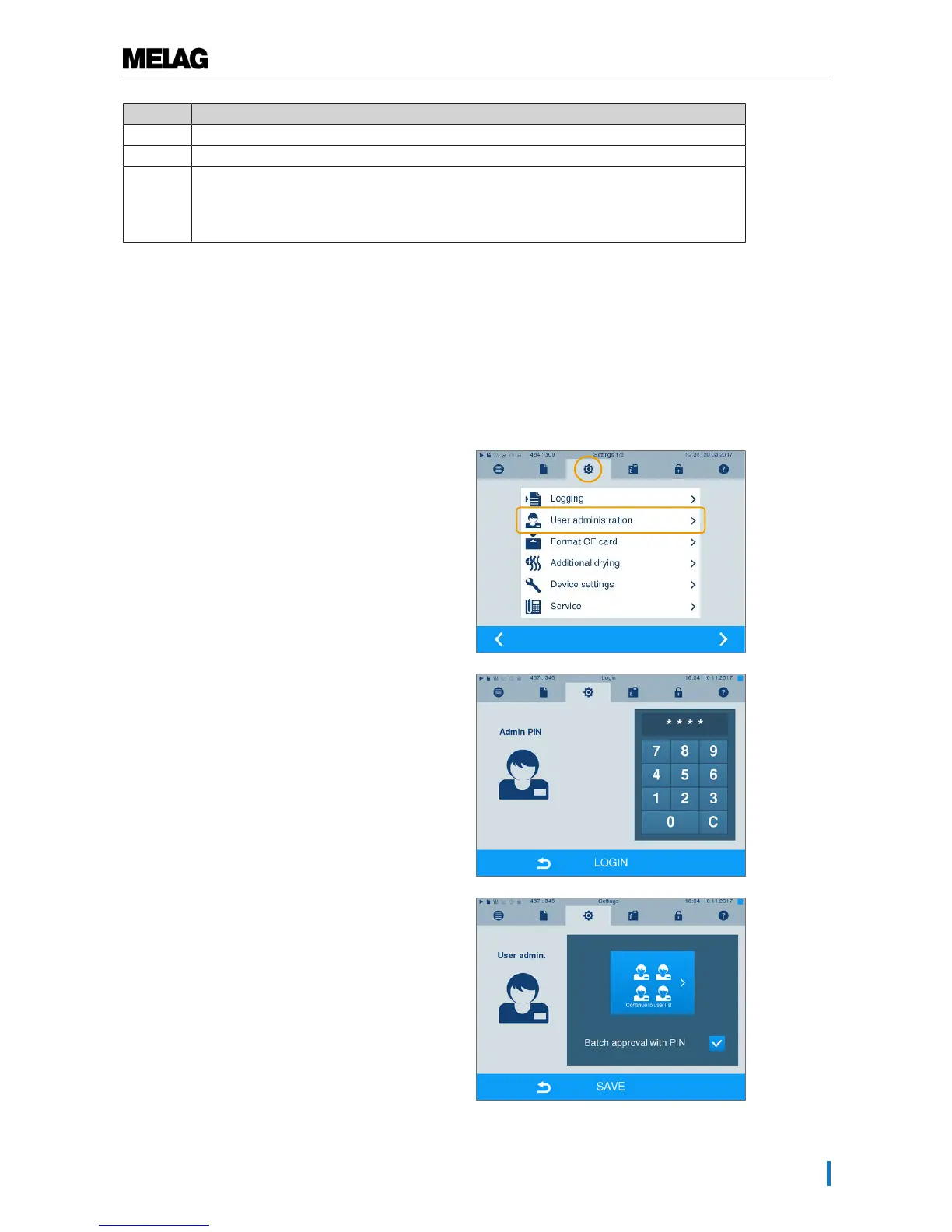
1. SelectSettings →User administration.
2. Entry of the Admin PIN is necessary to reach the User
administration menu and undertake settings. Enter the
Admin PIN (standard 1000) and confirm with LOGIN.
The display switches to the User administration
window.
3. Press "Continue to user list" to display the user list.












 To Next Page