D33451 | Date 01/2018 59
Menu mode
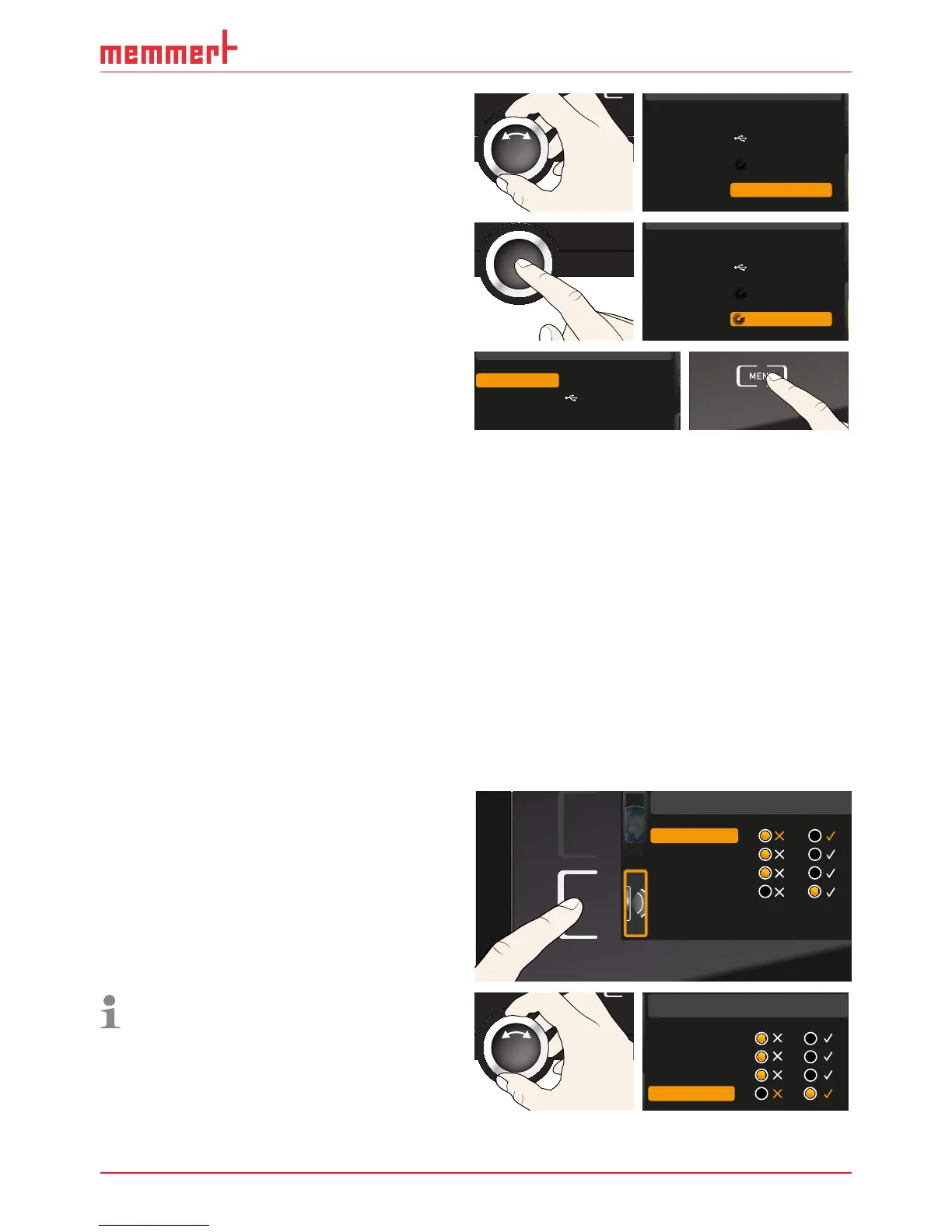
3. With the turn control, select the pro-
gramme you want to make available
for use, in this example the sterilisation
programme
Steri 180.
Select
Delete
Test 012
Test 022
Test 013
Test 014
Steri 180
5. As soon as the programme is ready, the
selection returns to
Select. To start the
programme: Return to operating mode
by pressing the MENU key and start the
programme as described on page 30.
Select
If you connected a USB storage medium, you can now remove it.
To delete a programme, select
Delete with the turn control and select the programme to be
deleted the same way you can select a programme for activation. Sterilisation programmes
cannot be deleted.
7.7 Sounds
In the SOUND display, you can define whether or not the appliance should emit acoustic
signals and, if yes, define for which events it should do so:
► on the press of a key
► at the end of a programme
► On alarm
► if the door is open
1. Activate the acoustic signal adjustment.
To do so, press the activation key on
the left side of the
SOUND display. The
display is enlarged. The first category
(in this case
Keysound) is automatically
highlighted. On the right, the current set-
tings are shown on.
Sound
Keysound
At the end
If door open
On alarm
If you want to edit another list entry: Turn
the turn control until the respective entry
– e.g.
if door open (special configura-
tion) – is highlighted in colour.
Keysound
At the end
If door open
On alarm
Sound



 To Next Page