58 D33451 | Date 01/2018
Menu mode
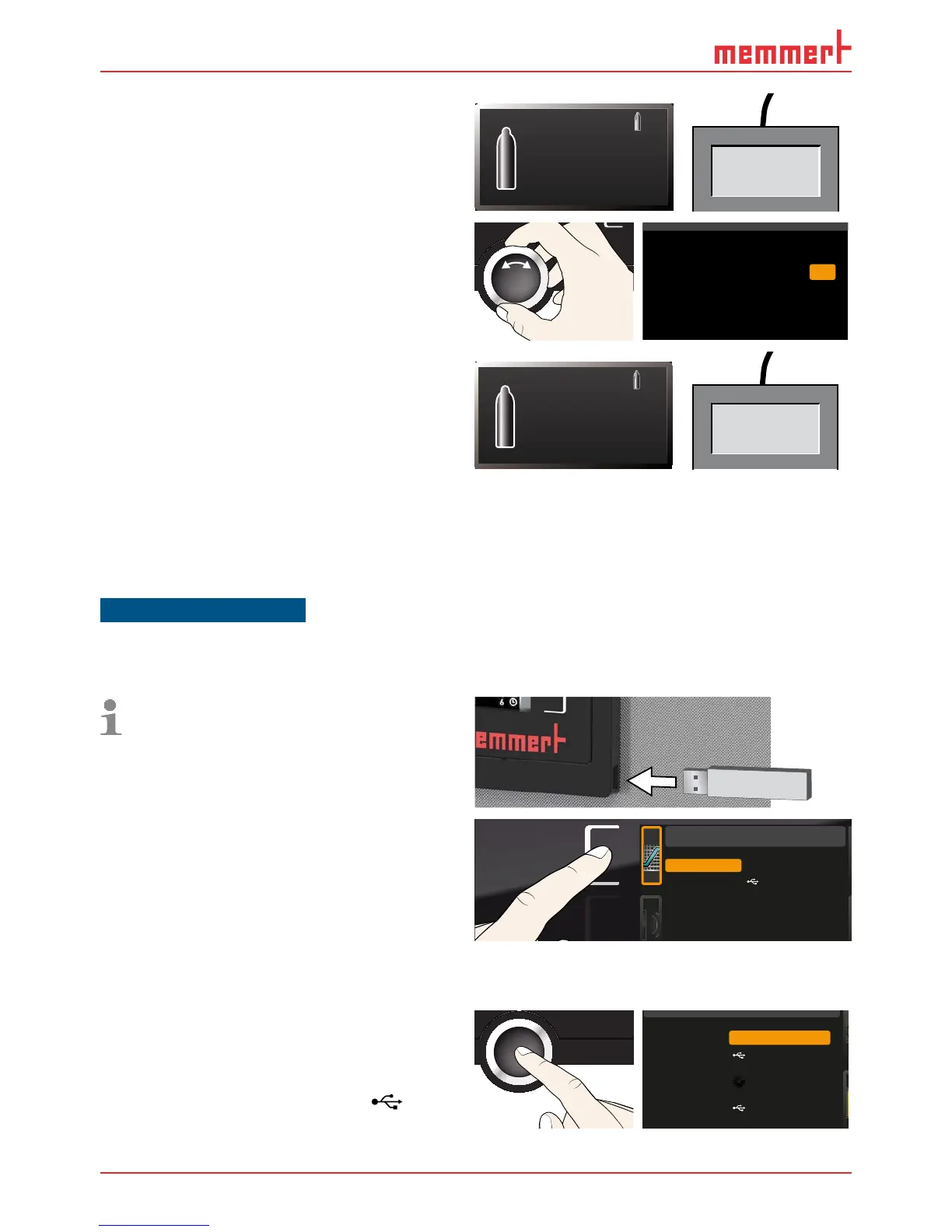
9. Wait until the appliance reaches the
setpoint and displays 10 %. The reference
instrument displays 8.5 %, for example.
CO2
10.0 %
10.0 %
Set
8.5 %CO2
10. In the SETUP, adjust the calibration value
Cal2 to –1.5 % (reference value measured
minus value displayed) and save the set-
ting by pressing the confirmation key.
%CO2
%CO2
%0,5-
%
Temperature
Cal1
Cal2
5.0
Humidity
%CO2
%
1,0+
Cal3 15.0
CO2
10.0 1,5-
O2
11. After the calibration procedure, the CO
2
value measured by the reference instru-
ment should now also be 10 %.
CO2
10.0 %
10.0 %
Set
10.0 %CO2
7.6 Programme
In the Program display, programmes created using the AtmoCONTROL software can be
transferred to the appliance and saved on a USB storage medium. Here, you can also select
the programme provided for use (see page 30 ) and delete programmes.
NOTICE
One or several default sterilisation programmes are saved in the appliance. They only serve to
sterilise the appliance itself and must not be used to sterilise medical devices.
To load a programme from a USB stor-
age medium: Connect the USB storage
medium with the saved programme(s)
to the interface on the right side of the
ControlCOCKPIT.
1. Activate the programme display. To do so,
press the activation key on the left side of
the
Prog display. The display is enlarged
and the entry
Select is automatically
highlighted. The programmes available
for activation are shown on the right. The
programme currently available for use –
in this example
Test 012 – is highlighted
in orange.
Program
Delete
Test 012
Test 013
Test 014
Test 015
Test 016
Select
2. Access the Select function by pressing
the confirmation key. All programmes
available are displayed, including the
ones saved on the USB storage medium
(identified by the USB symbol
). The
programme currently available for use is
highlighted in orange.
Select
Delete
Test 012
Test 022
Test 013
Test 014



 To Next Page