D33451 | Date 01/2018 57
Menu mode
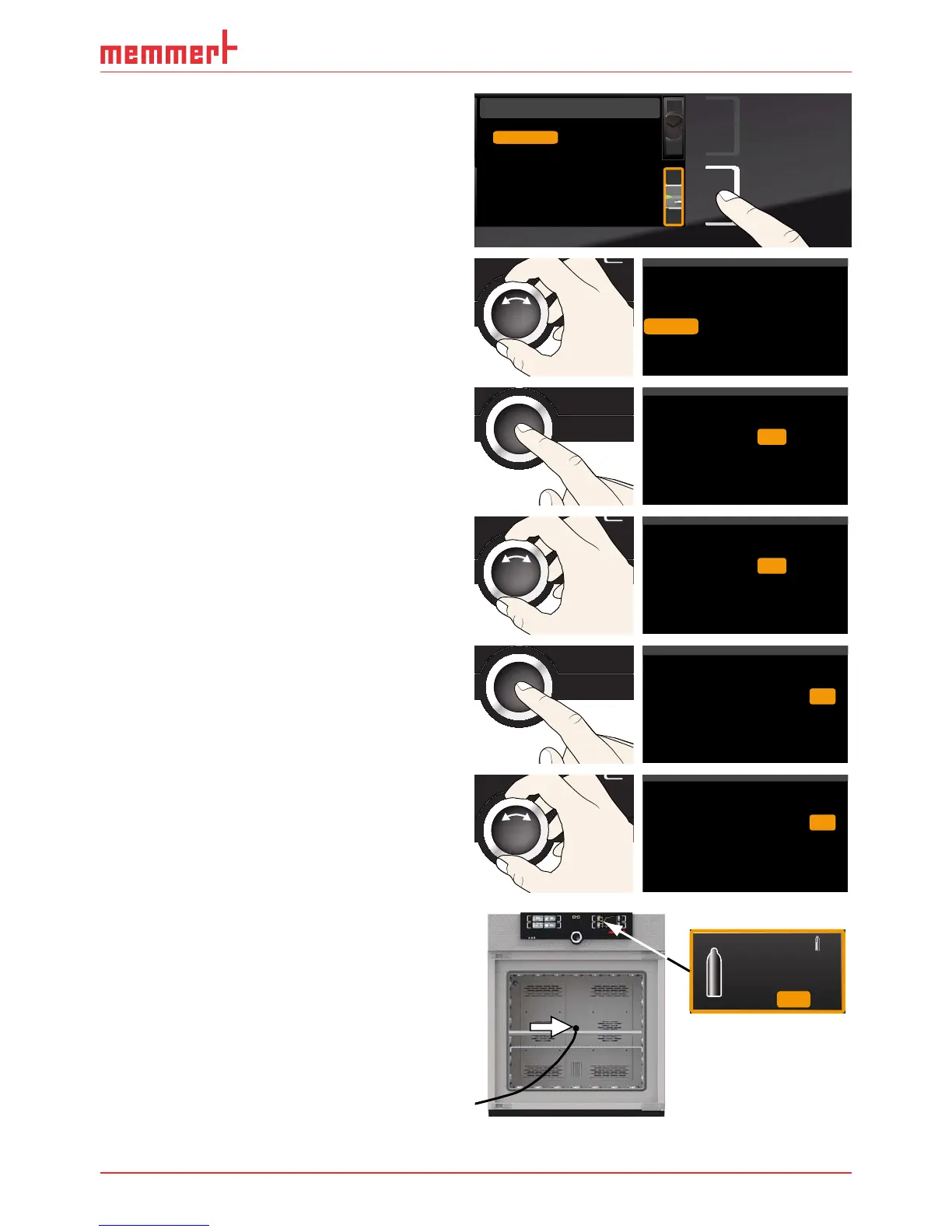
1. Press the activation key to the right of the
CALIB display. The display is enlarged
and the temperature adjustment option
is automatically selected.
Cal1
°C -0,2
K
Cal2 100.0 °C +0,1K
Cal3 180.0 °C -0,2 K
JUSTIEREN
Temperatur
letzte Justierung 12.10.2012 12:00
40.0
CK0,2-
CK0,1+
CK0,2-
Calibrate
Cal1
Cal2
Cal3
40.0
50.0
30.0
Temperature
Humidity
CO2
O2
2. Turn the turn control until CO2 or O2 is
selected.
%CO2
%CO2
%0,5-
%1,0+
Temperature
Cal1
Cal2
5.0
12.0
Humidity
%CO2
%
1,0+Cal3 15.0
CO2
O2
3. Press the confirmation key repeatedly,
until the calibration point Cal2 is selected.
%CO2
%CO2
%0,5-
%1,0+
Temperature
Cal1
Cal2
5.0
Humidity
%CO2
%
1,0+
Cal3 15.0
CO2
12.0
O2
4. With the turn control, set the calibration
point Cal2 to 10 %.
%CO2
%CO2
%0,5-
%1,0+
Temperature
Cal1
Cal2
5.0
Humidity
%CO2
%
1,0+Cal3 15.0
CO2
10.0
O2
5. Save the setting by pressing the confir-
mation key. The corresponding calibra-
tion value is automatically highlighted.
%CO2
%CO2
%0,5-
%
Temperature
Cal1
Cal2
5.0
Humidity
%CO2
%
1,0+Cal3 15.0
CO2
10.0 1,0+
O2
6. Set the calibration value to 0.0 % and ac-
cept the setting by pressing the confirma-
tion key.
%CO2
%CO2
%0,5-
%
Temperature
Cal1
Cal2
5.0
Humidity
%CO2
%
1,0+
Cal3 15.0
CO2
10.0 0,0
O2
7. Position the sensor of the calibrated refer-
ence instrument centrally in the working
chamber of the appliance.
8. Close the door and, in manual operating
mode, adjust the CO
2
content setpoint to
10 %.
CO2
1.0 %
10.
0
%
Set



 To Next Page