56 D33451 | Date 01/2018
Menu mode
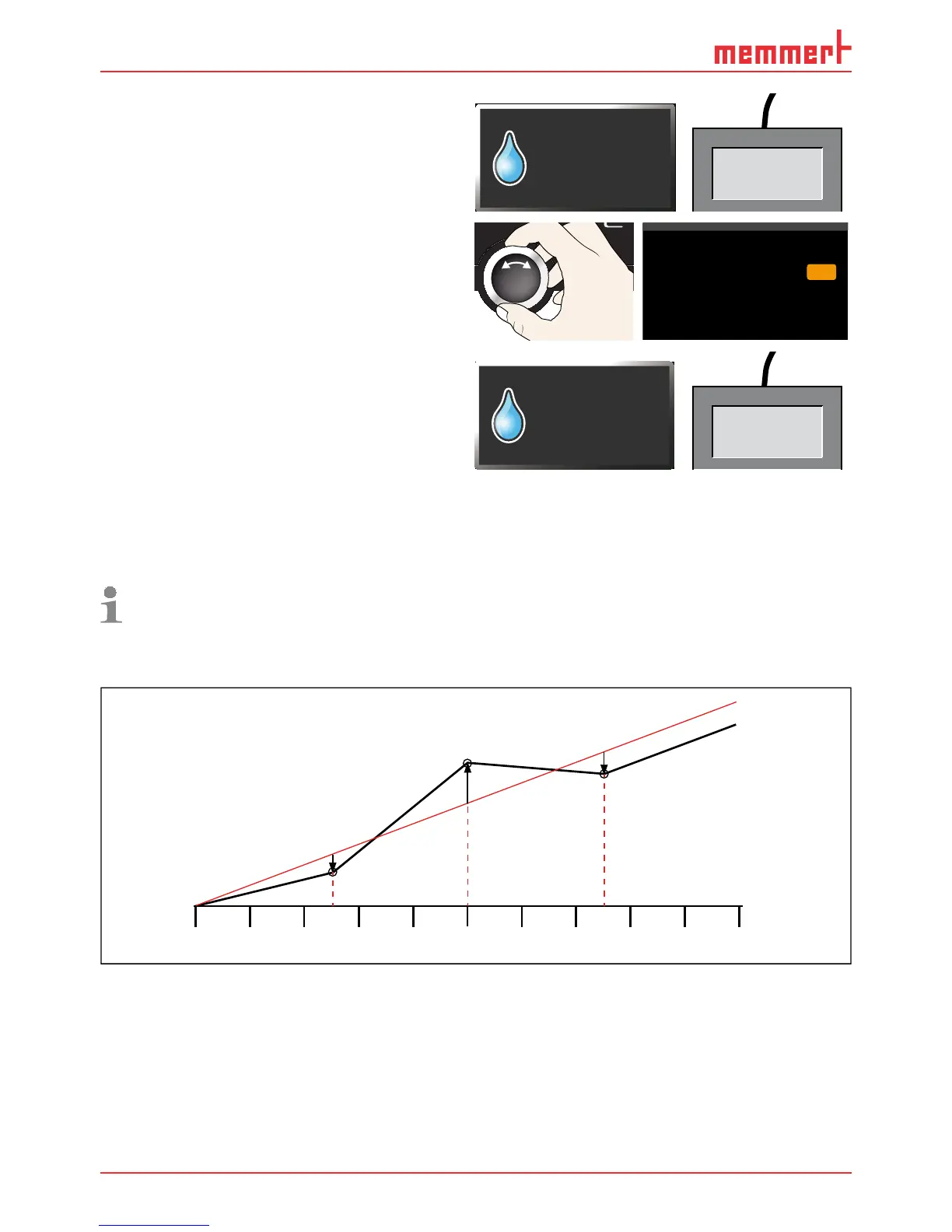
9. Wait until the appliance reaches the
set humidity and displays 60 % rh. The
reference instrument should display
58.5 % rh.
FEUCHTE
60.0%rh
Set 60.0%rh
58.5 %rh
10. In the SETUP, adjust the calibration value
Cal2 to –1.5 % (measured reference value
minus displayed value) and save the set-
ting by pressing the confirmation key.
%rh
%rh
%0,5-
%
Temperature
Cal1
Cal2
10.0
Humidity
60.0 -1.5
CO2
%rh
%
1,0+Cal3 80.0
O2
11. After the calibration procedure, the hu-
midity measured by the reference instru-
ment should now also be 60 % rh.
HUMIDITY
60.0%rh
Set 60.0%rh
60.0 %rh
7.5.3 CO
2
and O
2
calibration
You can calibrate the CO
2
and O
2
control (O
2
only in the corresponding configuration) accord-
ing to customer requirements with three freely selectable balance points. You can set a posi-
tive or negative compensation correction values for each selected balance point(Fig. 30).
For CO
2
calibration, a calibrated CO
2
measuring instrument is required;for O
2
calibration, a
calibrated O
2
measuring instrument is required.
The procedure for CO
2
and O
2
calibration is identical. This is explained with the example of CO
2
in the following.
Cal1
-0,4 %
20%
0%
10%
Cal2
+1,5 %
Cal3
-0,7 %
Factory calibration
Fig. 30 CO
2
calibration (example)
Example: A CO
2
deviation of 10 % or more should be corrected.



 To Next Page