D33451 | Date 01/2018 27
Operation and control
5.5.2 Basic operation
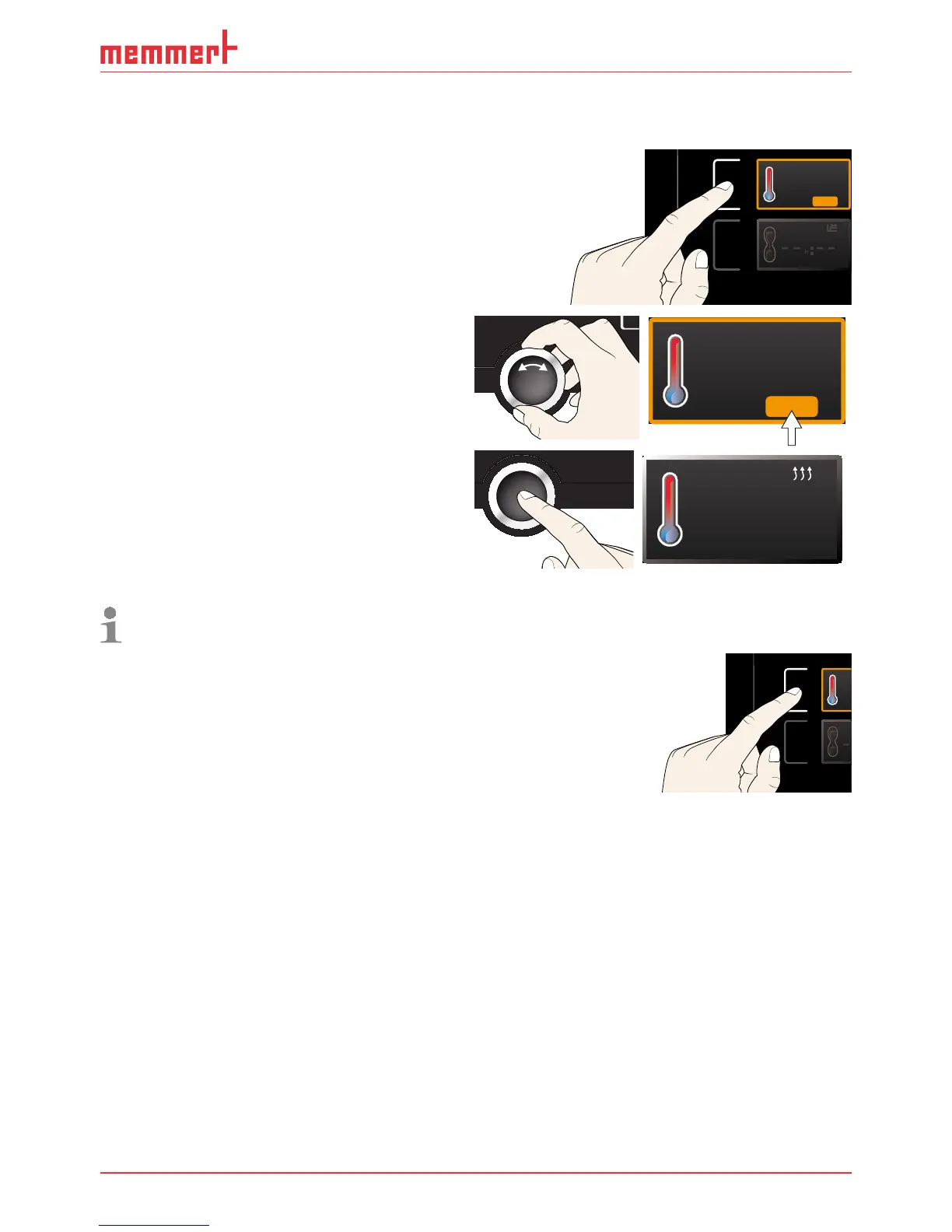
In general, all settings are made according to the following pattern:
1. Activate the desired parameter (e.g. tem-
perature). To do so, press the correspond-
ing activation key on the left or right or
the respective display. The activated dis-
play is lined in colour, the other displays
are dimmed. The set value is highlighted
in colour.
.5°C100
TEMP
22.4°C
TEMP
37.0°CSet
2. By turning the turn control to the left
or right, adjust the set value (e.g. to
37.0 ºC).
3. Save the set value by pressing the confir-
mation key.
The display returns to normal and the
appliance begins adjusting to the defined
set value.
23.2°C
TEMP
Set 37
.0°C
Additional parameters can be set accordingly.
If no new values are entered or confirmed for approx. 30 seconds, the appliance automati-
cally restores the former values.
If you want to cancel the setting procedure, press the
activation key on the left or right of the display that you
want to exit. The appliance restores the former values.
Only the settings that you have confirmed by pressing the
confirmation key before cancelling the setting procedure
are accepted.
5.5.3 Operating modes
The appliance can be operated in different modes:
► Manual mode: The appliance runs in permanent operation at the values set on the Con-
trolCOCKPIT. Operation in this mode is described in chapter 5.5.4 .
► Operation with digital backwards counter with target time setting, adjustable from 1
minute to 99 days (timer): The appliance runs at the values set until the timer has elapsed.
Operation in this mode is described in chapter 5.5.5 .
► Programme mode: The appliance automatically runs programme sequences which have
been defined using AtmoCONTROL software at a computer / laptop and then transferred
to the appliance from a USB stick or via Ethernet. Operation in this mode is described in
chapter 5.5.6 .
► via remote control (AtmoREMOTE)
22.4°C
TEMP
37.0°CSet



 To Next Page