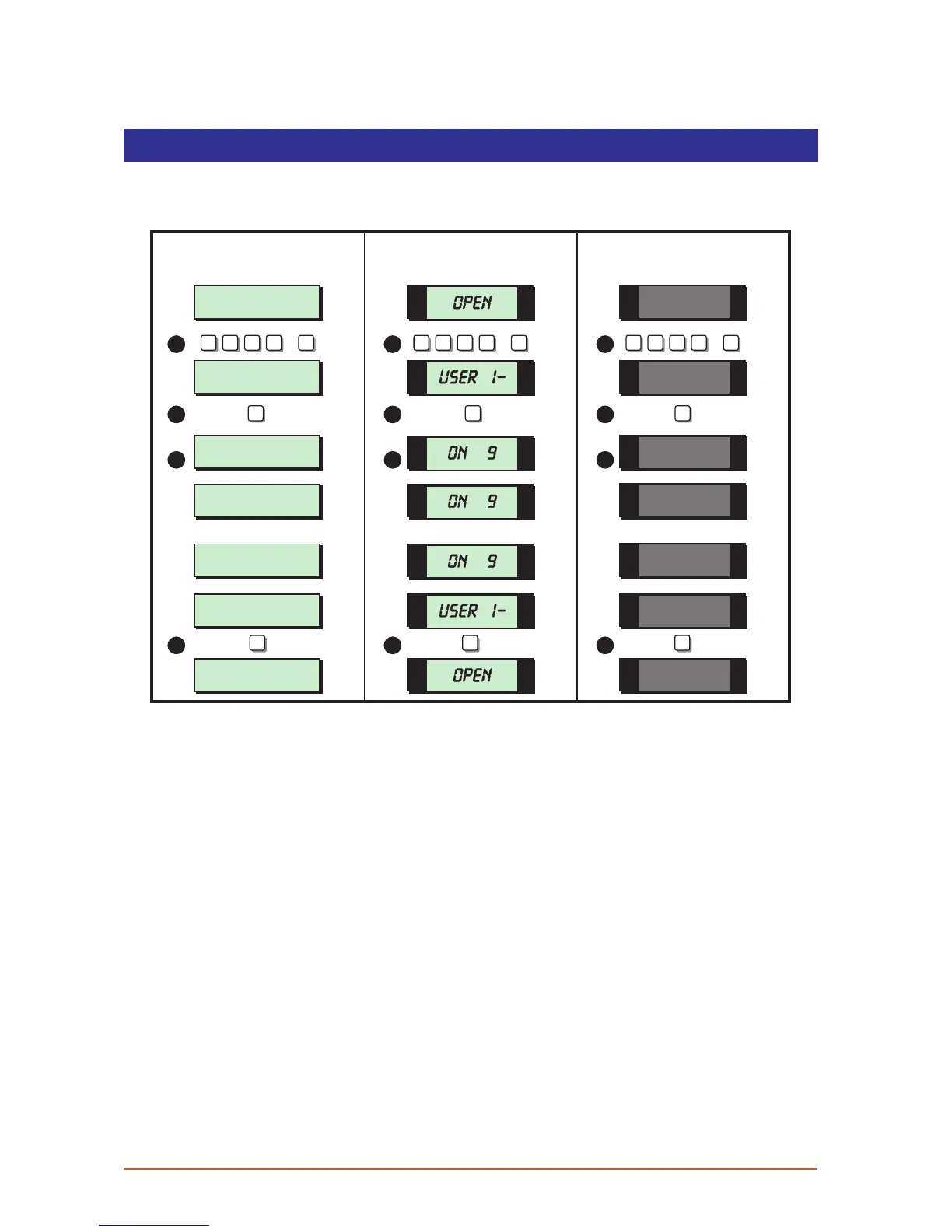
B ell Test
This option allows you to periodically test the external sounders (bell and strobe) and
internalsounders.Whenselectedeachdevicewilloperateinsequencefornineseconds.
User menu 1
Select Option :-
SYSTEM OPEN
17:30 01 JAN
SYSTEM OPEN
17:30 01 JAN
Sounder.ON> 09
PRESS ESC to end
BELL...ON> 09
PRESS ESC to end
Strobe.. ON> 09
PRESS ESC to end
1 -
OPEN
OPEN
ON 9
ON 9
ON 9
1 1 1
ESC ESC ESC
1 1 1
2 2 2
3 3 3
4 4 4
User menu 1
Select Option :-
1 -
? ? ? ?
ENT
+
? ? ? ?
ENT
+
? ? ? ?
ENT
+
LCD Remote St arburst Remote
LED Rem ote
1. From the unset (open) mode enter your passcode and press [ENT] to select user
menu 1.
2. Whilst user menu 1 is selected. Press [1] to select the bell test option.
3. The internal sounder operates for 9 seconds, then the external sounder operates for 9
seconds, then the external strobe operates for 9 seconds.
4. When all three tests are completed, the display shows user menu 1. To return the
system to the open mode press [ESC].
14



 To Next Page