----
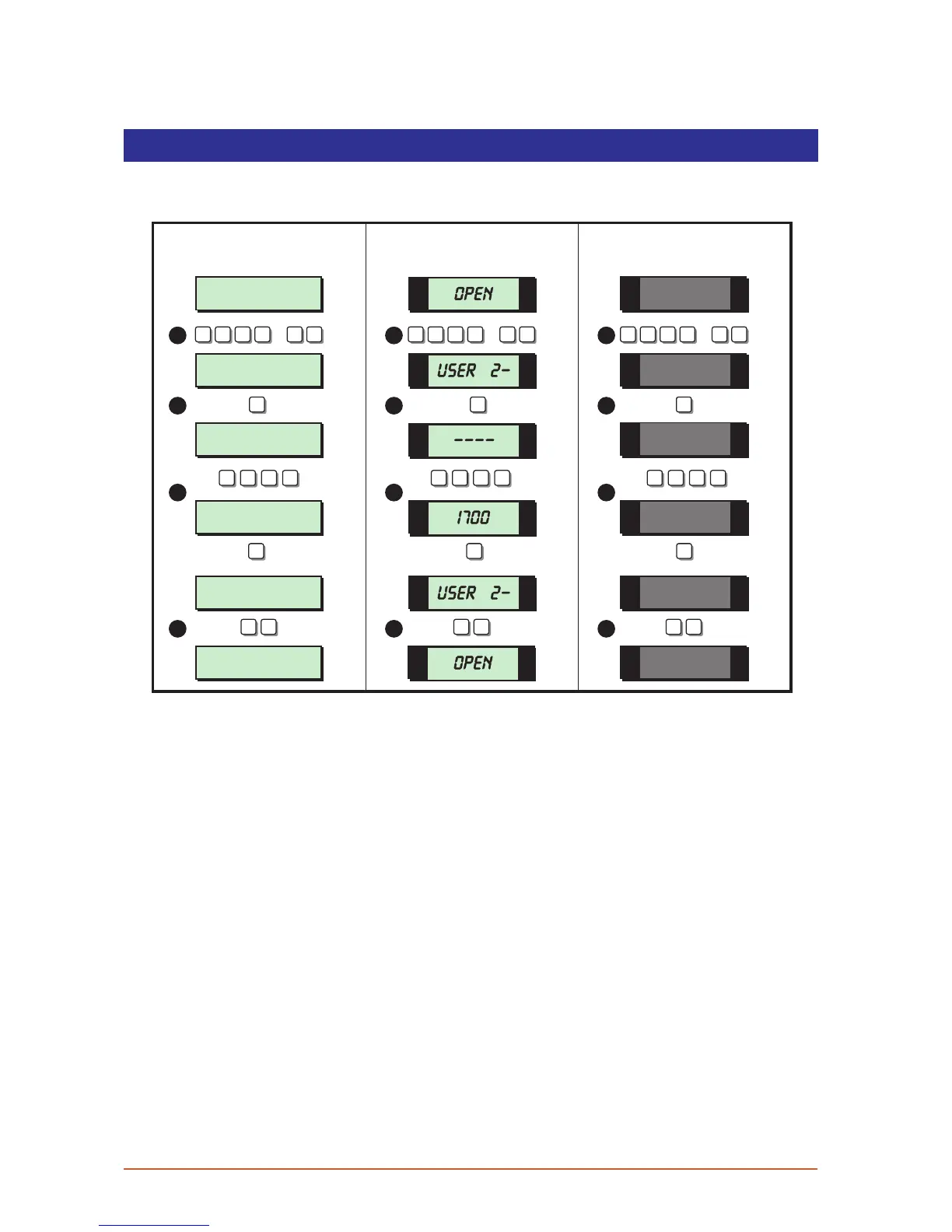
Set Clock
This option allows you to adjust the system clock. The clock is used for providing event times
in the event log and is also displayed when the system is unset or full set.
User menu 2
Select Option :-
User menu 2
Select Option :-
SYSTEM OPEN
17:30 01 JAN
Set Clock > ----
Set Clock > 1700
SYSTEM OPEN
17:00 01 JAN
LCD Remote St arburst Remote
LED Rem ote
2 -
OPEN
2-
OPEN
1700
ENT ENT ENT
ESC ESCESC ESCESC ESC
2
1 7 0 0 1 7 0 0 1 7 0 0
2 2
1 1 1
2 2 2
3
4
3
4
3
4
? ? ? ?
ENT
+
ENT
? ? ? ?
ENT
+
ENT
? ? ? ?
ENT
+
ENT
1. From the unset (open) mode enter your passcode and press [ENT] twice to select
user menu 2.
2. Whilst user menu 2 is selected. Press [2] to select the set clock option.
3. Enterthenewtimeina24hrformat,e.g.1700for5:00PM.Whenthedisplayshowsthe
correct time press [ENT] to accept.
4. To return the system to the open mode press [ESC] twice.
26



 To Next Page