----
Setup New U sers (Con t.)
User menu 2
Select Option :-
Alter user type
Master
Change pass code
New code > ----
Change pass code
New code > 2580
SYSTEM OPEN
17:30 01 JAN
Setup users
User No. > --
Setup users
User No. > --
Alter user type
Not in use
SYSTEM OPEN
17:31 18 JAN
2 -
OPEN
TYP.1
2580
Ur.--
OPEN
Ur.--
NoTU
ESC ESC ESC ESC ESC ESC ESC ESC ESC
4
0 0 08 8 85 5 52 2 2
ENT ENT ENT
ENT ENT ENT
ENT
0 3
ENT
0 3
ENT
0 3
4 4
1 1 1
2 2 2
3
4
6
3
4
6
3
4
6
LCD Remote St arburst Remote
LED Rem ote
? ? ? ?
ENT
+
ENT
? ? ? ?
ENT
+
ENT
? ? ? ?
ENT
+
ENT
1 8 1 8 1 8
5 5 5
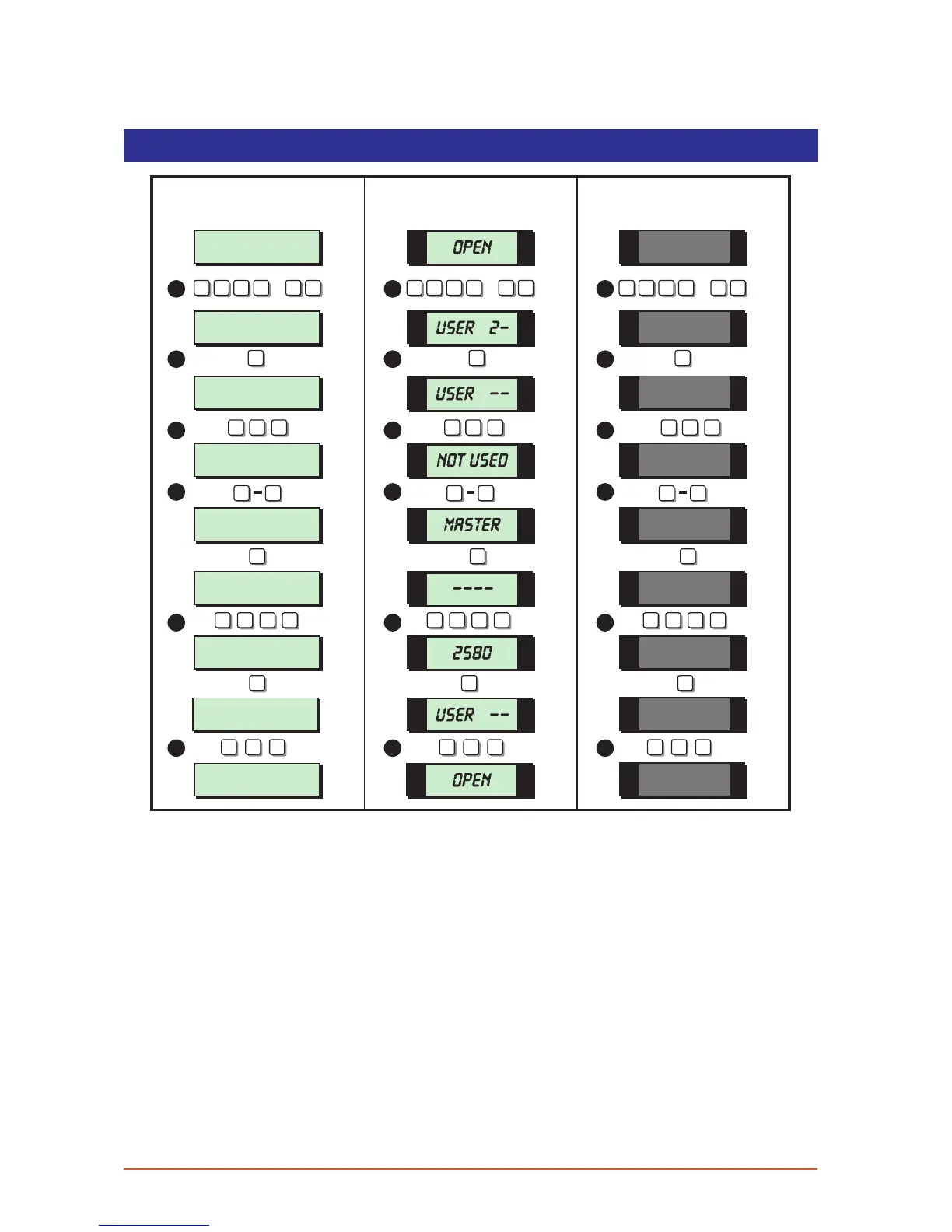
1. From the unset (open) mode enter your passcode and press [ENT] twice to select
user menu 2.
2. Whilst user menu 2 is selected. Press [4] to select the set-up new users option.
3. Enter the user number (02 - 15) that you require to set-up, then press [ENT].
4. The display shows the current type assigned for the selected user, to change the user
type press [1] - [8]. When the display show the required user type press [ENT] to
accept.
5. Enter the 4 digit passcode for the selected user, then press [ENT] to accept. A rising
multi-tone indicates the new passcode was accepted. A low tone indicates that the
passcode entered is not available, re-enter, using a different 4 digit code.
6. The system will return to step 3, if required repeat for other users or press [ESC] three
times to return the system to the open mode.
29



 To Next Page