300Mbps Wireless N Router User Guide
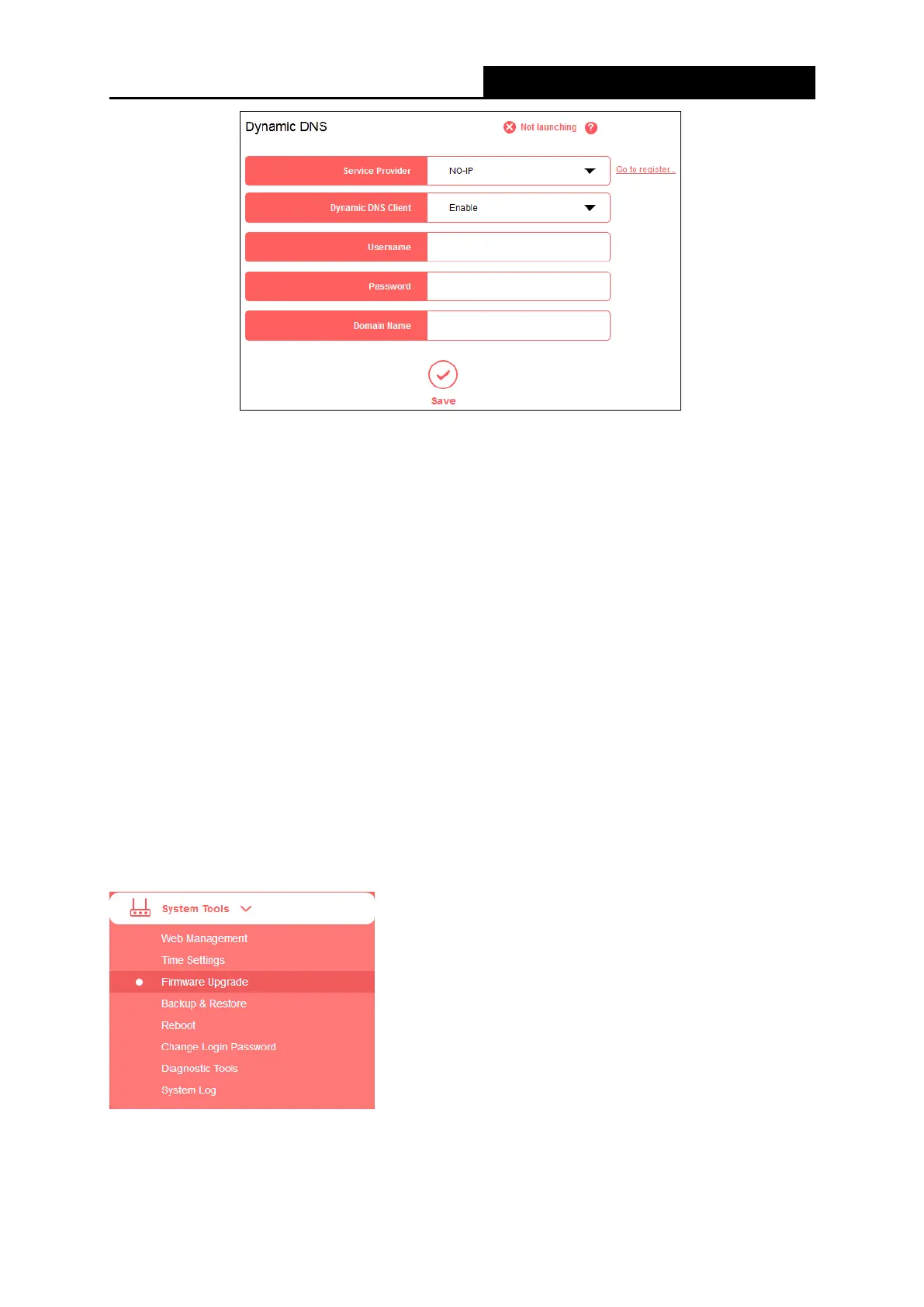
▶ Service Provider - The Dynamic DNS service provider.
▶ Dynamic DNS Client – Select to enable or disable dynamic DNS client.
▶ Username/Password - Enter the username and password of your DDNS account.
▶ Domain Name - Enter the domain name provided by the DDNS service provider.
To set up for Dynamic DNS, follow these steps:
1. Select your service provider from the drop-down list.
2. Enable the Dynamic DNS client.
3. Enter the username and password of your DDNS account.
If you do not have an account, click Go to register… to register an account.
4. Enter domain name you registered with the Dynamic DNS service provider.
5. Click Save.
5.5 System Tools
There are eight submenus under the Forwarding menu: Web Management, Time Settings,
Firmware Upgrade, Backup & Restore, Reboot, Change Login Password, Diagnostic Tools
- 42 -


 To Next Page
 Loading...












