STARTING&DRIVING
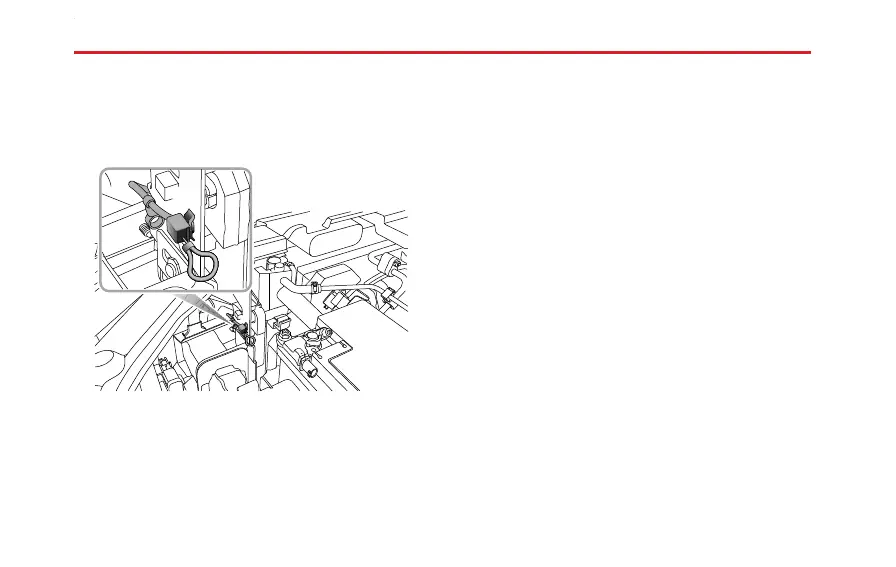
T oaccessthemanualrelease,raisethebonnetandlocate
thereleasecableontheN/Softheradiatorcowling
assembly-seepicture.
Pullthereleasecablehandle,removetheconnectorplug
whilstmaintainingtensiononthecablethiswillreleasethe
lockingdevice.
RapidCharging
Note:Pleasereadanyequipmentoperating
instructionscarefullypriortousingtherapidcharging
station.Eachtypeofchargermayusedifferent
instructions.
Ifyouhaveanydoubtspleaseseekprofessionalassistance.
RapidChargingSafetyPrecautions
•Beforeconnectingtherapidcharger,switchthevehicle
powersystemOFFandwait10seconds.
DisplayInformation
1Frontchargingbreathinglamplocatedinthefront
vehiclelogopositionbrightensanddims.
2Whenchargingiscompletethefrontcharging
breathinglightwillextinguish.
Note:Ifatanytimeduringthechargingprocessyou
shouldwanttocheckthestateofcharge,pleaseswitch
thevehiclepowersystemtotheONposition.Thehigh
voltagebatterystateofchargewillbedisplayedinthe
messagecentreintheinstrumentpack.
150



 To Next Page
 Loading...










