7.3.4 Replacing the Remote Control Battery
36 Instructions SL1
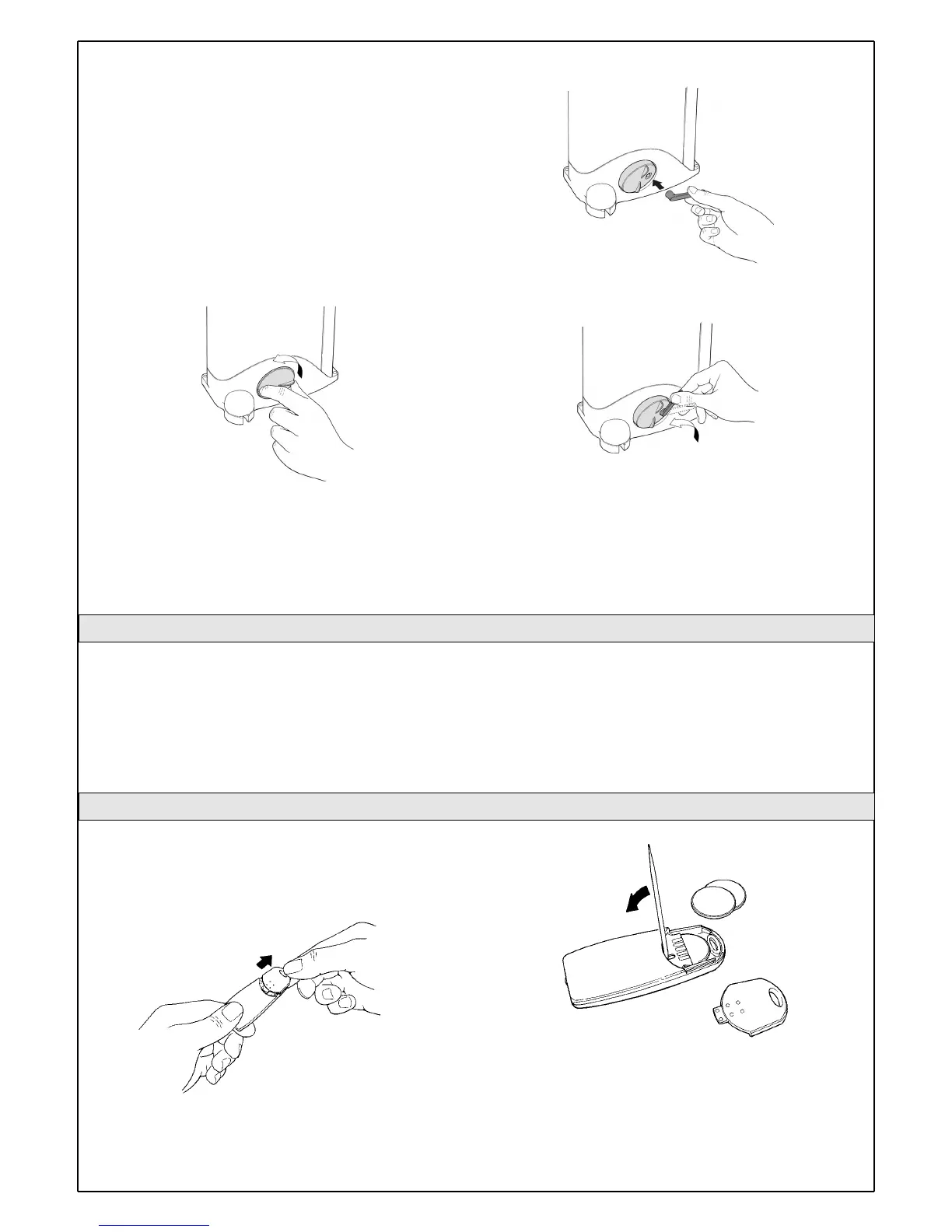
Gearmotor release
The gearmotor is equipped with a mechanical system which allows the
gate to be opened and closed manually (i.e. as if SL1 were not present).
The manual operation must be resorted to in case o power failures or
system malfunctions. If a power failure occurs, the buffer battery can be
used (PR1 optional accessory).
If there is a malfunction of the gearmotor it is still possible to try and
release the motor in order to check whether the problem is connected
with the release mechanism.
1Turn the release mechanism cover anti-clockwise until the hole
matches the release pin.
2 Insert the key in the pin.
3 Turn the key anti-clockwise by approx. 90° until you feel the gate
release
4 At this point, the gate can be moved manually.
5To restore the functionality of the automation system, rotate the key
clockwise while simultaneously moving the gate until it is caught by the
mechanism.
6Remove the key and close the cover by turning it clockwise.
The only maintenance operations that the user can and must perform
periodically concern the cleaning of the photocell glasses and the
removal of leaves and debris that may impede the automation.
• Use a slightly damp cloth (not wet) to clean the surface of the
devices. Do not use any substances containing alcohol, benzene,
diluents or other flammable substances. The use of these
substances could damage the devices, start fires or generate
electric shocks.
• Disconnect the power supply to the automation before you
proceed to remove leaves and debris, to prevent anyone from
activating the gate.
If the range of the remote control is significantly diminished and the light
emitted by the LED is feeble, the remote control battery is probably
exhausted. The remote control houses two CR2016 type lithium
batteries. To replace them proceed as follows:
1Open the bottom by pulling it.
2 Insert a small pointed tool in the slit and prise the batteries out.
3 Insert the new battery, observing the polarity (the "+" symbol towards
the bottom ).
4 Close the bottom until it clicks.
The batteries contain polluting substances: do not dispose of
them together with other waste but use the methods established
by local regulations.
Figure 78
Figure 79
7.3.3 Maintenance Operations to Be Performed by the User
Figure 80
Figure 81
Figure 77



 To Next Page