© Microhard Systems Inc. 19
2.0 Quick Start
2.2.2 Configuring the Station/Client (Continued)
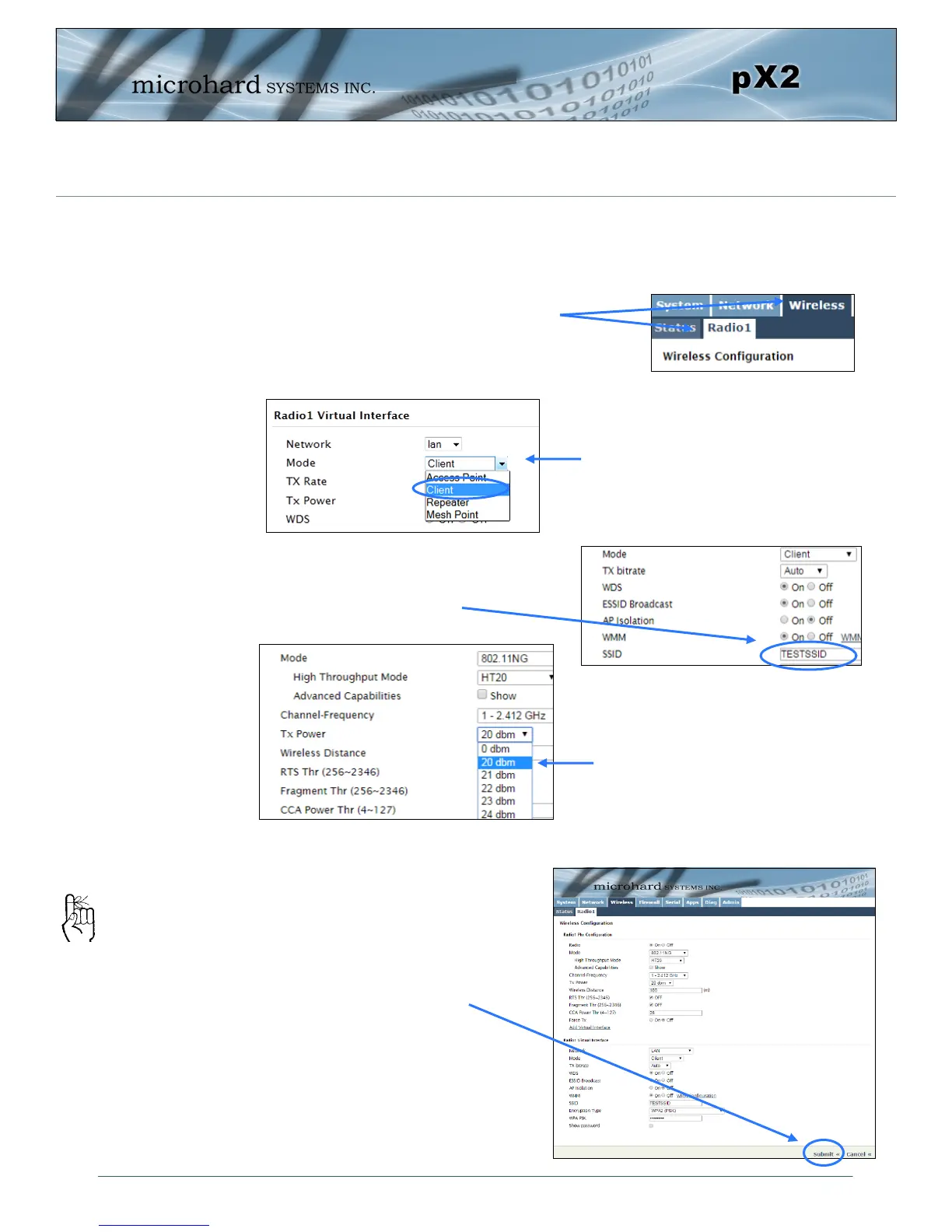
Configure the pX2 as a Station/Client.
In the Radio1 Virtual Interface sec-
tion, select Client from the Mode
dropdown box.
The remaining settings in the
Wireless menu should be left as
defaults for this exercise.
Click on the Submit button to
write the changes to the pX2. The
Cancel button will revert back to
previously saved values
If any additional
settings need to be
changed, ensure they
are also changed on
the Station.
Enter a unique Network Name(SSID)
as shown.
TESTSSID
For bench or close proximity testing
it is best to use a lower power set-
ting to prevent RF saturation. Select
20dBm from the TX Power setting.
Select Wireless from the top/main navi-
gation, and then Radio1 from the sub-
menu list.



 To Next Page