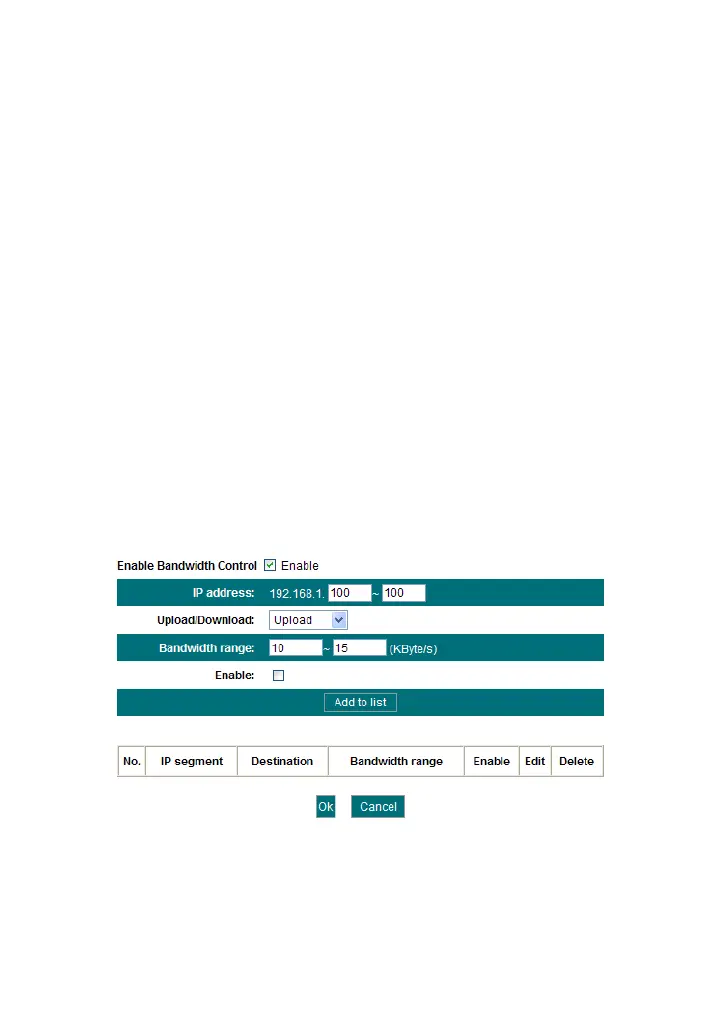
IP Address: The IP address range of the hosts whose traffic has
been controlled. It can be a single IP address or IP address range.
Upload/Download: To specify the traffic heading way for the
selected IP addresses: upload or download.
Bandwidth Range: The maximum and minimum upload/download
data traffic of the hosts in specified IP range. The unit is KByte/s.
The uplink of upload and download can not exceed the WAN port
bandwidth limitation range.
Enable: To enable the current edited rule. Otherwise, the rule will
not go into effect.
Add to list: After you edit the rule, click the “add to list” button to
add the current rule to the rule list.
Here we take 2Mbps bandwidth as an example. Theoretically, the biggest
downloading rate for 2Mbps bandwidth is 2Mbps=256KByte/s, and the
biggest uploading rate is 512kbps=64KByte/s
Example 1
If you want to set the download rate of the computer at the IP address of
192.168.1.100 as 80-90KByte/s, upload rate as 10-15KByte/s, first add
one upload rule as shown in the picture below:
1. Enter 192.168.1.100 in the IP address field
2. Select upload in the Upload/Download field.
3. Enter 10-15 in the bandwidth range field
4. Select “Enable”
5. Click “Add to list”
6. Click “Ok” to finish the upload rule settings.



 To Next Page