PDS-104G PoE Switch
Power Over Ethernet PowerView Pro User Guide
Copyright © 2016 Microsemi Page 11 of 48
Rev. 1.0 CPG – PoE BU
One Enterprise Aliso Viejo, CA 92656 USA
3 Web Interface
Unit default IPv4 address is 192.168.0.50. For the first-time configuration, please configure your
computer/laptop Ethernet network interface to the following IPv4 parameters:
IPv4: 192.168.0.40
IPv4 Mask: 255.255.255.0
3.1 Secured SSL/TLS Web interface – handling certificates
Please refer to document PDS-104G Web Certificate Management for instructions on how to create, sign, and
upload self-signed or CA signed certificates to the unit.
3.2 Main Web Page
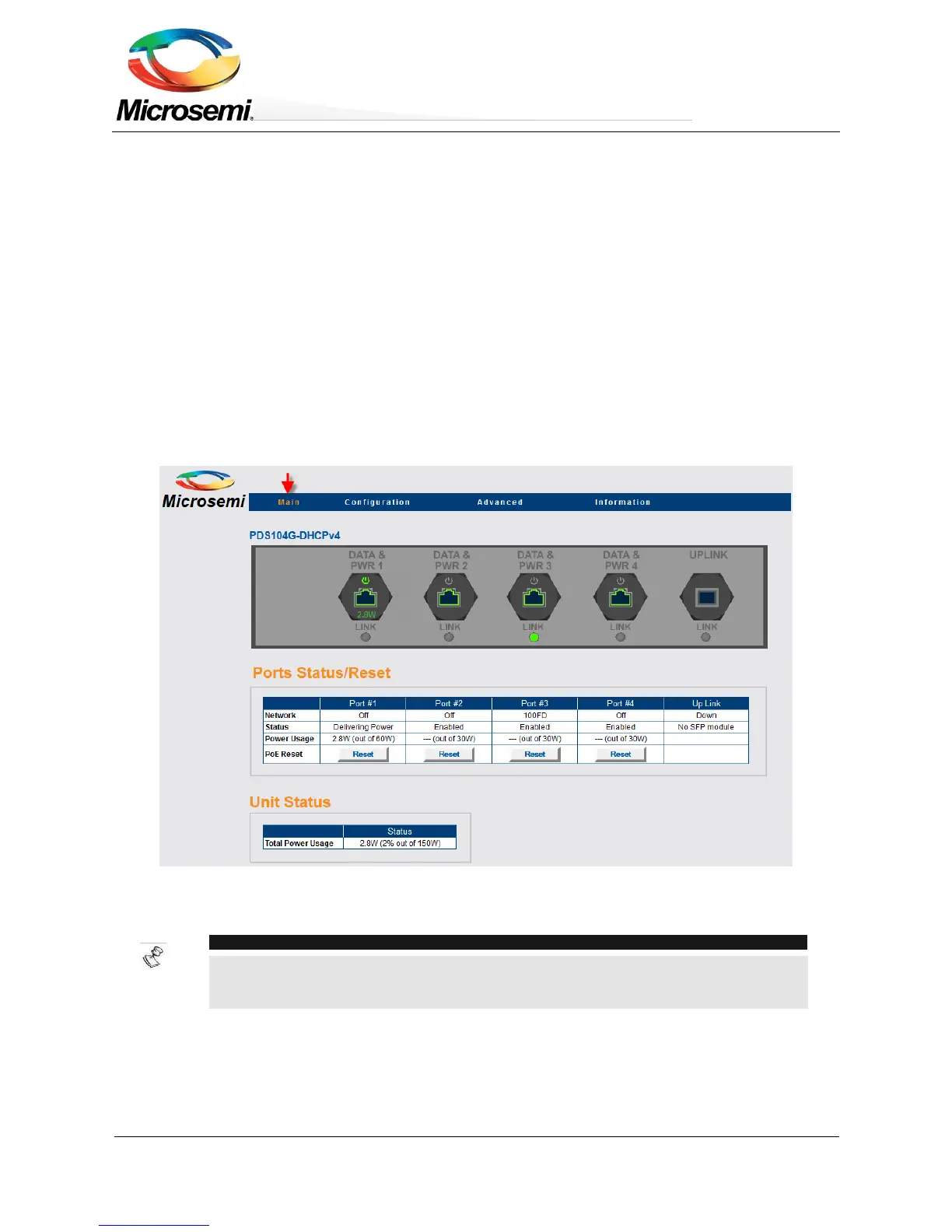
The main Web page is used to monitor unit status, PoE ports status such as Ethernet Link connection speed,
PoE power consumption, and total unit PoE power consumption. The Web page is updated automatically every
few seconds.
Figure 3-1: Main Web Page
NOTE:
Ethernet Network link is always enabled, regardless of PoE configuration (enabled/disabled),
supporting 10MB, 100MB, and 1000MB speeds.


 To Next Page