PDS-104G PoE Switch
Power Over Ethernet PowerView Pro User Guide
Copyright © 2016 Microsemi Page 31 of 48
Rev. 1.0 CPG – PoE BU
One Enterprise Aliso Viejo, CA 92656 USA
5 SNMP Monitoring and Configuration
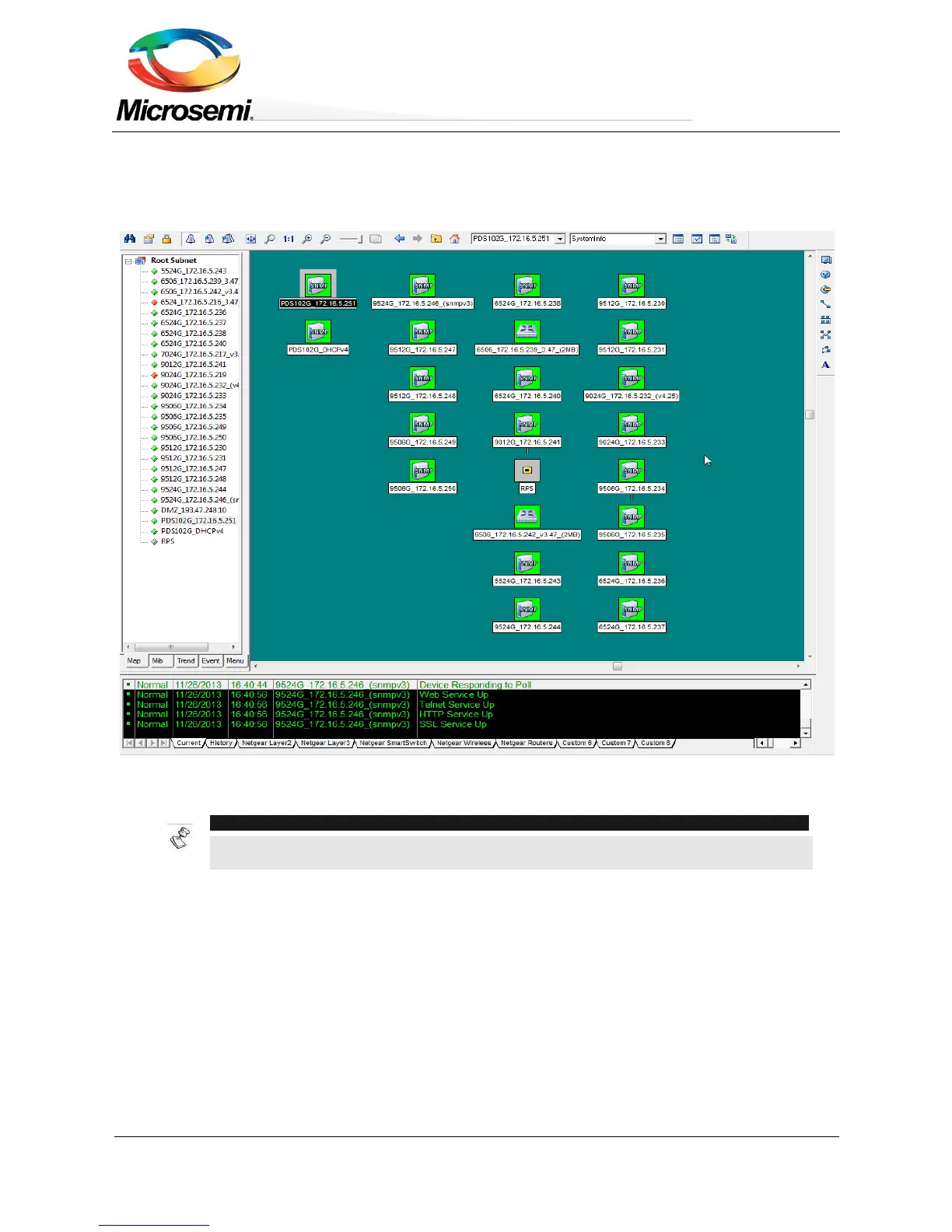
Multiple units can be monitored and managed by using third-party standard Network management tools such as
HP Openview, IBM Tivoli, SNMPc, etc.
Figure 5-1: SNMPc Network Management Tool
NOTE:
Due to security concerns the unit is shipped with the SNMPv2/v3 disabled. Prior to
enabling SNMP, please modify SNMP community strings and only then enable it.
5.1 Enabling SNMP
The Network Manager interface supports SNMPv1, SNMPv2c, and SNMPv3 (since SNMPv1 is obsolete, the
unit will accept and reply to SNMPv1 packets however SNMP traps/notifications will be sent in SNMPv2,
SNMPv3 or both).
To use the SNMP:
1. Browse to the Configuration Web page and enable SNMPv2 or SNMPv3:
For SNMPv2c, make sure that community strings match your SNMP manager configuration.
For SNMPv3, make sure username, authentication and privacy password and encryption methods
match your SNMP manager configuration.


 To Next Page