PDS-104G PoE Switch
Power Over Ethernet PowerView Pro User Guide
Copyright © 2016 Microsemi Page 16 of 48
Rev. 1.0 CPG – PoE BU
One Enterprise Aliso Viejo, CA 92656 USA
Obtain IPv6 address from DHCPv6 Server
Static IPv6 address whenever DHCPv4 is off
Static IPv6 mask whenever DHCPv4 is off
Static IPv6 default gateway whenever DHCPv4 is off
3.3.3.3 Network Hostname/FQDN
Host name field is used by both DHCPv4 and DHCPv6 to register the unit name in DHCPv4/v6 Server, allowing
the IT manager to easily find which remote network device was given a specific IP address. Please note that
IPv6 uses the FQDN terminology as host name.
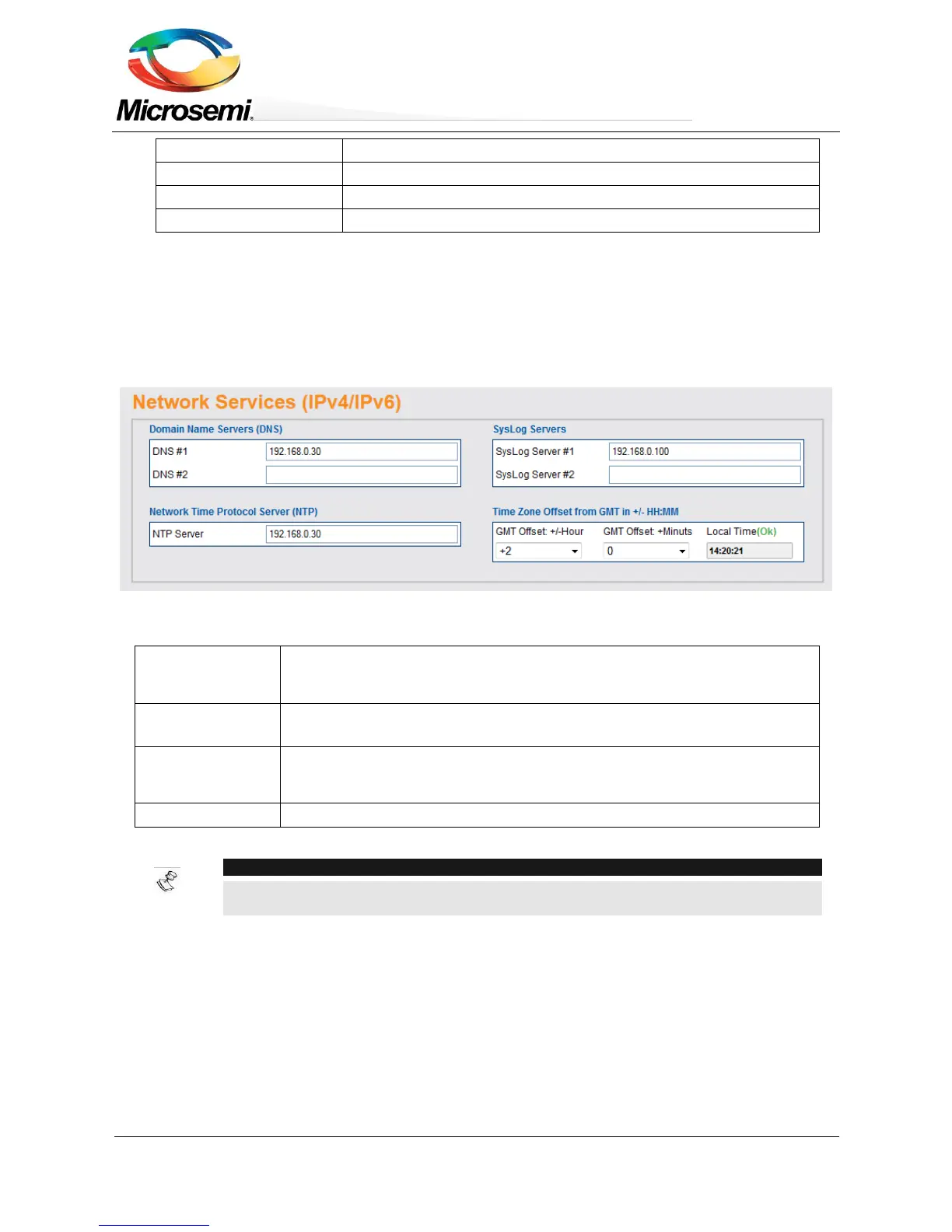
3.3.4 Network Services Configuration (IPv4/IPv6)
Figure 3-9: Network Services Configuration
DNS Server #1
DNS Server #2
Domain Name Server IPv4/IPv6 address. Please note that DNS fields will
become gray whenever DHCPv4 or DHCPv6 is enabled, expecting to get DNS
IP address from DHCPv4/v6 Server.
SysLog Server #1
SysLog Server #2
Network System Log IPv4/IPv6 Servers address used to log various unit log
message events, to be viewed later by the IT manager.
Network Time Protocol Server IPv4/IPv6 address required by Automatic
Weekly Schedule PoE Port Activation and Automatic Weekly Schedule Port
Reset features.
Local time shift from GMT time in hours and minutes.
NOTE:
For valid NTP Server IP configuration, please make sure a green (OK) appears to the
right of Local Time label (Web page reload refresh may be required).


 To Next Page