PDS-104G PoE Switch
Power Over Ethernet PowerView Pro User Guide
Copyright © 2016 Microsemi Page 19 of 48
Rev. 1.0 CPG – PoE BU
One Enterprise Aliso Viejo, CA 92656 USA
---- – No PoE power (Ethernet port is enabled and functional but there are no PoE devices).
3.4 Advanced Web Page
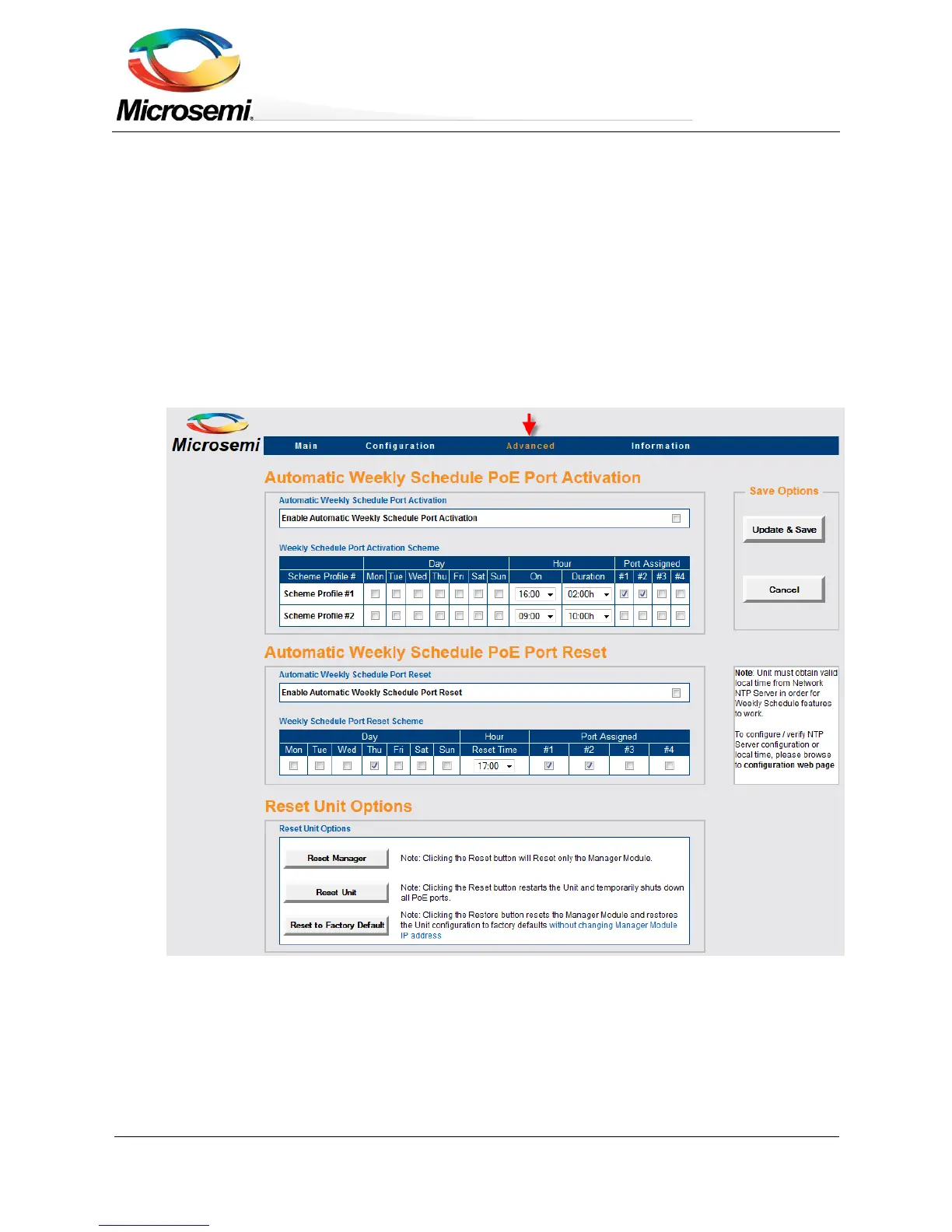
Advanced Web page configuration offers the following features to be configured:
Automatic Weekly Schedule PoE Port Activation (Ethernet port is always enabled)
Automatic Weekly Schedule PoE Port Reset
Reset Unit Options
o Reset Manager – Reset only the Network Manager without affecting PoE or network traffic through
the various ports.
o Reset Unit – Reset the internal Network Manager, internal PoE controller and internal Ethernet Switch.
o Reset to Factory Default – Reset unit configuration to factory default excluding unit network
configuration in order to enable remote unit access even after factory default button was pressed.
Figure 3-12: Advanced Web Page Configuration
3.4.1 Advanced Web Page – Automatic Weekly Schedule PoE Port Activation
Automatic Weekly Schedule PoE Port Activation offers automatic activation/deactivation of PoE devices on
various days of the week for specific hours. It may be used to increase network security by turning off Wi-Fi
Access Points during non-working hours or to save power during non-working hours by turning off PoE devices.


 To Next Page