PDS-104G PoE Switch
Power Over Ethernet PowerView Pro User Guide
Copyright © 2016 Microsemi Page 22 of 48
Rev. 1.0 CPG – PoE BU
One Enterprise Aliso Viejo, CA 92656 USA
NOTE:
Network traffic to PD devices might be interrupted for several seconds, without affecting
PoE power.
Reset Unit – Reset the entire unit including the internal Network Manger, the PoE controller, and the
internal Ethernet Switch.
Restore to Factory Default – Restore unit configuration to factory default, leaving IPv4/IPv6 network
configuration unchanged (as DHCP/Static IP, IP Address, etc.), maintaining the option to access the
unit over the network as before.
NOTE:
To simplify finding the unit over the network, upon power up the unit will send SysLog
broadcast messages to IP 255.255.255.255 to all SysLog servers on the Network
reporting its IP network configuration parameters, its MAC address, host name, etc.
3.5 Information Web Page
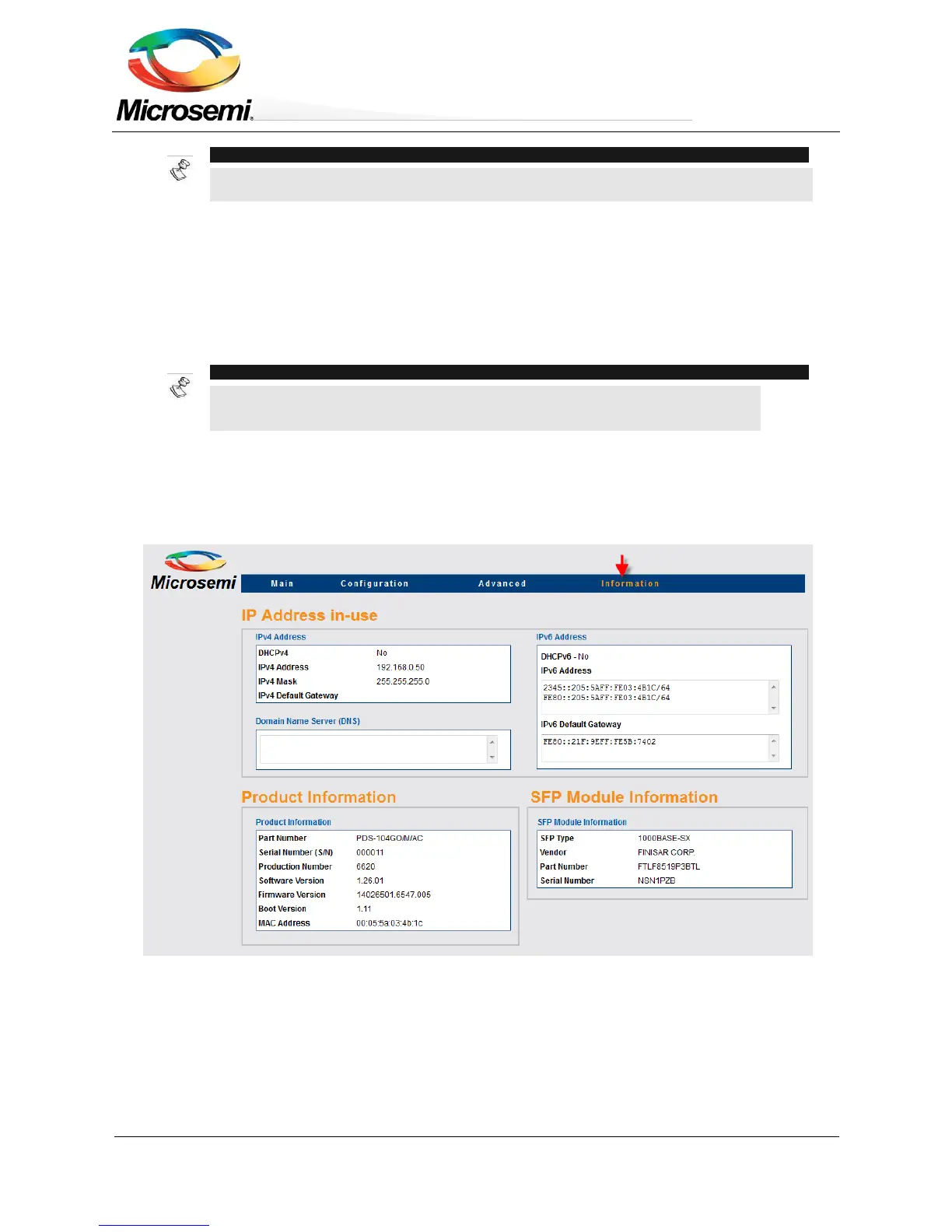
Information Web page provides information on current IPv4 and IPv6 addresses, SFP module plus
miscellaneous product information such as software version, PoE firmware version, etc.
Figure 3-16: Information Web Page
3.5.1 Information Web Page – IP Address in-use
The IP Address in-use reports in-use unit IPv4 address, in-use IPv6 address, and in-use DNS (Domain Name
Servers)


 To Next Page