PDS-104G PoE Switch
Power Over Ethernet PowerView Pro User Guide
Copyright © 2016 Microsemi Page 27 of 48
Rev. 1.0 CPG – PoE BU
One Enterprise Aliso Viejo, CA 92656 USA
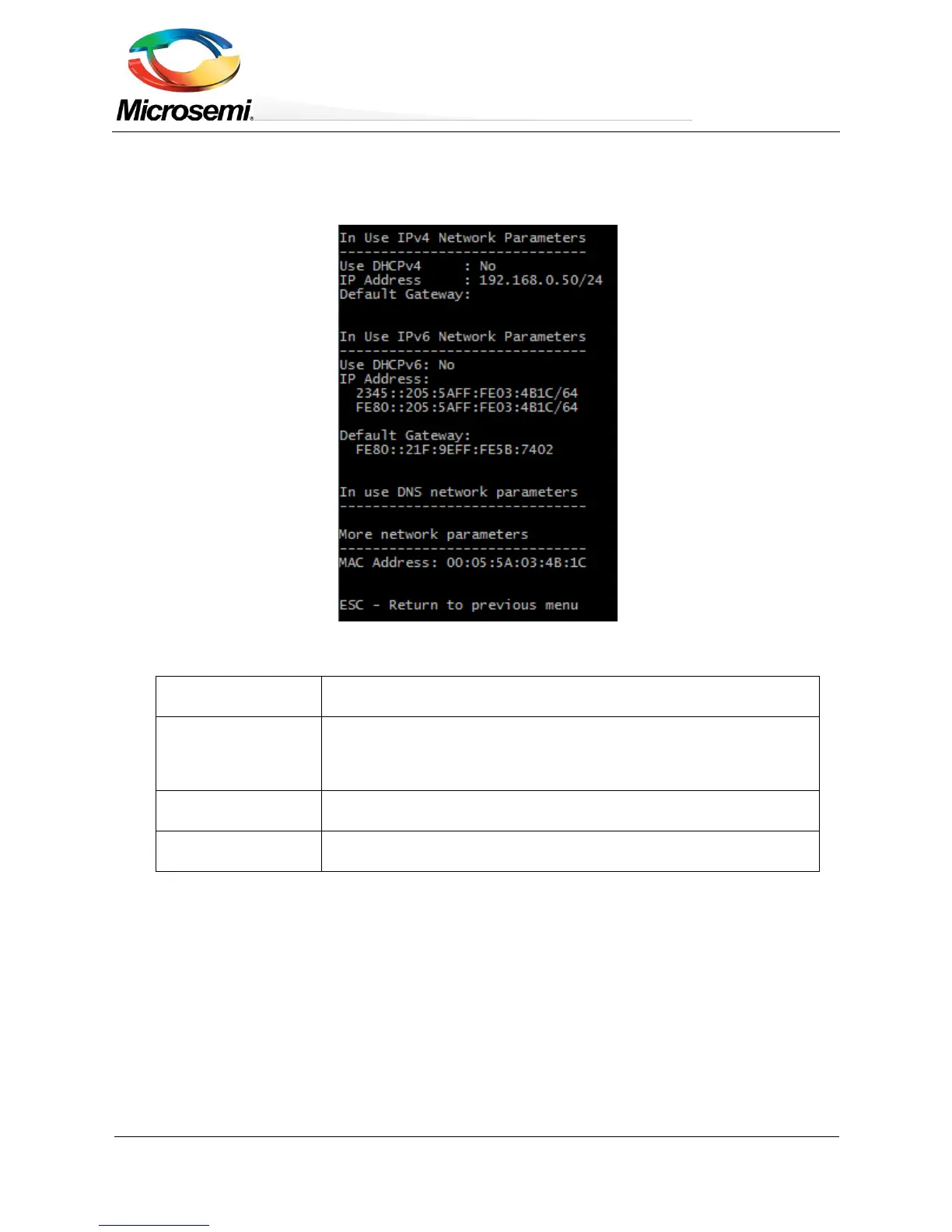
4.2.2 Telnet/SSH – View Network Parameters
Telnet/SSH – View Network Parameters provides information on in-use IPv4, IPv4, Default Gateway and unit
MAC Address.
Figure 4-4: Telnet/SSH View Network Parameters
Reports if DHCPv4 is enabled or disabled, and the actual in-use IPv4
address, IPv4 mask and default gateway.
In-use IPv6 Network
Parameters
Reports if DHCPv6 is enabled or disabled, and the actual in-use IPv6
address, IPv6 prefix and IPv6 default gateway. Please note that IPv6 may
report several IPv6 addresses which were obtained automatically in
addition to a static/DHCPv6 IPv6 address.
In-use DNS Network
Parameters
Reports in-use IPv4/IPv6 Domain Name Server IPs which were configured
statically or obtained by DHCPv4/DHCPv6.
Reports the unit MAC address.


 To Next Page