PDS-104G PoE Switch
Power Over Ethernet PowerView Pro User Guide
Copyright © 2016 Microsemi Page 17 of 48
Rev. 1.0 CPG – PoE BU
One Enterprise Aliso Viejo, CA 92656 USA
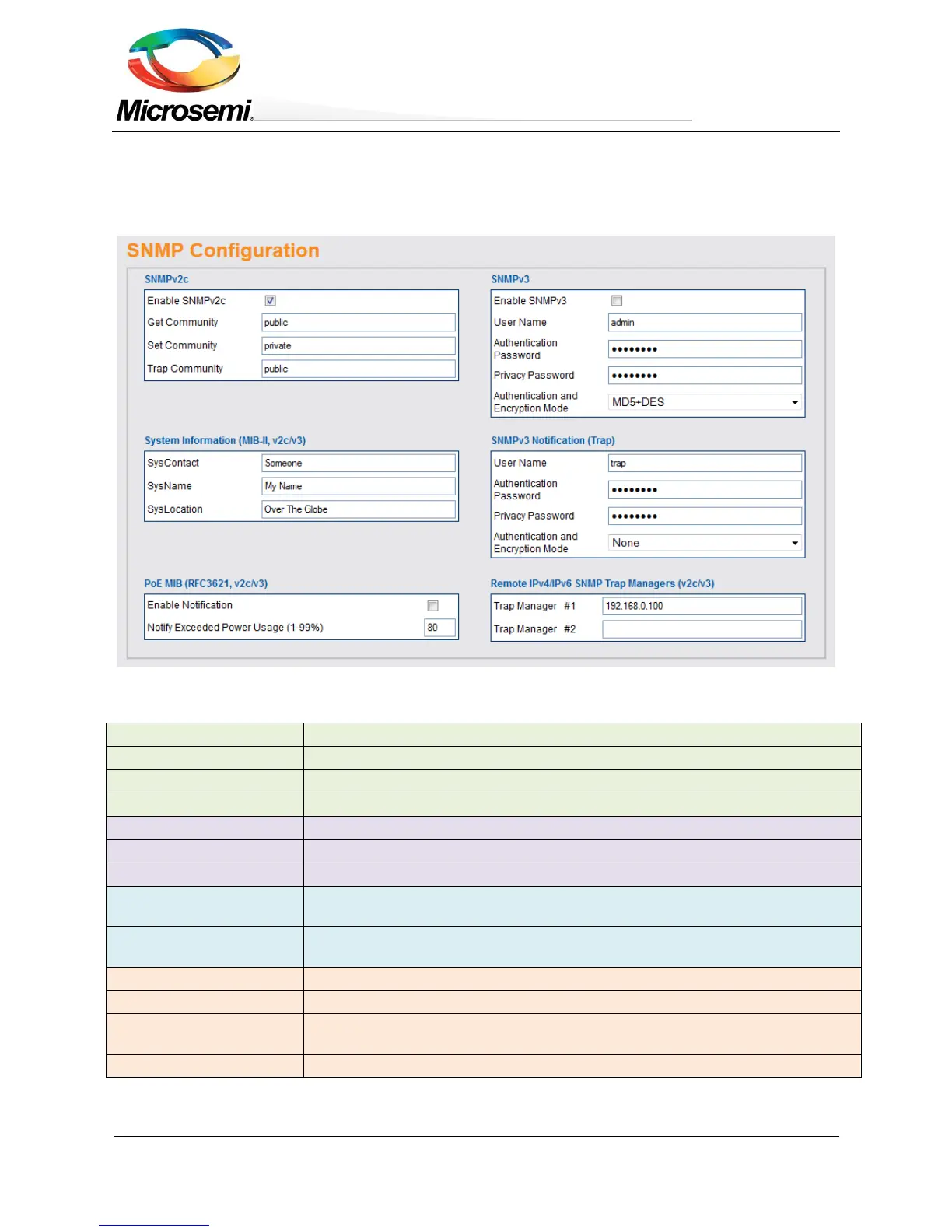
3.3.5 SNMP Configuration
SNMP configuration refers to various configuration parameters applicable both for SNMPv2c, SNMPv3 or both.
The blue title above each SNMP sub parameters group should guide the user if the parameters apply to
SNMPv2c, SNMPv3 or both.
Figure 3-10: SNMP Configuration
Enable/Disable SNMPv2 support.
SNMPv2 GET community string. For example – public.
SNMPv2 SET community string. For example – private.
SNMPv2 Trap community string. For example – public.
SNMP MIB-II system contact OiD string. For example – John.
SNMP MIB-II system name. For example – My Unit.
SNMP MIB-II system location. For example – University.
First IPv4 / IPv6 / DNS name of remote SNMP Manager Server receiving unit trap
reports such as Cold-Start, etc.
Second IPv4 / IPv6 / DNS name of remote SNMP Manager Server receiving unit
trap reports such as Cold-Start, etc.
Enable/Disable SNMPv3 support.
SNMPv3 Authentication
Password
SNMPv3 password to be used by MD5 / SHA.
SNMPv3 password to be used by DES/AES.


 To Next Page