CHAPTER
CHAPTER CHAPTER
CHAPTER Ⅱ
ⅡⅡ
Ⅱ System Function & Configuration
System Function & Configuration System Function & Configuration
System Function & Configuration
P 29
II.2.B
II.2.B II.2.B
II.2.B
Test Environment Setup
Operation procedure
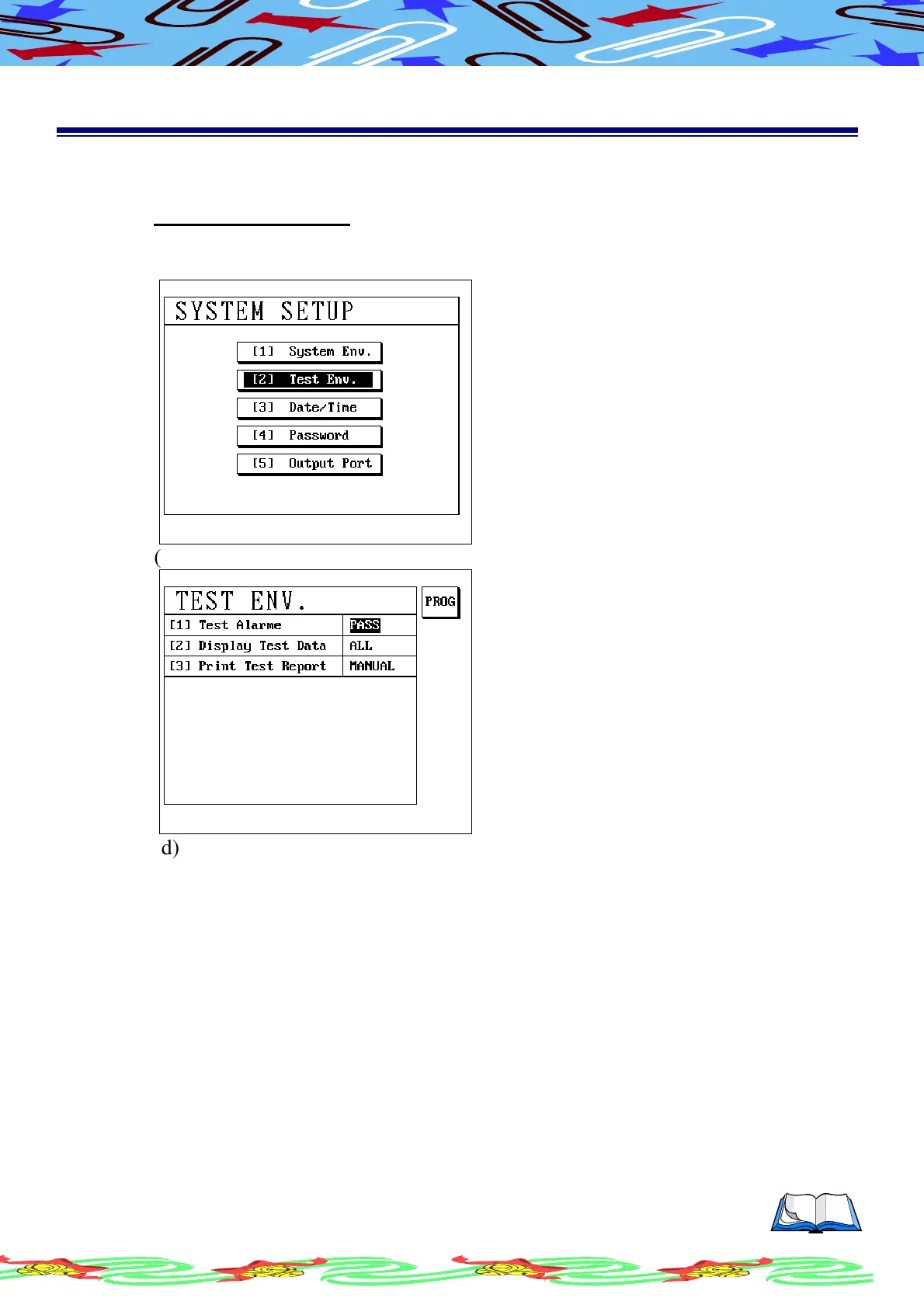
(a) Press [Sys] and using [↑] or [↓] to select Test Env. item
(b) LCD display as following
(c) Press [Enter], LCD display as following
(d) Use [↑] or [↓] to select item which you are going to setup
(e) Press S1[PROG] to change
(f) Press [Enter] , after setup has been done
II.2.B.a
II.2.B.a II.2.B.a
II.2.B.a
Test Alarm
The function is able /unable to alarm performed during the sequence test. You
can set the proper selection depending on your need.
ALL Both PASS/FAIL sound on.
OFF Both PASS/FAIL sound off.
PASS Alarm performed only PASS test occurred.
FAIL Alarm performed only FAIL test occurred.



 To Next Page