CT
CTCT
CT-
--
-8700
87008700
8700 User
User User
User’s Guide
s Guides Guide
s Guide
P 34
II.4
II.4 II.4
II.4
Open/Short Setup & Test
This system designs to perform the O/S setup by automatic learning from the
existed connections. After the learning process, the LCD display will
automatically show O/S status of DUT.
Operation Procedure
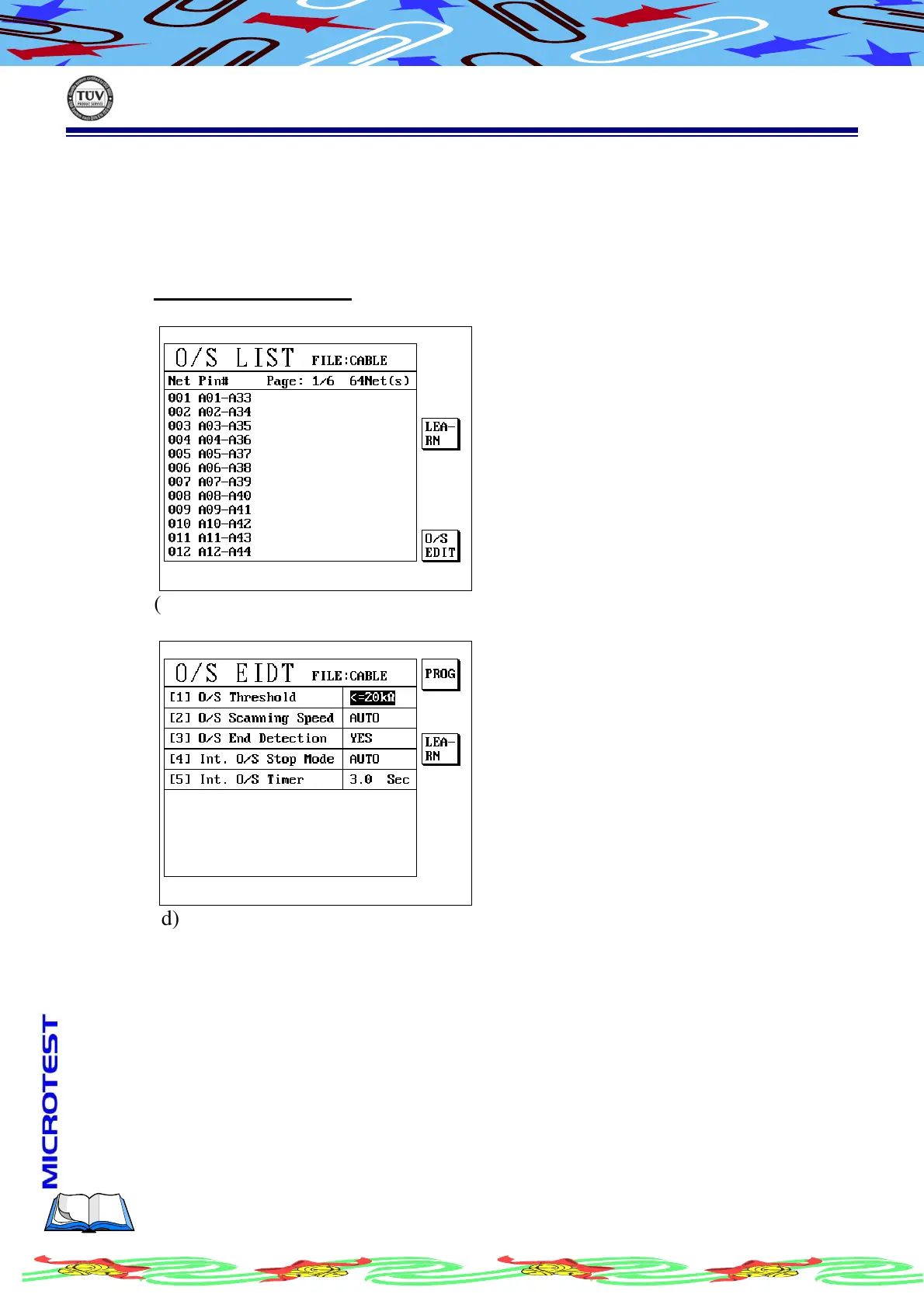
(a) Press [O/S], LCD display as following
(b) The O/S list come from learning, so press S3 [LEARN]
(c) Press S6 [O/S EDIT], LCD display as following
(d) Press S1[PROG] and key in alphanumeric what you want to setup
(e) Complete it and press [Exit] to leave
II.4.A
II.4.A II.4.A
II.4.A
O/S Threshold Setup
Press S1 [PROG] to shift value in 2/5/10/20/50 kΩ
II.4.B
II.4.B II.4.B
II.4.B
O/S Scanning Speed
Press S1 [PROG] to shift AUTO/FAST/MED/SLOW



 To Next Page