CT
CTCT
CT-
--
-8700
87008700
8700 User
User User
User’s Guide
s Guides Guide
s Guide
P 38
III.1.B
III.1.B III.1.B
III.1.B
Conductance Setup
Operation Procedure
(a) Press [Cond]
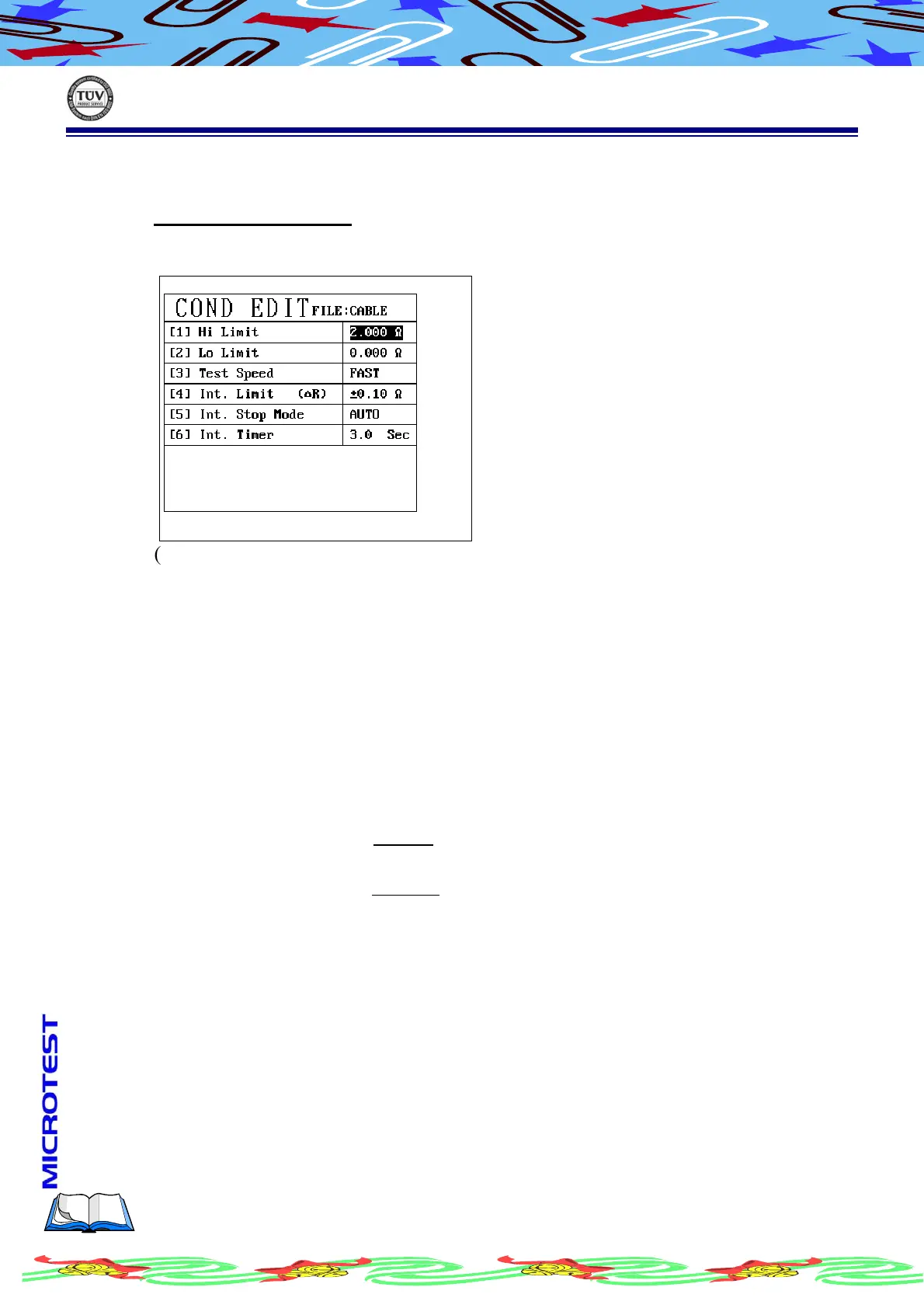
(b) LCD display as following
(c) Use [↑] or[↓] to select the item needed
(d) Complete setup, press [Exit] to leave
High limit use number key to enter value, the limit is 0~50Ω
Low limit use number key to enter value, the limit is 0~50Ω
Test Speed Press S1[PROG] to shift speed as
FAST/LOWER/FMID/AUTO
When setting is AUTO, the system will automatically
select fastest and steadiest test speed to progress
Int. Limit Spec Use numeric key to enter value, the limit is ±50Ω
This function provides the repeatedly test at one DUT
Int. Stop Mode Use S1 [PROG] to change mode be AUTO/TIMER
AUTO
: System will test repeated until DUT cable
completely take off then automatic stop
TIMER: Follow test time to do test
Int. timer Use alphanumeric key to setup second, the limit is 0~99,
However, when the Int. stop mode setting is auto, this
function will not work.



 To Next Page