Classic Manual Rev L
20 | P a g e 1 0 - 0 0 1 - 1 R E V L
WARNING: If using Follow-Me on multiple Classics in a positive-grounded system, contact MidNite
Tech Support for information on modifying the Follow-Me cables.
The Follow-Me function basically is just what it is called. The Classic will simply ask the Classic to
its right, “What do I do now?” and this propagates around the loop continually. Whichever Classic
goes to Float first, for example, will simply tell the other Classics it is time to go to Float.
NOTE: Absorb is NOT a Follow-Me mode, each Classic MUST reach the Absorb voltage setting on its
own. Resting is NOT a Follow-Me mode, each Classic goes to Resting on its own.
NOTE: Follow-Me coordinates charge stages but the Classics will still vary in the amount of power
processed. Follow-Me was not intended to make them all produce the same amount of current.
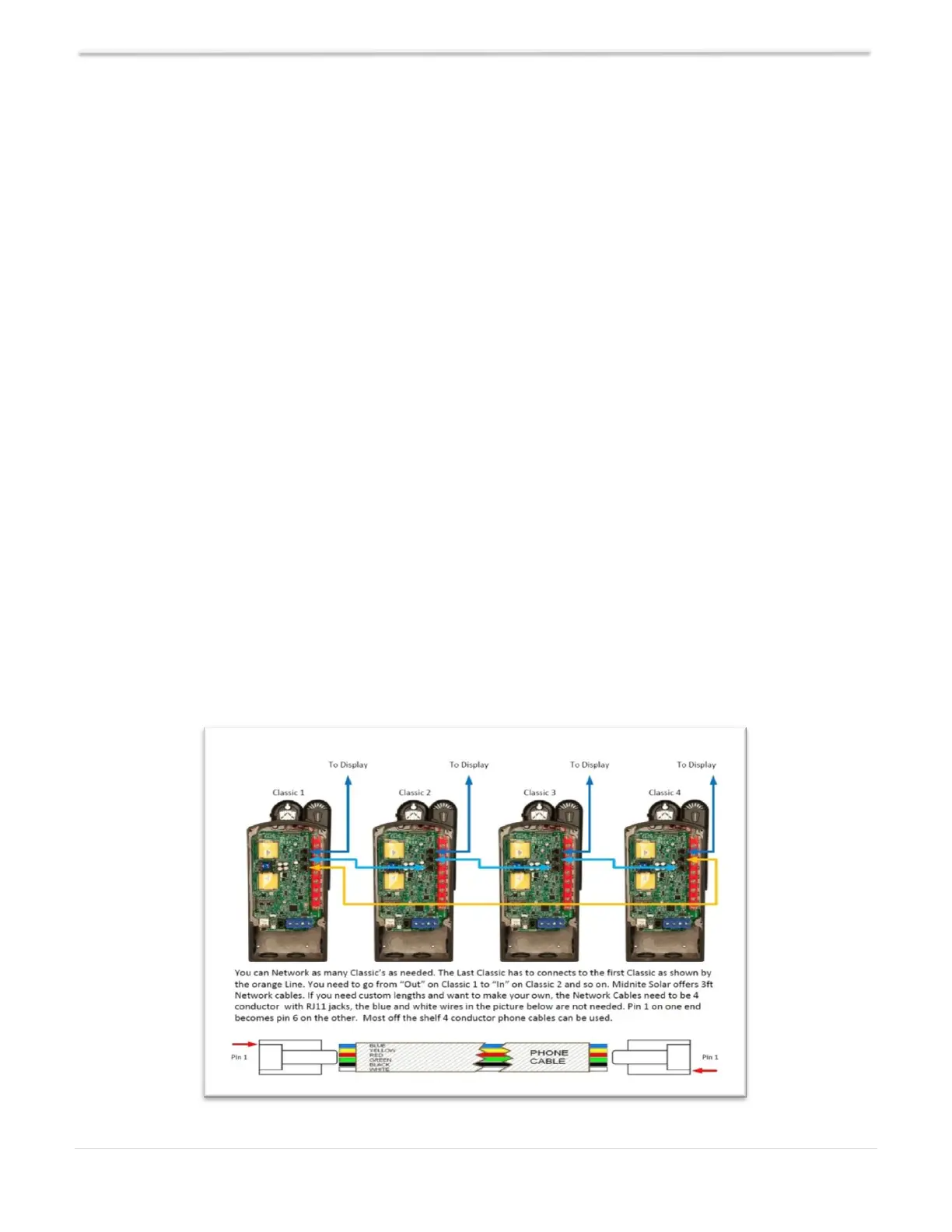
To enable Follow-Me, you need to wire the Classic network cables as shown in Diagram 3. You also
need to enable Follow-Me as follows:
Navigate to the TWEAKS Menu.
Depress the MAIN MENU key repeatedly until CHARGE is highlighted.
Scroll to the right until TWEAKs is highlighted and depress the ENTER key.
Depress the RIGHT SOFT key (upper right button) four times until you see the screen with
“Follow-ME and “BTSNET.”
Using the LEFT/RIGHT ARROW keys, highlight Follow-Me and turn it on using the UP
ARROW.
Highlight BTSNET and turn it on if you want to share battery temperature data.
Depress ENTER to save this data.
When installing the Follow-Me cables for the last time, it is recommended you add a bit of the
included silicone grease on the metal contacts of the male ends of all the cables.
Diagram 3 – Follow-Me Wiring



 To Next Page