Problem solving guide
133
With the help of the following guide, minor faults in the performance of the
appliance, some of which may result from incorrect operation, can be remedied
without contacting Miele. This will save you time and money because you won't
need a service call.
Please note that a call-out charge will be applied to unnecessary service visits
where the problem could have been rectified as described in these operating
instructions.
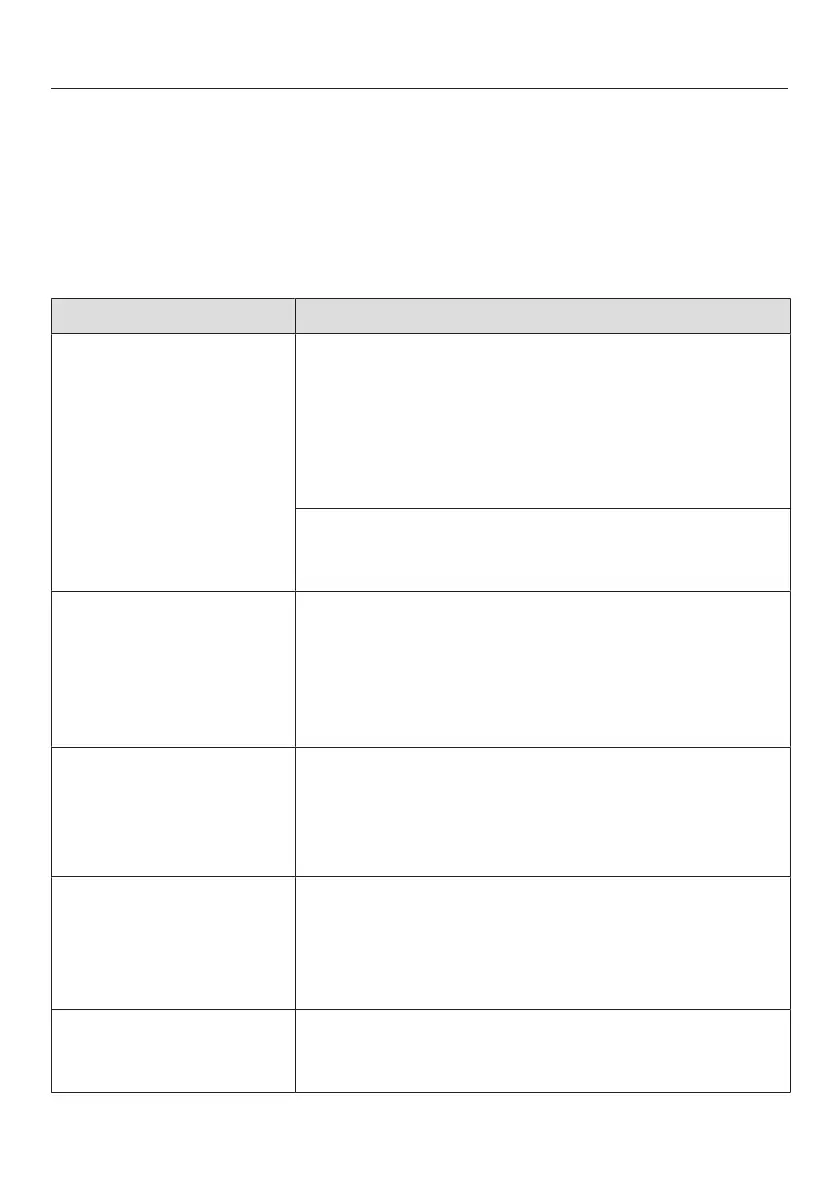
Problem Possible cause and remedy
The display is dark. You have selected theQuickTouch| Off setting. When
the Dialog oven is switched off, the display is
switched off.
As soon as the Dialog oven is switched on, the
main menu will appear. If you want the time of day
to be displayed constantly, select QuickTouch| On
with time.
There is no power to the Dialog oven.
Check if the circuit breaker has tripped. Contact a
qualified electrician or Miele.
System lock appears in
the display when the
Dialog oven is switched
on.
The system lock has been activated.
The system lock can be deactivated for a
programme by touching the symbol for at least
6seconds.
The system lock can be permanently deactivated
(see “Settings – Safety”).
The oven does not heat
up.
Demo mode is active.
The Dialog oven can be demonstrated, however the
heating elements will not work.
Deactivate Demo mode (see "Settings -
Showroom programme").
Power cut -process
cancelled appears in the
display.
There has been a brief power cut. This has caused
the current cooking programme to stop.
Switch the Dialog oven off and then back on
again.
Restart the cooking programme.
12:00 appears in the
display.
The power supply was interrupted for longer than 200
hours.
Reset the time and date.



 To Next Page