Temperature Control Units : MFC with G Series Instrument
Page: 28
Milacron Process Support Business
4165 Halfacre Road Batavia, Ohio 45103
Phone: 513-536-2584
www.milacron.com
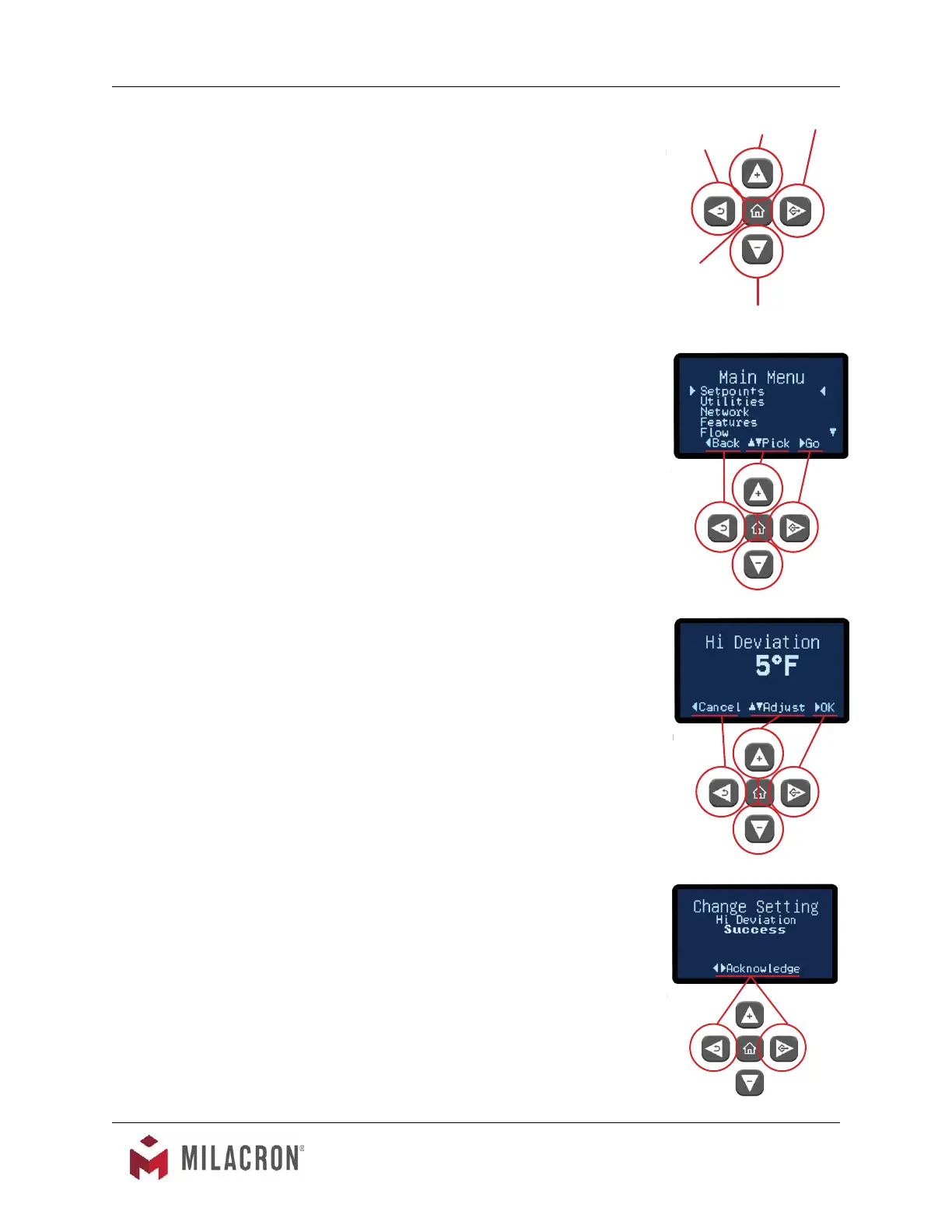
2. The Up button, when pressed, will add one unit of
value or will scroll up through a menu.
3. The Down button, when pressed, will subtract one
unit of value or will scroll down through a menu.
4. The Go button, when pressed, will advanced
through a series of screens or save a value.
5. The Back button, when pressed will go backwards
through a series of screens.
B. Prompts on Selection Screens. Selection screens display a
menu of selectable items.
1. The Up button will scroll up through the menu items.
The screen indicators will scroll along with the
pressing of the button.
2. The Down button will scroll down through the menu
items. The screen indicators will scroll along with the
pressing of the button.
3. The Go button will advance to the value screen of the
selected parameter.
4. The Back button will return to the previous screen.
Successive pressing of the Back button will eventually
end at the Home screen.
C. Prompts on Value Screens. Value screens allow the user to
set or change parameter values.
1. The Up button will add to the value of the parameter.
2. The Down button will subtract value from the
parameter.
3. The Go button will save the new value to memory.
4. The Back button will cancel the transaction and will
return to the parent screen.
D. Prompts on Success Screens. Success screens appear
once a value is changed and the new value is successfully
saved. The screen shows the name of the parameter and
displays “Success” as indication the value was saved.
1. Use the Go or Back buttons to acknowledge the
prompt.
2. After acknowledging the success, the screen returns
to the parent screen.
Go
Up
Back
Down
Home



 To Next Page