Temperature Control Units : MFC with G Series Instrument
Page: 39
Milacron Process Support Business
4165 Halfacre Road Batavia, Ohio 45103
Phone: 513-536-2584
www.milacron.com
C. Additional information for the Mold Purge is found in Section 8.3 and the Remote Setpoint
is found in Section 8.4.
D. Mold Purge (optional features not included on all units) :
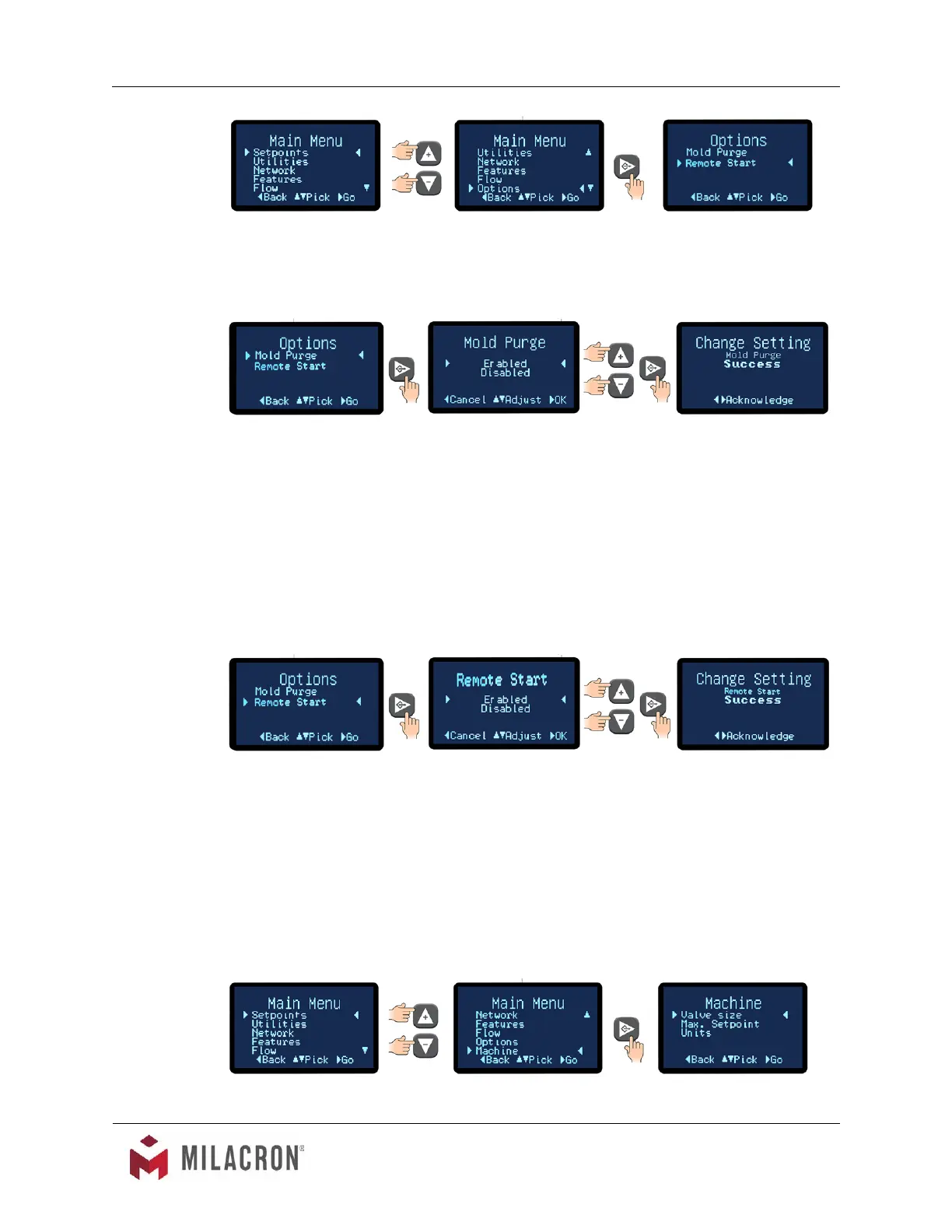
1. Select Mold Purge from the Options menu.
2. Advance to the Mold Purge Enable / Disable screen. Select Enabled to enable
the mold purge feature. Starting a mold or system purge is done by another
screen. Refer to Section 3.9.B and 8.3 for more information. Choose disabled to
disable the mold or system purge feature.
3. Once acknowledged, press the Back button repeatedly to return to the Options
screen or press the home button to return to the Home screen.
E. Remote Start (optional features not included on all units) :
1. Select Remote Start from the Options menu.
2. Advance to the Remote Start Enable / Disable scree. Select Enabled to enable
the remote start feature. Select Disabled to disable the feature. Refer to Section
8.4 for more information.
3. Once acknowledged, press the Back button repeatedly to return to the Options
screen or press the home button to return to the Home screen.
3.14 INSTRUMENT : MACHINE MENU



 To Next Page