Temperature Control Units : MFC with G Series Instrument
Page: 35
Milacron Process Support Business
4165 Halfacre Road Batavia, Ohio 45103
Phone: 513-536-2584
www.milacron.com
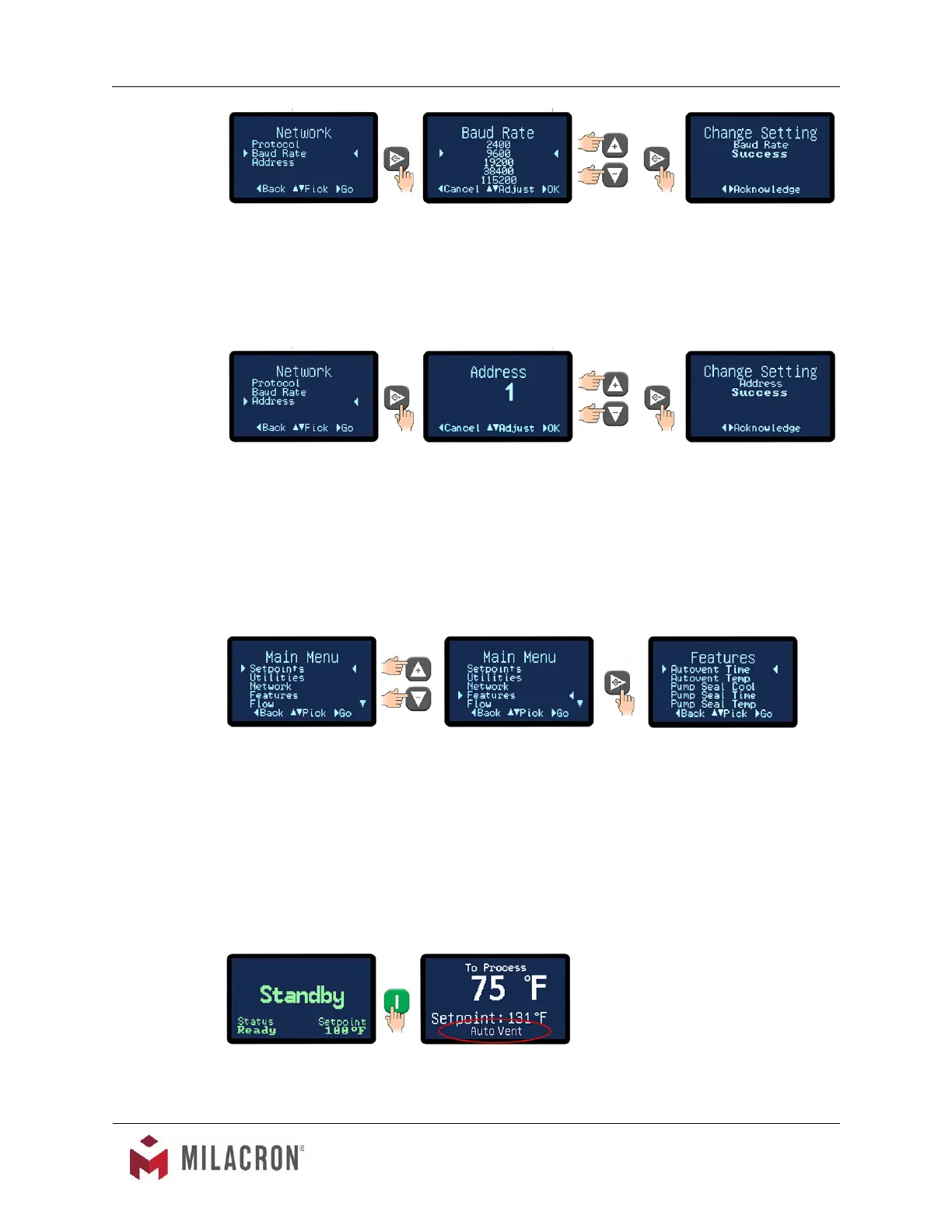
2. Use the Up or Down arrow buttons to select the baud rate. The available rate
units are 1200, 2400, 9600, 19200 and 38400.
3. Press the Select button to save the selection and conrm success.
D. Address: This is the number assigned to the unit in a network.
1. Press the Select button to select Address.
2. Use the Up and Down arrow keys to select the address for this unit. The factory
default is 1. The selection range is from 1 - 10.
3. Press the Select button to save the address and conrm success.
3.11 INSTRUMENT : FEATURES MENU
A. Items in the Features menu include Autovent Time, Autovent Temp, Pump Seal Cool,
Pump Seal Time and Pump Seal Temp.
B. What is Autovent? Autovent is a features built into the controller to purge air from the
process system. When the power button is pressed and the process temperature is
below the “autovent” (factory default is 100°F) the controller will initiate the autovent cycle
for the “autovent time” (factory default is 45 seconds). When the unit is in the autovent
sequence "autovent" is displayed on the home screen. During the autovent sequence
the cooling valve is 100% open and pump is running to remove entrapped air from the
process.



 To Next Page