Temperature Control Units : MFC with G Series Instrument
Page: 29
Milacron Process Support Business
4165 Halfacre Road Batavia, Ohio 45103
Phone: 513-536-2584
www.milacron.com
E. Screen Indicators.
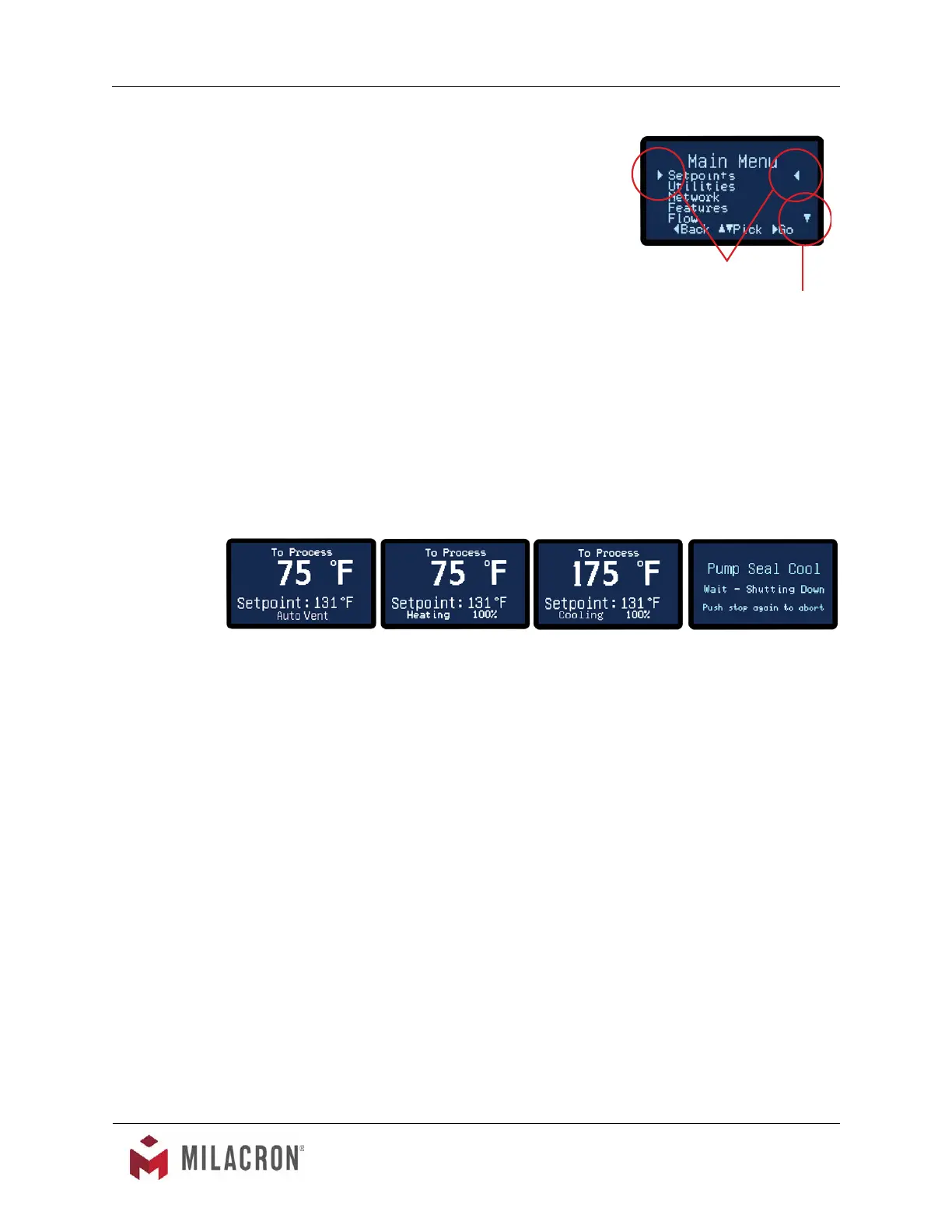
1. Small indication triangles are used as on screen
pointers.
2. The horizontal indicators point to the current
selection. By pressing the Go button, the
screen advances to that selection.
3. The vertical indicator shows that some menu
items are not currently shown on the screen. By
pressing the Down button, the menu will scroll
down to display the menu items not currently visible. By pressing the Up button,
the menu will scroll up.
3.5 INSTRUMENT : OPERATING SCREENS
A. The instrument displays several operating screens to indicate what the unit is doing as
far as heating, cooling and other functions. In most operating screens, the To Process
temperature is shown with the operation indicated under the setpoint temperature, as
shown in the examples below.
B. Auto Vent. Auto vent occurs when the start button is pressed and the process
temperature is below 100°F (factory default). Auto Vent purges air from the process on
initial start with cooler temperatures. However, when the unit is started and the process
temperature is above 100°F, the instrument assumes this is not an initial start up and
the auto vent is bypassed. The temperature and time parameters of the Auto Vent are
programmed in the Features Menu.
B. Heating. The amount of heating applied to the process is indicated in the Heating
Screen.
C. Cooling. The amount of cooling applied to the process is indicated on the Cooling
Screen. The amount of cooling is the aperture opening of the modulating cooling valve.
D. Pump Seal Cooling. This screen appears when the unit is stopped. However, the pump
will continue to run and the cooling valve will open 100% to reduce process temperature
to a safe shutdown temperature. The time and temperature of the pump seal cooling
feature are programmed in the Feature Menu.
Horizontal Indicators



 To Next Page