Temperature Control Units : MFC with G Series Instrument
Page: 31
Milacron Process Support Business
4165 Halfacre Road Batavia, Ohio 45103
Phone: 513-536-2584
www.milacron.com
3.7 INSTRUMENT : MAIN MENU
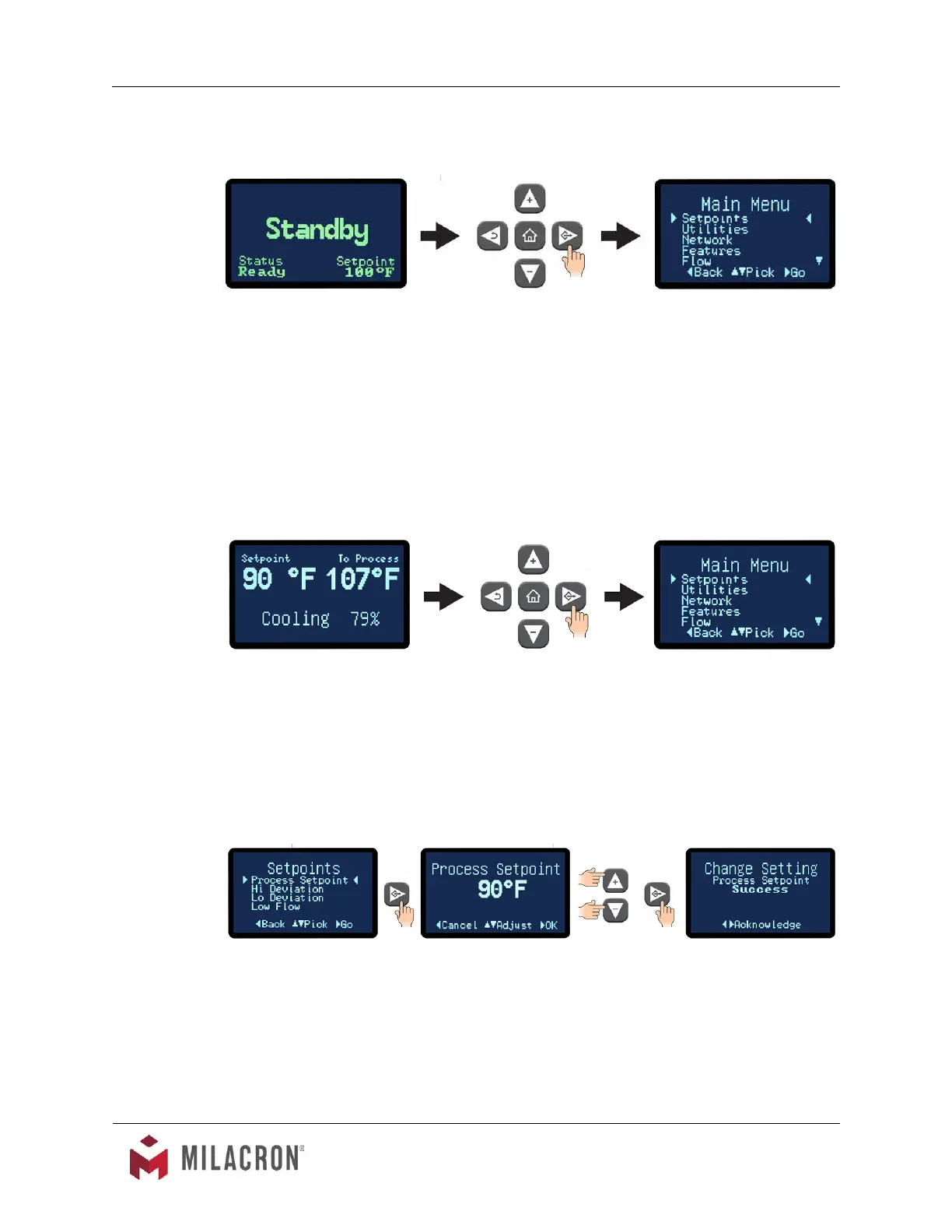
A. The Main Menu offers the ability to set and change values in the following areas:
1. Setpoints.
2. Utilities.
3. Network.
4. Features.
5. Flow.
6. Machine.
B. The Main Menu is accessible from the Standby screen by pressing the Go button.
C. The Main Menu is also accessible from any Operating screen by pressing the Go button.
In the example below, while on the Cooling screen, pressing the Select button will
advance to the Main Menu.
3.8 INSTRUMENT : SETPOINTS MENU
A. Under the Setpoints menu item, the values for the Process Setpoint, Hi Deviation, Low
Deviation and Low Flow can be set or changed. Digital ow rate display is an option and
may not be included on your machine.
B. Process Setpoint. Use the Up or Down buttons to change the process setpoint.
1. The Setpoint range is from 32°F to 250°F. Please note, the unit can not reduce
process temperature below the provided water supply temperature.
2. Once acknowledged, the unit will control to the new setpoint temperature. Press
the Back button repeatedly to return to the Setpoints screen or press the home
button to return to the Home screen.



 To Next Page