Temperature Control Units : MFC with G Series Instrument
Page: 38
Milacron Process Support Business
4165 Halfacre Road Batavia, Ohio 45103
Phone: 513-536-2584
www.milacron.com
3.12 INSTRUMENT : FLOW MENU (Option)
A. The Flow Menu is only functional when the optional ow meter is installed.
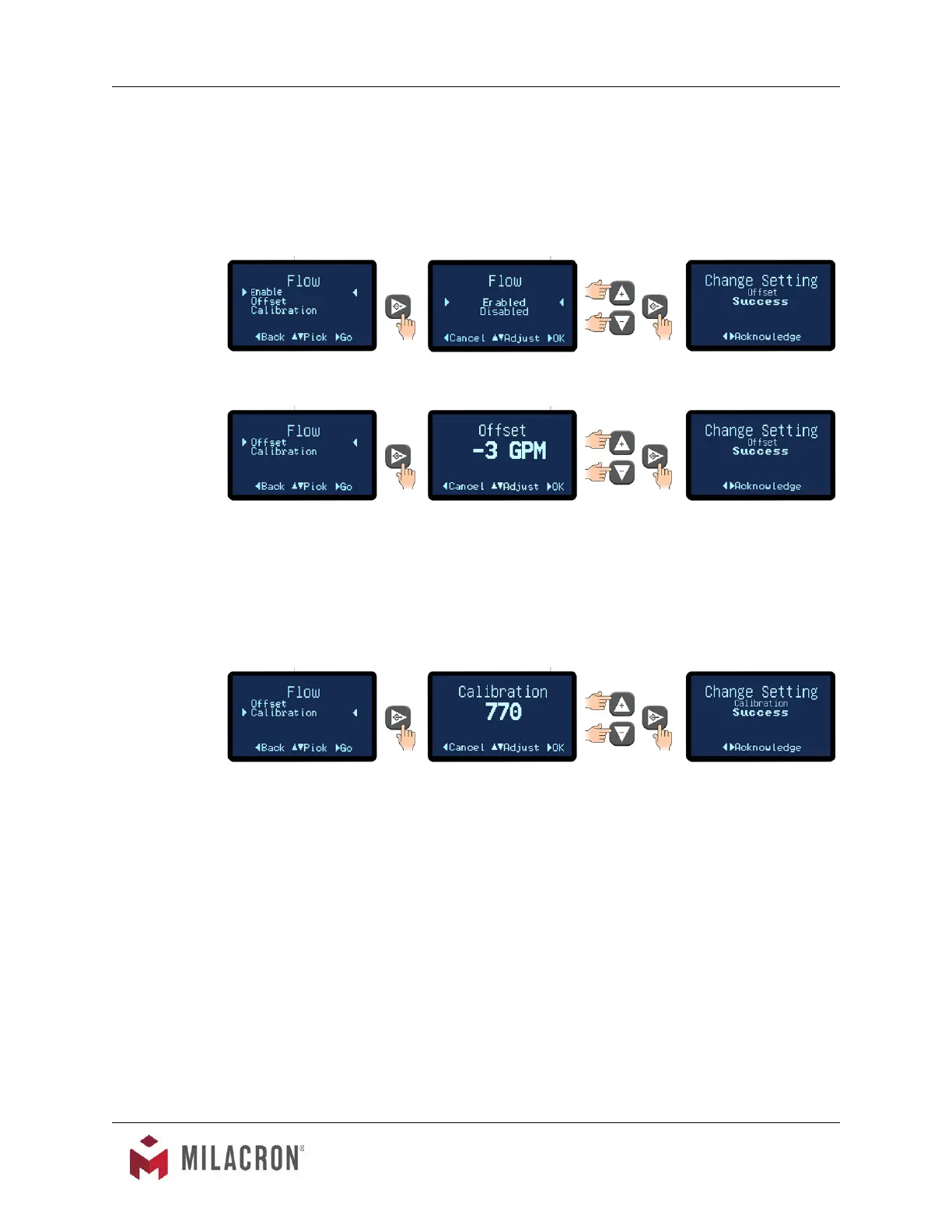
B. Items in the Flow Menu are Enable, Offset and Calibration.
C. Advance to the Flow Enable / Disable screen. Select Enabled to enable the ow option.
D. Offset. This allows the user to select the flow offset according to the pump horsepower.
1. The factory default for this value is 3 for ½ - 3 horsepower pump. The default is 0
for 5 and 7½ horsepower pumps.
2. These values should be factory set and should not be changed. Adjust only if
they are set to values other than the factory default.
D. Calibration. This allows the user to calibrate the unit’s flow meter.
1. Using a reliable and accurate external ow meter the user can input a calibration
constant value in the screen so that the unit ow display matches the external
ow meter.
2 Use the Up or Down arrow keys to input the value and then press the Select
button to save and conrm success.
3. The factory default is 3000 for 5 & 7½ horsepower units. The factory default is
770 for ¾ - 3 horsepower units.
3.13 INSTRUMENT : OPTIONS MENU
A. Two selections are available under the Options menu : Mold Purge and Remote and Auto
Start. These selections will enable or disable these options.
B. Please note: these options require factory or eld installation of optional equipment.



 To Next Page