Temperature Control Units : MFC with G Series Instrument
Page: 37
Milacron Process Support Business
4165 Halfacre Road Batavia, Ohio 45103
Phone: 513-536-2584
www.milacron.com
When the pump seal feature is activated, pressing the stop button engages the feature.
Pressing the stop button twice stops the unit.
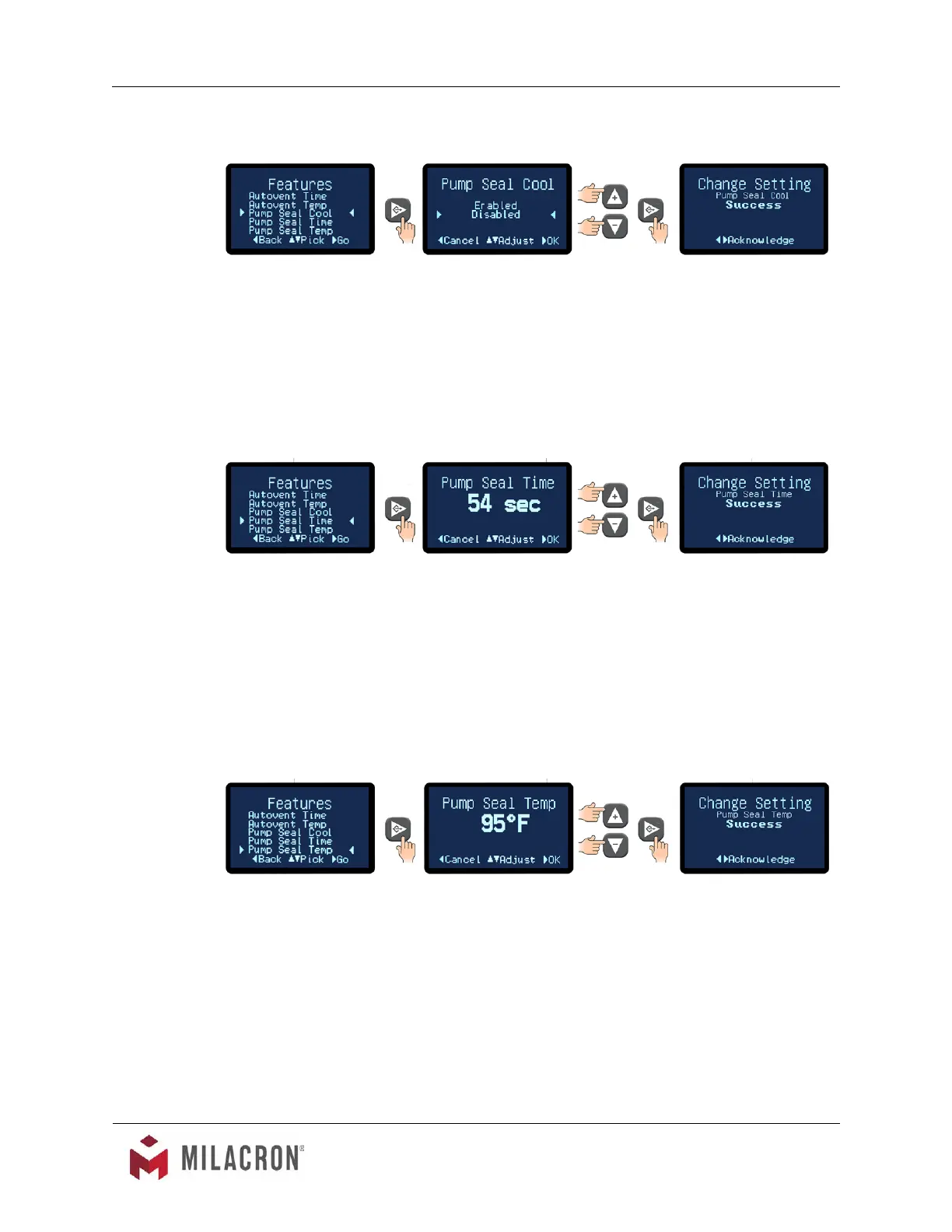
To activate the Pump Seal Cooling feature advance to the Pump Seal Cool item and
press the Go button to move to the Pump Seal Cool screen. Select Enabled or Disabled
and press the Go button to save the selection.
The Pump Seal Cooling feature is controlled by the Pump Seal Time and Pump Seal
Time items in the Features menu.
F. Pump Seal Time. This controls the duration of the Pump Seal Cooling feature. Upon
pressing the Stop button, the Pump Seal Cooling will initiate. For example, if the feature
is set at 54 seconds, the Pump Seal Cooling will continue for 54 seconds.
1. Press the Select button to select Pump Seal Time item.
2. Use the Up or Down arrow buttons to select the time of the pump seal cooling
feature. The range is 1 - 60 seconds. The factory default is 60 seconds.
3. Press the Select button to save the Pump Seal Time and conrm success.
G. Pump Seal Temp. This controls the temperature at which the unit will try to cool to before
shutting off. At shut down the controller will initiate the Pump Seal Cooling feature if the
process temperature is above this value.
1. Press the Select button to select Pump Seal Temp item.
2. Use the Up or Down arrow buttons to select the temperature of the pump seal
cooling feature. The range is 60°F - 100°F. The factory default is 100°F.
3. Press the Select button to save the Pump Seal Temp and conrm success.



 To Next Page