Temperature Control Units : MFC with G Series Instrument
Page: 32
Milacron Process Support Business
4165 Halfacre Road Batavia, Ohio 45103
Phone: 513-536-2584
www.milacron.com
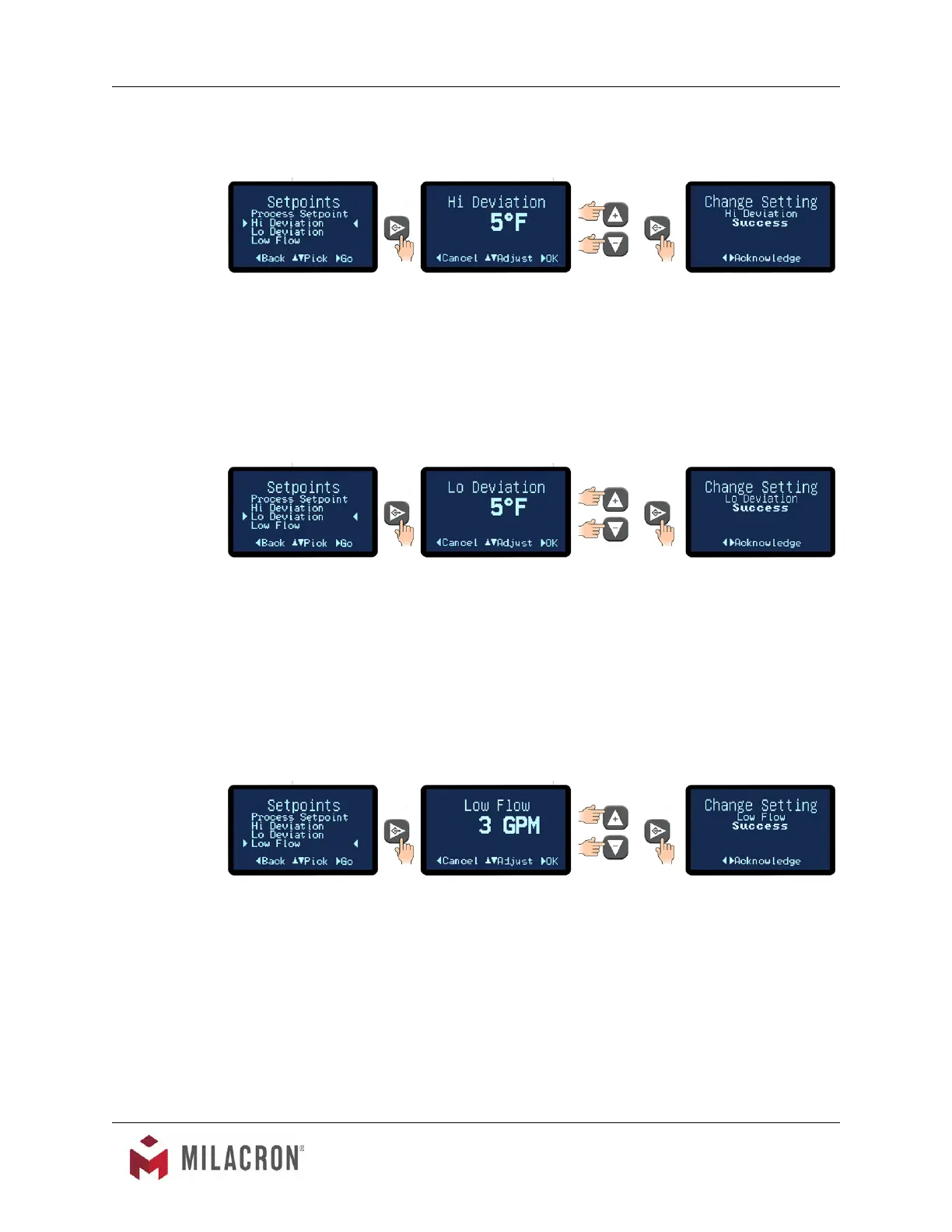
C. Hi Deviation. The High Deviation value programs the controller to sound the alarm if the
process temperature exceeds the set difference from setpoint. For example, Hi Deviation
= 5°F, Setpoint = 200°F. Hi deviation alarm will sound if the temperature reaches 205°F.
1. The factory default is 10°. The range for the Hi Deviation is from 0°F - 50°F.
2. Once acknowledged, press the Back button repeatedly to return to the Setpoints
screen or press the home button to return to the Home screen.
D. Lo Deviation. The Lo Deviation value programs the controller to sound the alarm if the
process temperature exceeds the set difference from setpoint. For example, Lo Deviation
= 5°F, Setpoint = 200°F. Lo deviation alarm will sound if the temperature cools to 195°F.
1. The factory default is 10°. The range for the Lo Deviation is from 0°F - 50°F.
2. Once acknowledged, press the Back button repeatedly to return to the Setpoints
screen or press the home button to return to the Home screen.
D. Low Flow (optional feature not included on all units). The Low Flow value programs
the controller to sound an alarm if the process ow goes below the low ow set value.
For example, if the ow set value is 3 GPM and if the ow goes below 3 GPM an alarm
condition is indicated. Note: the low ow alarm feature is only available with the purchase
of the optional ow meter.
1. The factory default is 0 GPM. The range for the Low Flow is from 0 to 100 GPM.
2. Once acknowledged, press the Back button repeatedly to return to the Setpoints
screen or press the home button to return to the Home screen.
3.9 INSTRUMENT : UTILITIES MENU
A. Items in the Utilities menu include the operations for the Mold Purge, Manual Vent,
Software Version Number and Display Test.



 To Next Page