Temperature Control Units : MFC with G Series Instrument
Page: 33
Milacron Process Support Business
4165 Halfacre Road Batavia, Ohio 45103
Phone: 513-536-2584
www.milacron.com
B. Mold Purge (optional feature not included on all units). The mold or system purge
system contains several solenoid valves and check valves. When activated and supplied
with compressed air, the mold or system purge system will expel process water from
the mold to the drain. Mold or system purge systems are supplied as a factory installed
option or a field retrofitted kit.
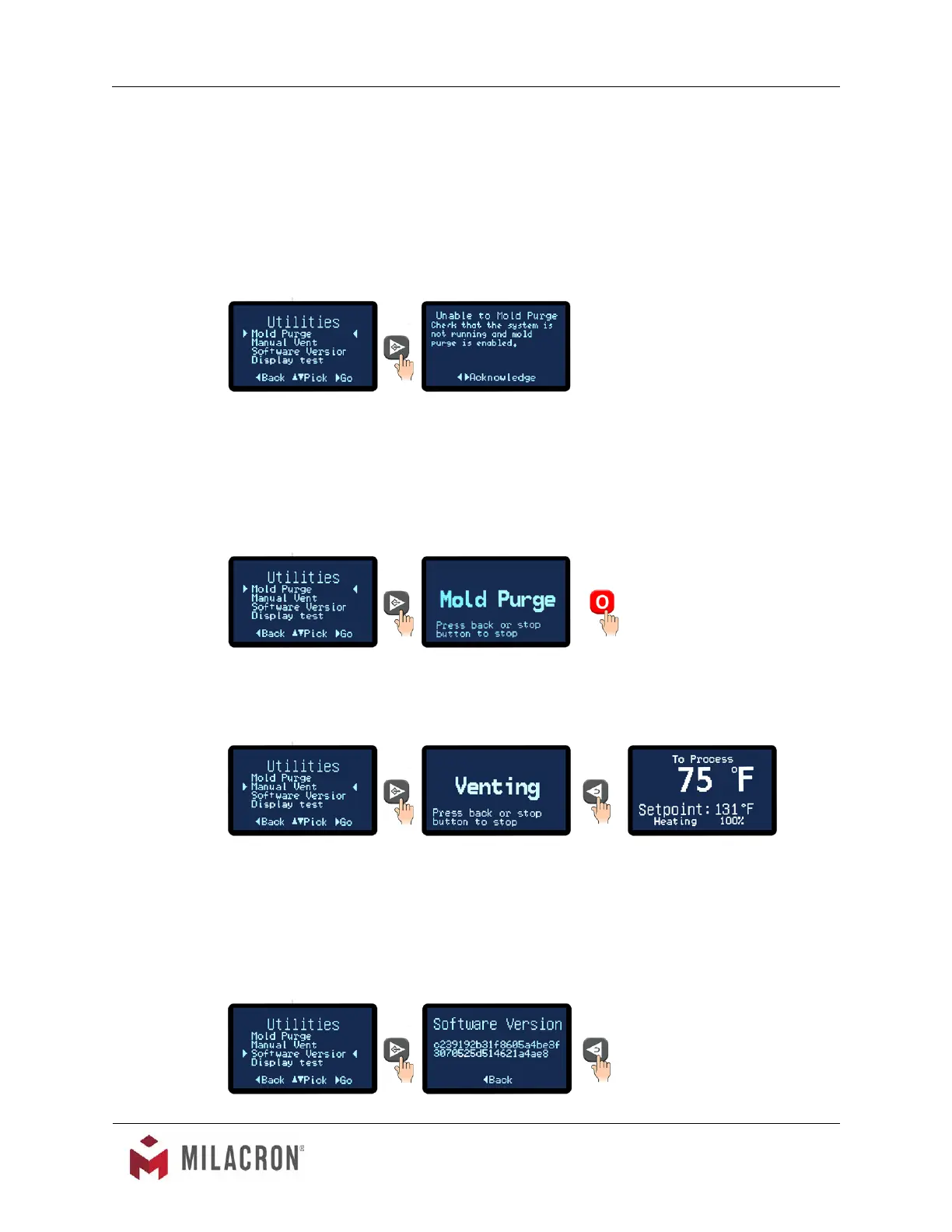
1. On selecting the mold purge feature, the controller checks to determine if
the pump is running. If it is, then the Unable To Mold Purge Message will be
displayed.
2. When the pump is not running and when Mold Purge is enabled (refer to Section
3.13 for more information on enabling Mold Purge) Mold Purge is activated by
selecting the mold purge item from the Utilities menu. Mold purge is started
immediately. When mold purge is activated the following screen will show.
3. Press the back button or the stop button to stop the Mold Purge.
C. Manual Vent. Manual venting is achieved by fully opening the cooling valve. To initiate a
manual vent, advance to the Utilities screen and select the Manual Vent item.
1. Press the Select button to start the venting.
2. To stop the venting, press the Back button. On release, the screen will return to
the Home screen.
D. Software Version. The software version number is the current version of the controller’s
software. This number came be useful when troubleshooting at times.



 To Next Page