Temperature Control Units : MFC with G Series Instrument
Page: 27
Milacron Process Support Business
4165 Halfacre Road Batavia, Ohio 45103
Phone: 513-536-2584
www.milacron.com
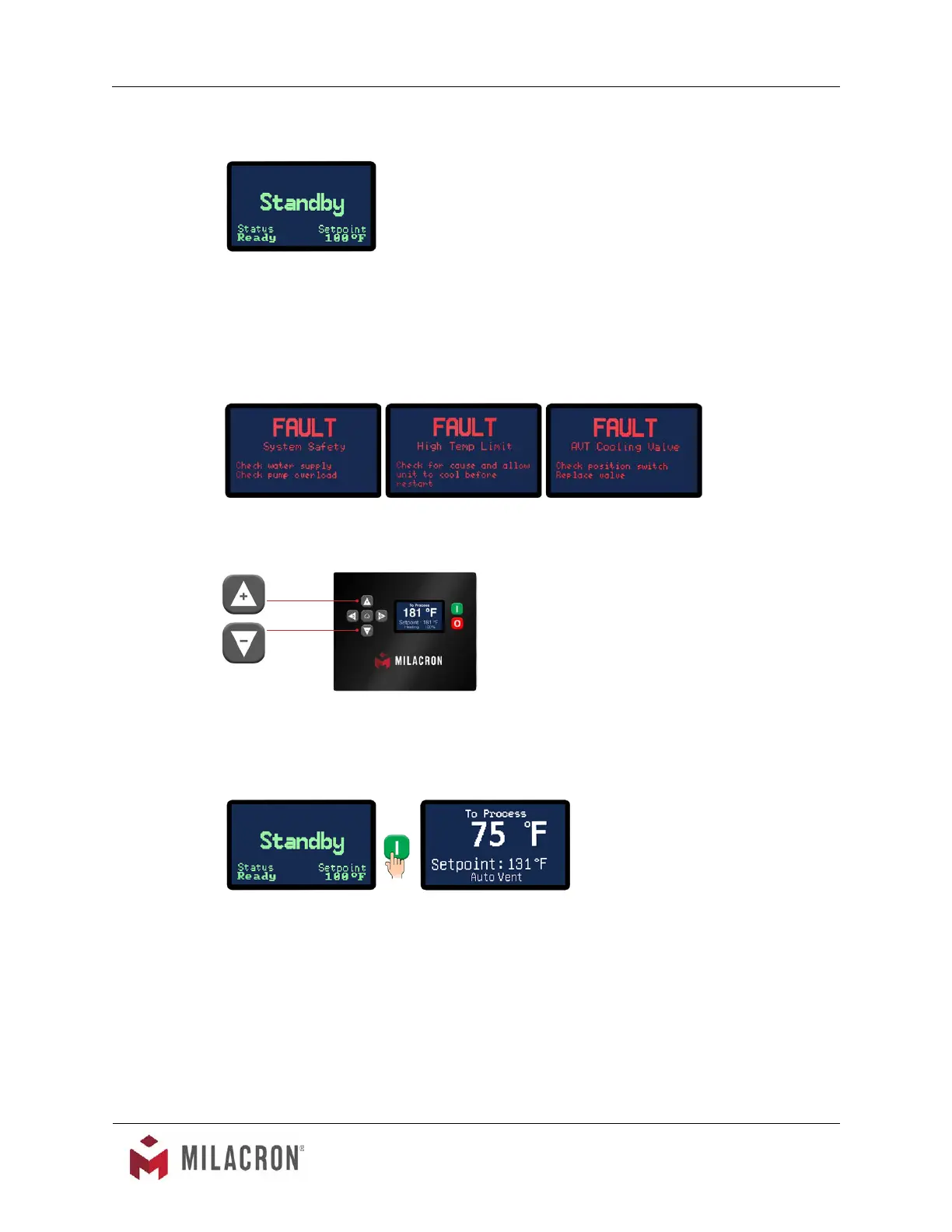
1. Apply power. The Standby screen will illuminate. When Standby is displayed on the
screen, the unit is not running.
2. This unit features an LCD screen. Use the five soft touch buttons to navigate the
available screens and select parameters.
3. A System Safety Fault may prevent startup. Probe, cooling valve, water supply pressure,
pump overload or high temperature limit may display once power is applied and must be
corrected prior to operation.
4. Adjust the setpoint to the desired value by pressing the Increment or Decrement buttons.
5. The unit is ready to start when no errors are shown on the screen. Press the green start
button. The unit will auto vent if the fluid temperature is below 100°F or as programmed
in the Features menu.
6. Once the autovent sequence is complete the unit will heat or cool to maintain the setpoint
temperature.
3.4 INSTRUMENT : BASIC NAVIGATION
A. The instrument has 5 soft keyed buttons.
1. The Home button, when pressed , shows the Home screen.
Sample of Fault display screens. Not all Fault screens are shown here. Check manual for more information.



 To Next Page