Temperature Control Units : MFC with G Series Instrument
Page: 80
Milacron Process Support Business
4165 Halfacre Road Batavia, Ohio 45103
Phone: 513-536-2584
www.milacron.com
8.3 OPERATION OF MOLD PURGE
A. The mold purge system includes valves and piping that when activated and supplied with
compressed air will expel process water from the mold or process to the central water
return line or drain.
B. Mold Purge is an optional feature and not included on all units. The function of the Mold
Purge requires the purchase on the option.
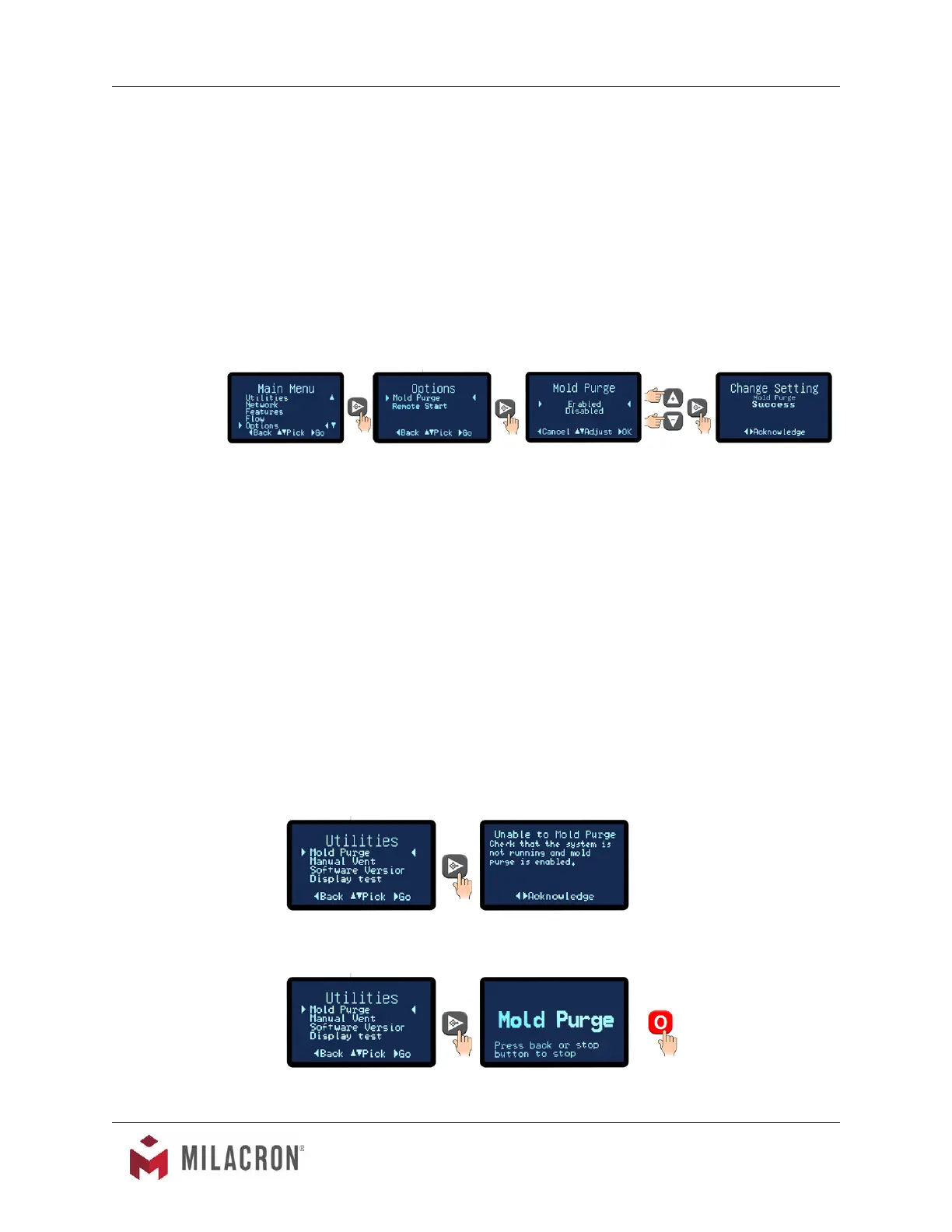
C. The Mold Purge parameter must be enabled to operate the mold purge. Advance to
the Main Menu and select Options. Within the Options menu, select Mold Purge. Select
Enable to enable the Mold purge system. Press the Select button to acknowledge and
save the selection.
D. The mold purge feature is used when the pump is turned off and has been cooled
to below 85°F.
E. The operation of the mold purge is as follows (see illustration) :
1. Stop the pump, maintain electrical power to unit.
2. Close the water supply ball valve.
3. Connect a regulated air supply to mold purge compressed air connection.
Note: Air supply should be regulated approximately 10 PSI above drain line
pressure.
4. Mold Purge is activated by selecting the mold purge item from the Utilities menu.
Mold purge is started immediately.
If the pump is running, the follow message will be displayed.
If the pump is not running, the mold purge will start.



 To Next Page