OM-291865 Page 27
SECTION 6 – CONTROLS
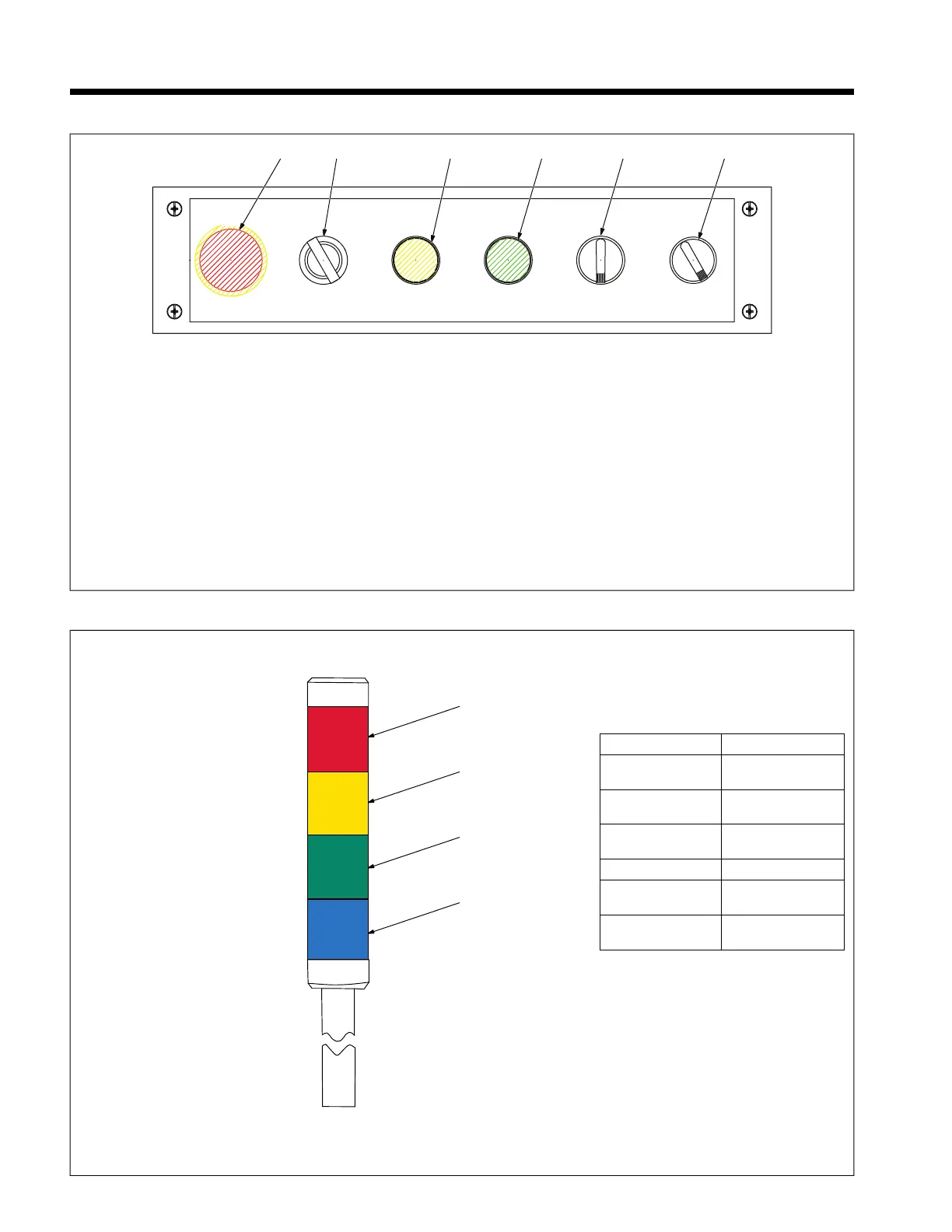
6-1. Operation Box
EMERGENCY
STOP
AUTO TEACH REVERSE FORWARD
WIRE JOG
ON OFF
WELD ENABLESTARTEND
PROGRAM PAUSE
/
1 2
3
4
5
6
293166-A
1 Emergency Stop Button
Press this button to stop cobot and welding
and to remove drive power from cobot.
2 Auto/Teach Key Switch
Auto Mode allows playback of active pro-
gram. Teach Modes allow creation and edit-
ing of programs.
3 End Program Button
Press this button to stop the cobot and force
an end to program in auto mode.
4 Start/Pause Button
Pressing this button in Auto Mode will start
the active program in auto mode.
Pressing this button while cobot is running a
program will cause cobot to pause.
Pressing this button while cobot is paused
will cause the cobot to resume from paused
position.
5 Wire Jog Forward/Reverse Switch
Rotate switch counterclockwise to retract
the weld wire.
Rotate switch clockwise to jog the weld wire
forward.
6 Weld Enable Switch
Rotate switch counterclockwise to enable
welding arc.
Rotate switch clockwise to disable welding
arc.
6-2. Signal Light Tower
1 Red Light
2 Amber Light
3 Green Light
4 Blue Light
Light Definition
Red — Steady
State
Emergency Stop
condition
Red — Flashing Grip Error or Cobot
Error
Amber — Steady
State
Cobot is moving
Amber — Flashing Cobot is welding
Green — Steady
State
Cobot is in collabo-
rative mode
Blue — Steady
State
Cobot is in Auto
mode








 To Next Page