Complete Parts List is available at www.MillerWelds.com
OM-262506 Page 39
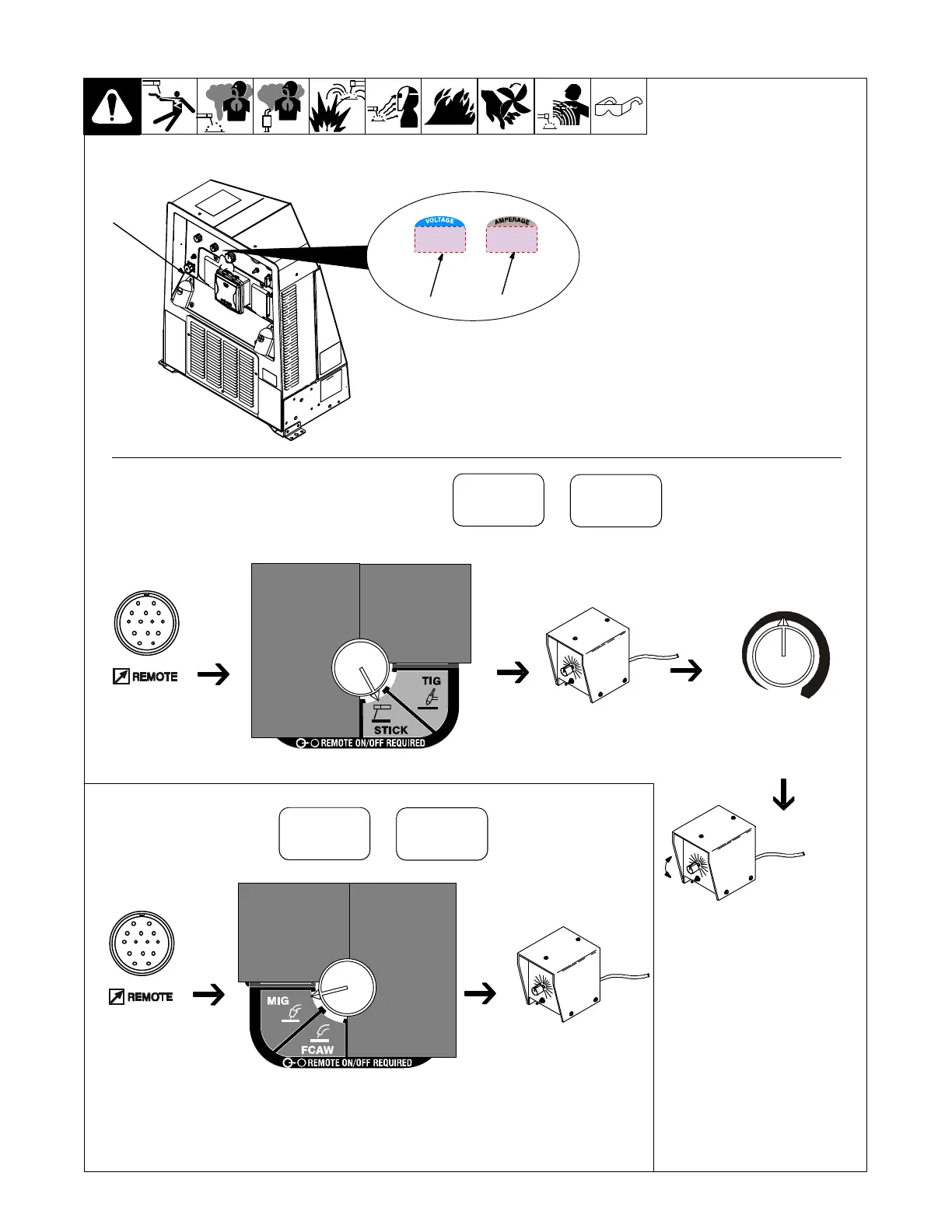
1 Remote 14 Receptacle RC14
Connect optional remote control to RC14 (see
Section 5-11).
When a remote control is connected to the
Remote receptacle, the Auto Sense Re-
mote feature automatically switches volt-
age/amperage control to the remote con-
trol. When a device is connected to the Re-
mote receptacle, remote voltage/amper-
age control is always available regardless
of the position of the Process/Contactor
switch.
2 Voltmeter
3 Ammeter
0774 / Ref.246 345-B / Ref. 907 428−1
Turn Remote Control On. Ad-
just Optional Remote
Control to 100%
Set V/A Control
To Desired Maximum
Weld Output Using Weld
Meters
Set TIG or STICK Process
In Example:
Min = 20 A DC
Max = 205 A DC
Max (205 A DC)
Min (20 A DC)
Connect Remote
Control To Remote
Receptacle RC14
1
Adjust Optional Remote
Control to desired
weld output
Weld meters show preset
output when not welding.
Set WIRE Process
Connect Remote
Control To Remote
Receptacle RC14
Adjust Optional Remote
Control to desired
weld output
23
56
205
Voltmeter Shows Open-Circuit
Voltage When Not Welding, Arc
Voltage While Welding
Ammeter Shows Preset
Output When Not Welding,
Actual Amperage While
Welding
Voltmeter Shows Preset
Output When Not Welding,
Actual Voltage While Welding
28
0
Ammeter Shows Zero
6-8. Remote Voltage/Amperage Control






 To Next Page