Complete Parts List is available at www.MillerWelds.com
OM-262506 Page 30
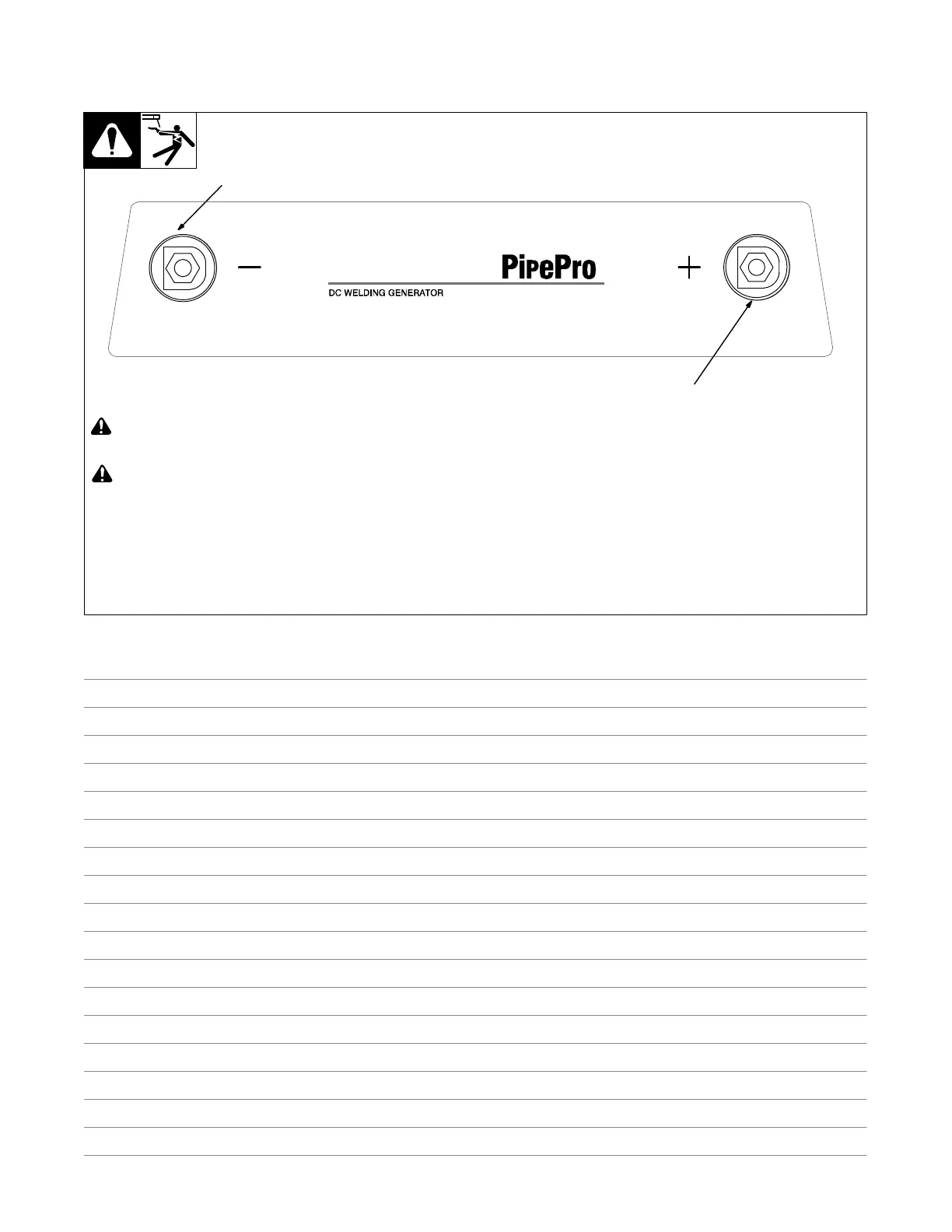
5-9. Weld Output Terminals
A. Big Blue 350 PipePro And Big Blue 350X PipePro Models
256 735-A
! Turn off power before connecting to
weld output terminals.
! Do not use worn, damaged, under-
sized, or repaired cables.
1 Negative (−) Weld Output Terminal
2 Positive (+) Weld Output Terminal
Use Process switch to select type of weld
output (see Section 6-2).
Stick Welding
For Stick welding Direct Current Electrode
Positive (DCEP), connect electrode holder
cable to Positive (+) terminal and work
cable to Negative (−) terminal.
For Direct Current Electrode Negative
(DCEN), reverse cable connections.
TIG (GTAW) Welding
For TIG welding Direct Current Electrode
Negative (DCEN), connect torch to Negat-
ive (−) terminal and work cable to Positive
(+) terminal.
MIG And FCAW Welding
For MIG and FCAW welding Direct Current
Electrode Positive (DCEP), connect wire
feeder cable to Positive (+) terminal and
work cable to Negative (−) terminal.
For Direct Current Electrode Negative
(DCEN), reverse cable connections.
CAC-A Gouging
For CAC-A connect electrode holder cable
to Positive (+) terminal and work cable to
Negative (−) terminal.
1
2
Notes






 To Next Page