AN-49-011 © 2023 Mini-Circuits
Rev. D | ECO-016581 | 25-Jan-2023 Page 30
5.5. Daisy-Chain Control with Dynamic Addressing
5.5.1. Master/Slave Connection with USB Control
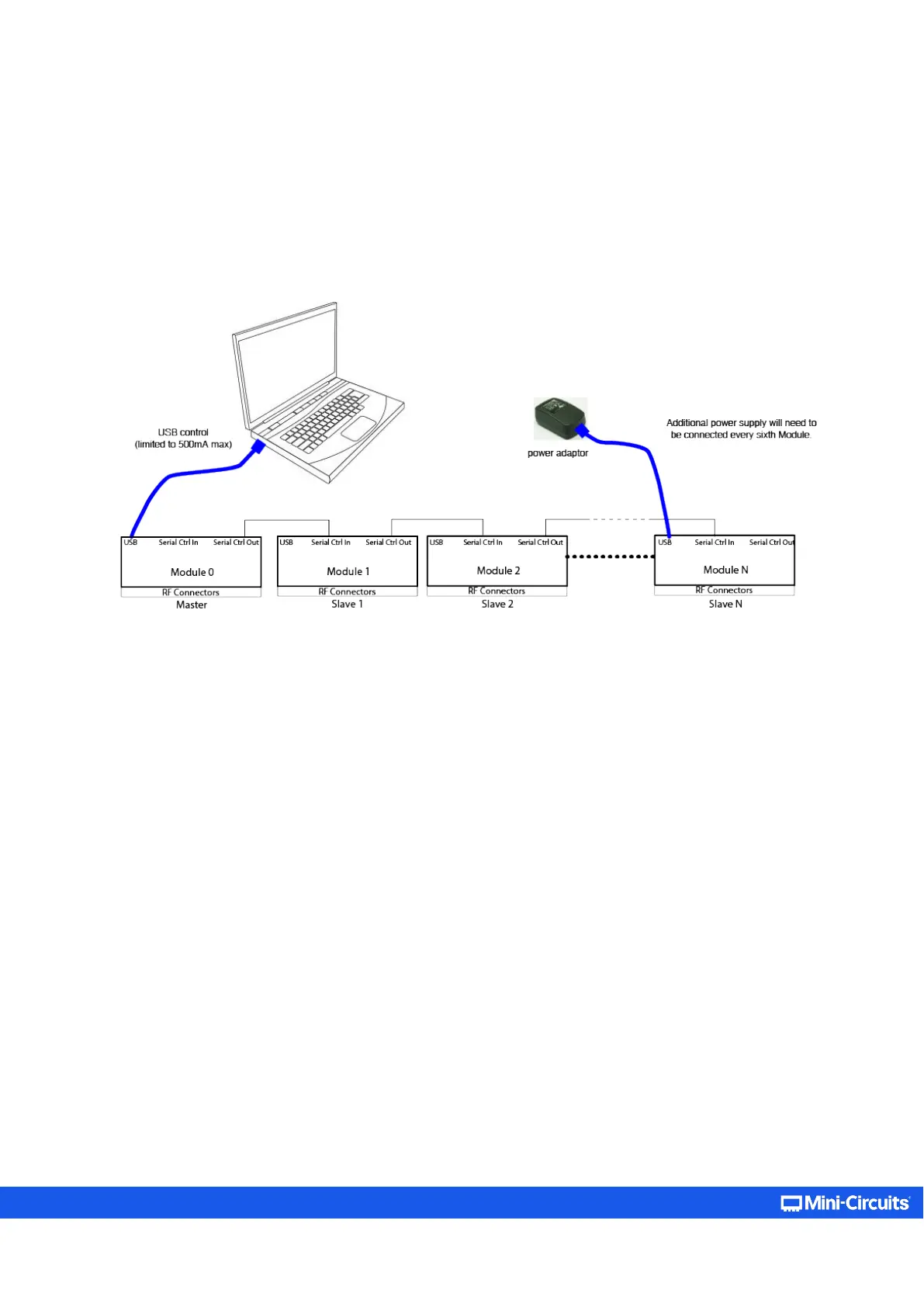
In models with dynamic addressing support you can connect a number of units in series, allowing control of multiple attenuators
from a single USB or Ethernet port, with each attenuator controlled independently. Dynamic addressing sets the addresses
automatically in the order the attenuators are connected (no need to set addresses for each unit) with the master unit (unit
connected directly to USB or Ethernet control) as address 0 and the slave units incrementing to the end of the chain.
Figure 5.5.1: Master/Slave connection with USB control
The additional “Dynamic Address” panel on the right-hand side of the main control screen will appear if any slave units are
detected when the GUI connection (USB or Ethernet) is initiated. This panel shows the number of units connected and their current
attenuation settings. If any changes are subsequently made to the daisy-chain interconnections the Refresh button can be used
to have the addresses checked and re-assign automatically to all units in the chain.



 To Next Page