AN-49-011 © 2023 Mini-Circuits
Rev. D | ECO-016581 | 25-Jan-2023 Page 17
5.1.2. Ethernet Control
To use Ethernet control with a supporting unit either enter its IP address on the startup screen (ports for HTTP/Telnet/SSH would
be also required if using non-default ports) or click on the search icon next to it to find all Mini-Circuits attenuators connected to
the network.
Note:
• When connecting to the unit with Ethernet control for the first time you may need to connect using default IP address or
change the factory default Ethernet configuration to match your network configuration. See section 5.3 or the programming
manual for details
.
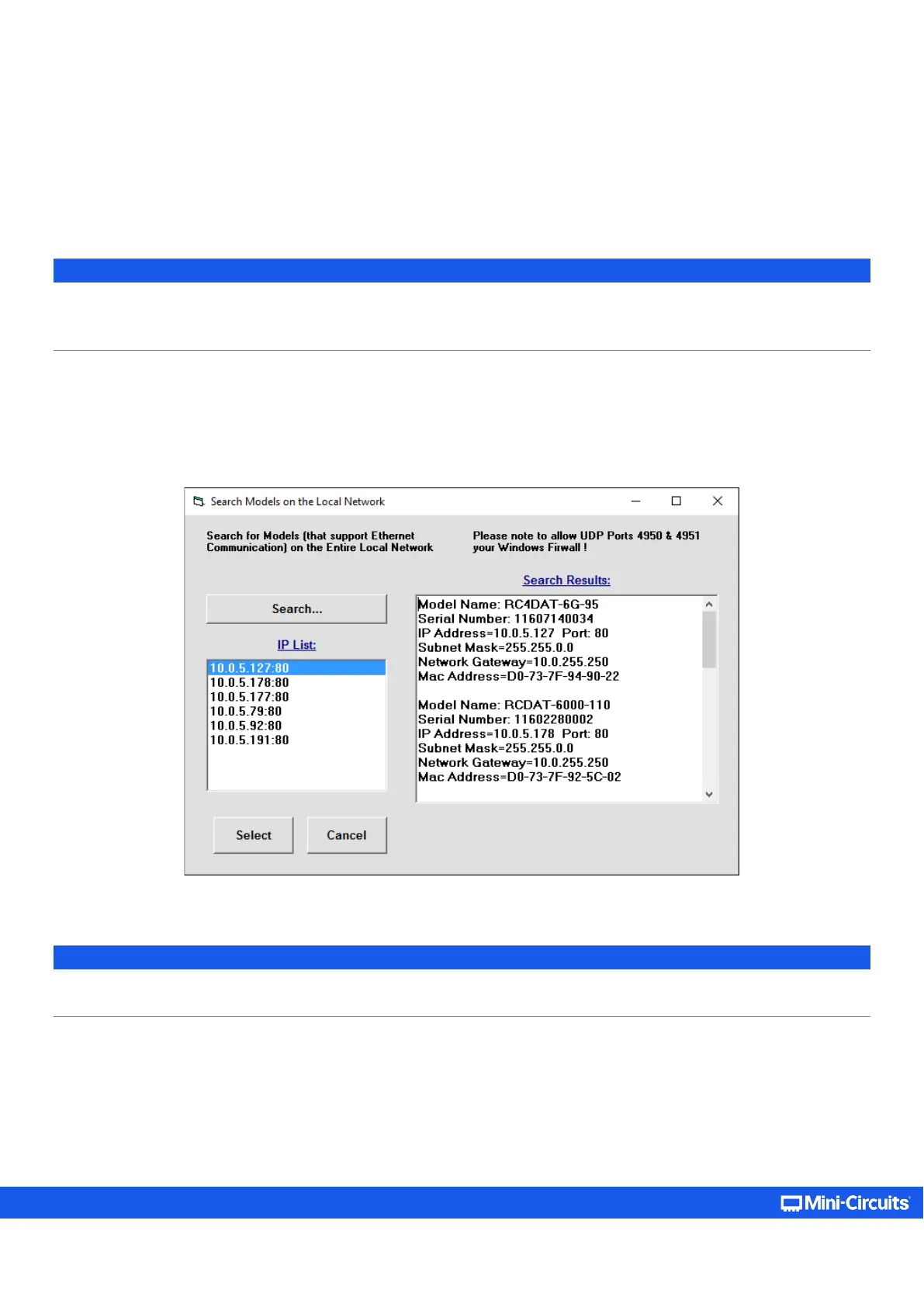
After clicking on the Search icon, the IP search will pop up with a list of attenuators’ IP addresses and their HTTP ports on the left
side of the screen, and full details of each unit on the right. Click the IP address you wish to use and press Select. The search
window will close, and the IP address will be entered in the IP address field of the startup screen automatically.
Figure 5.1.2a: Ethernet IP search window
Note:
• To refresh the list of units found click on the Search… button.
• The search function uses ports UDP 4950 and UDP 4951 for communication. Ensure your firewall allows access to them.



 To Next Page